Entering RGI Info for Member/Tenants
NewViews uses information entered on the RGI Info tab of member/tenant accounts to automatically create rent roll transactions
in the Income Register (see Creating Rent Roll Transactions Automatically
for details).
The Rent Summary View
The Rent Summary view displays a summary of housing charges based on information that is entered
in the RGI Info tab and its companion panes.
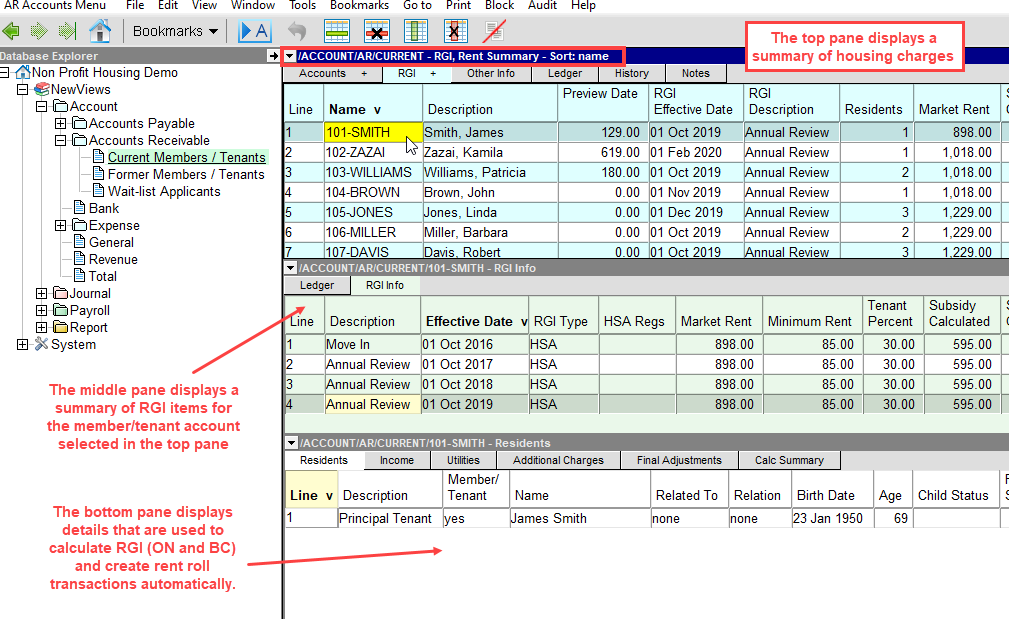
The columns in this table are described below:
Name
| The member/tenant's account name.
|
Description
| The member/tenant's account description (this is generally the member/tenant's full name).
|
Preview Date
| The date at which the summary of housing charges is displayed. This date can be set to any date in the past, present or future - to change it see Preview Date. In general, no date is set which results in today's date being used.
|
RGI Effective Date
| The date of the most recent RGI calculation in effect. Note: If a Preview Date is set, this field will display the most recent RGI calculation as at the preview date.
|
RGI Description
| A short description of the most recent RGI calculation. Note: If a Preview Date is set, this description will correspond to the most recent RGI calculation as at the preview date.
|
Residents
| The total number of household residents in the unit occupied by the member/tenant.
|
Market Rent
| The market rent value for the unit occupied by the member/tenant.
|
Subsidy Calculated
| The subsidy amount that is calculated by the RGI calculator.
|
Subsidy Override
| Any value that is displayed here will override the subsidy that is calculated by the RGI calculator.
|
Net Rent
| The net rent to be paid by the member/tenant.
|
Additional Charges
| The total additional charges (e.g. parking, sector support, etc.) to be paid by the member/tenant.
|
Total Rent
| The total housing charge for the member/tenant.
|
Household Layout
| The layout for the unit (e.g. Apartment 1 bedroom, Row House, etc.) Press F3 to select.
|
Deposit
| The total amount of any deposits received from a member/tenant.
|
Review Date
| The next scheduled RGI review date.
|
Review Reason
| The reason for the next scheduled RGI review date.
|
The Preview Date on the Rent Summary View
The Preview Date in the Rent Summary view gives the user the ability to
see a summary of rental charges on any date (present, past or future) based on the effective date of the RGI details.
Note that any amounts that appear in the Preview Date column are account balances on the preview date.
Changing the Preview Date
-
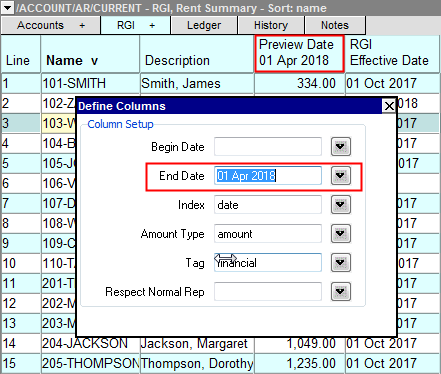
Double click the header of the Preview Date column.
-
The Define columns prompt will appear.
-
Change the End Date on line 11 to correspond to the desired end date for viewing summary information
on the Rent Summary view. You can press <F3> to select the date from a calendar.
Note: Changing the preview date DOES NOT alter any RGI details that have been entered
in the middle and bottom panes of the Rent Summary view.
The RGI Calculator for Ontario and British Columbia (Canada)
For housing complexes in Ontario and British Columbia, the Rent Info tab for member/tenant accounts includes
an RGI Calculator that can be used to calculate subsidies based on market rent and household composition, income
and utilities.
See Using the RGI Calculator in Ontario.
See Using the RGI Calculator in British Columbia.
RGI Calculations Outside Ontario and British Columbia
For housing complexes outside Ontario and British Columbia, the Rent Info tab for member/tenant accounts
is used to manually enter subsidy amounts and additional charges so that rent roll transactions can be created automatically.
See Using the Rent Info Tab Outside Ontario and British Columbia.
Creating Rent Roll Transactions for Non-Subsidized Units
When a rent roll consists of both subsidized and non-subsidized units, the RGI Info tab for non-subsidized residents is
used to specify the full market rent amount with 0.00 subsidy, and any additional charges. NewViews uses this
information to automatically create rent roll transactions for non-subsidized units.
See Using the Rent Info Tab for Non-subsidized Units.
Copyright (c) 2003-2026 Q.W.Page Associates Inc., All Rights Reserved.