In the Database Explorer, activate (click on) the uppermost folder (i.e. the house icon).
The My Company Address/Info should be displayed in the window on the right. If not, click the My Company Address/Info tab at the top of that window.
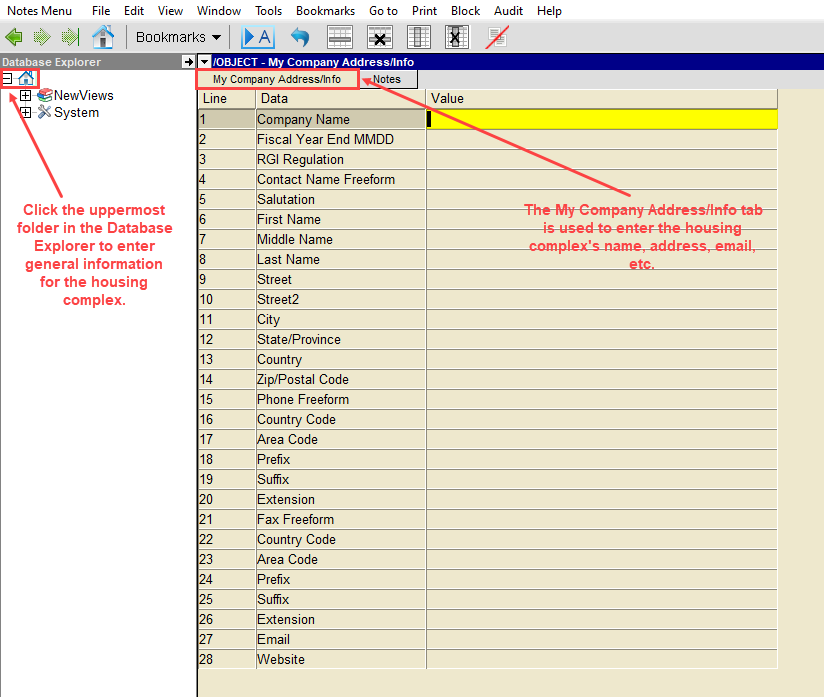
Enter the name of the housing complex in the Company Name field.
As soon as you move off this field, the name of the uppermost folder in the Database Explorer on the left will change to reflect the name that has been entered.
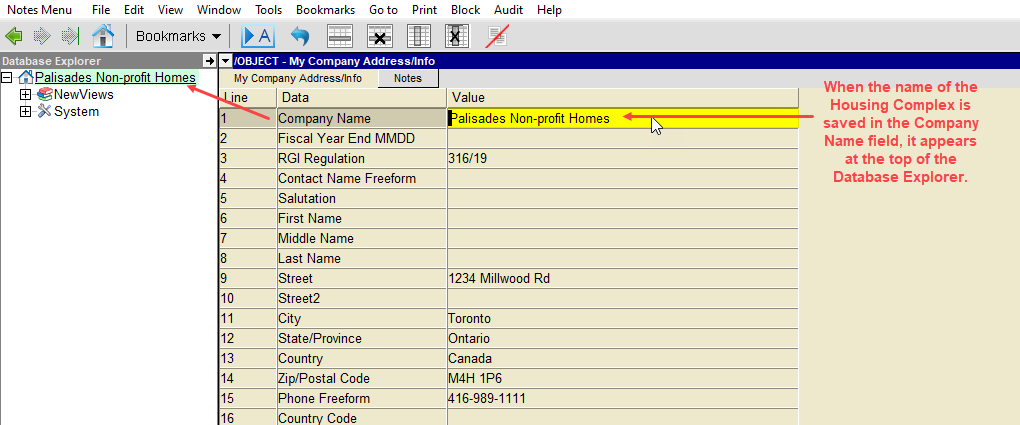
Fill in the remaining fields as follows:
| Field | Value |
| Fiscal Year End MMDD | Enter the fiscal year for the organization in the format MMDD. |
| RGI Regulation | If you are calculating RGI based on Ontario Regulation 298/01 until July 1, 2021 press F3 and choose 298/01. If you have switched to calculating RGI based on Ontario Regulation 316/19, choose 316/19. |
| Contact Name Freeform | Enter the name of person who is primarily responsible for the books. |
| Street City State/Province Country Zip/Postal Code | Enter the complete address of the organization in these fields. |
| Phone Freeform | Enter the main phone number for the organization in this field. |
| Fax Freeform | Enter the fax number for the organization in this field. |
| Email | Enter the main email address for the organization in this field. |
| Web Site | Enter the website address for the organization in this field. |