Setting Up a Canadian Bank Account for EFT
The EFT Canada Info view of a bank account is used to enter information
that is necessary to use the bank account for electronic funds transfer (EFT) (e.g. payments
to suppliers by EFT), direct deposits to employees and pre-authorized debits (PADs) from tenants/members.
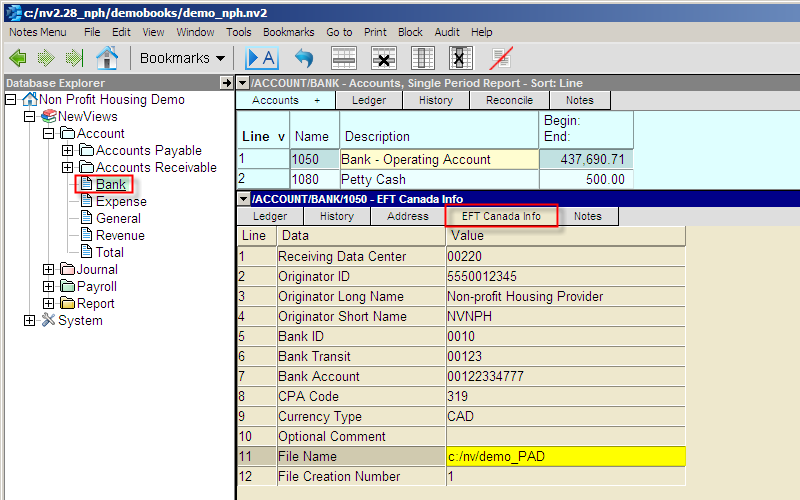
Shown above is the EFT Canada Info view of a bank account,
containing sample settings.
Contact your bank and ask to enroll in their EFT
services. Your bank will provide you with the necessary information.
Please take note of the following:
-
The EFT Canada Info view of a bank account contains settings for both EFT payments
and PADs. Before creating the EFT files that are
transmitted to the bank, you MUST change the CPA Code on Line 8 of
the EFT settings table.
Consult your bank (or use the links below) to obtain the appropriate CPA Code
for EFT payments and/or direct deposits.
For PADs, use a CPA Code of 319.
-
Note that the File Name specified on line 11 will be overwritten each time
you create an EFT file, and the File Creation Number on line 12 will be
incremented automatically.
The links below provide the required information for several Canadian banks:
Testing will be performed directly between your company and your bank
before the actual electronic funds transfers can take place.
Plan your testing several days in advance before going live with the service.
Copyright (c) 2003-2025 Q.W.Page Associates Inc., All Rights Reserved.