The pane below the ROE table contains four windows. The Errors window contains a list of any errors in the ROE information that must be corrected before the ROE can be printed.
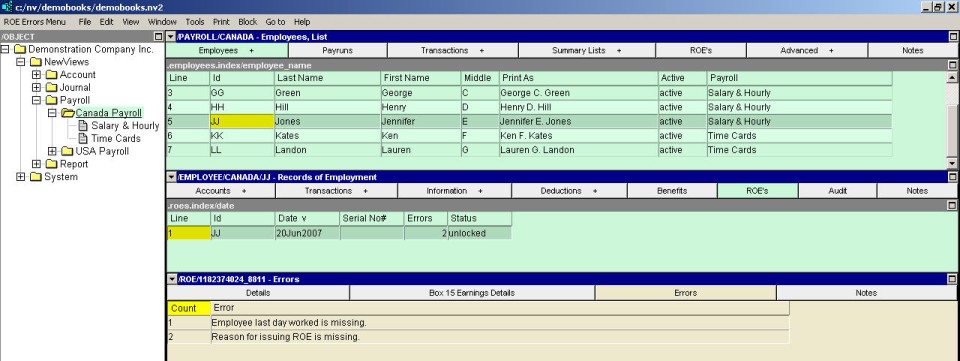
Example ROE error window.
Most of the errors are self-explanatory, but a few merit further explanation.
The first day worked must be earlier than or equal to the last day for which paid.
The first day worked must be earlier than or equal to the final pay period ending date.
The first day worked and last day for which paid for this ROE must not be overlapped with the first day worked and last day for which paid on any previous ROE issued for the same employee, unless the Employer Business Number has been registered with the capability to issue overlapped Records of Employment.
The last day for which paid must be earlier than or equal to the Final Pay Period Ending Date.
Employee last day worked (date) is after the first day worked on prior ROE (serial number) issued (date).
The first day worked and last day for which paid for this ROE must not be overlapped with the first day worked and last day for which paid on any previous ROE issued for the same employee, unless the Employer Business Number has been registered with the capability to issue overlapped Records of Employment.
This error indicates that the last day worked is after the end of the final pay period the employee worked in. Either the last day worked is incorrect (too late), or the final pay period is incorrect (too early.)
This error will only occur in books that have been converted from NV1 (The DOS version of NewViews.)
When converting employee paychecks, Payruns are created in the payroll the employee belongs to. A Payrun is created for each paycheck date encountered, and all of the paychecks on that date are attached to the corresponding Payrun.
However, for a given paycheck, there is no way for the conversion to know what the correct pay period year and number is - this information was never kept in NV1 Payroll. Therefore, the Payruns created during the conversion have no pay period year or number set.
The fact that there are Payruns with no pay period year or number is not important when processing new Payruns, nor is it a problem when producing T4s or Releve 1s. But, for the production of an ROE it does pose a problem.
To compile the earnings information for Box 15 of an ROE, the employee's paychecks for the last 18 months are examined. For each paycheck, the pay period year and number are required in order to determine whether the earnings and hours for that check need to be reported on the ROE, and if so, in what pay period box. When paychecks are encountered that belong to a Payrun that does not have these values set, there is no way to determine whether the earnings should be included or not.
To correct this problem you must: