NewViews maintains a complete audit trail of changes to accounting and security-related information. A complete audit trail is especially important in a multi-user environment where any number of users simultaneously access and modify the same database.
In the figure below, the gray pane is a table of audit records. Each row in the table represents an operation performed by a user on a database object. The changes made during that operation are displayed in the bottom pane. As you move through rows in the gray pane, the bottom pane re-displays the changes for the current row.
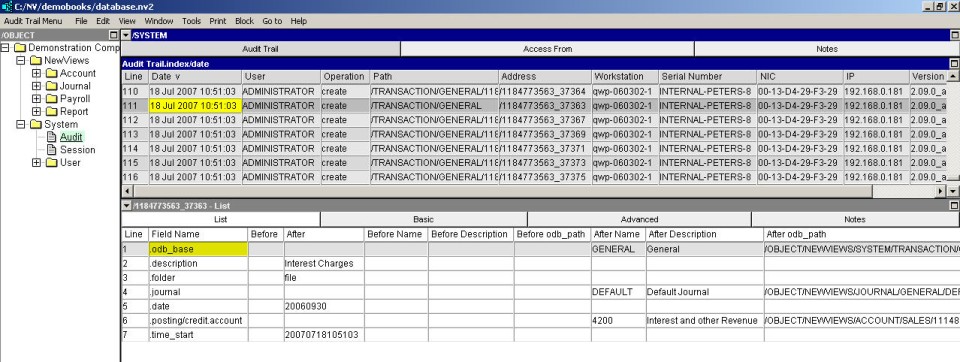
The Date field displays the exact date and time that an operation was performed. The time is displayed in a 24-hour format. If the operation was performed with multi-user access through a server, then the audit record date is the server computer system date/time. If the operation was performed with single-user access, then the audit record date is the workstation computer system date/time.
The audit trail can only move forward in time. If you are viewing an audit trail in date order, new audit records are appended to the table. The date/time of each new audit record must always be greater than that of the last audit record. Don't try to manipulate the audit trail by changing the system date or time of a computer. It won't work, and appropriate error messages will be displayed.
The User field provides the name of the user that performed the operation.
Note that this is the name of the user at the time the operation was performed. Although rarely done, you can change the name of a user, and from that point forward operations performed by that user will appear under the user's new name in the audit trail. However, user objects are also audited so the change to the user name, (and who changed it, and when, etc.), will also show up in the audit trail.
The Operation field displays the type of operation that was performed. The operation will be create, change, or delete. As you would expect, these correspond to the addition of new objects, changes to existing objects, and the deletion of existing objects, respectively.
The Path field displays the type of the object. Some examples are shown below:
| Audit Path Field | Type of object. |
| /ACCOUNT/GENERAL | General account. |
| /ACCOUNT/TOTAL | Total account. |
| /ACCOUNT/AP | Vendor account. |
| /ACCOUNT/AR | Customer account. |
| /ACCOUNT/SALES | Sales account. |
| /ACCOUNT/EXPENSE | Expense account. |
| /SYSTEM/USER | User object. |
| /SYSTEM/ACCESS | Security access object. |
| /TRANSACTION/GENERAL | General journal transaction. |
| /TRANSACTION/BANK/DEPOSIT | Bank deposit transaction. |
| /TRANSACTION/PURCHASE | Purchase transaction, i.e. invoice or order. |
| /TRANSACTION/SALES | Sales transaction, i.e. invoice or order. |
| /TRANSACTION/BANK/DEPOSIT/1113766601_4599 | Line item on a bank deposit. |
| /TRANSACTION/PURCHASE/1113766601_4865 | Line item on a purchase invoice or order. |
| /TRANSACTION/SALES/1113766601_5177 | Line item on a sales invoice or order. |
Only a few of many possible examples are shown, but in general it is quickly clear from the Path field, what type of object was modified.
Notice the last three rows in the table. In each case the path ends in a rather obscure numeric value. This is the internal address of the transaction header to which a line item belongs. The occurrence of an address in the path is a visual cue that the object is a line item instead of a transaction header. In NewViews, all transaction line items are individual objects, and therefore when you change a particular line item on a transaction it will show up as a separate row in the audit trail.
Each object in NewViews has an internal address. The address of the object that was modified is displayed in the audit record's Address field. The address of each object is completely unique. It never changes, and it is never re-used as objects are created and destroyed. Because other fields of an object can change, even its name, the address is the only way to uniquely identify an object for all time.
The audit trail is inherently forensic in nature and the need for the address only reflects this fact. However, in general, it is seldom necessary for a user to require the address of an object to determine what is happening. Most operations and the objects they were performed on are readily identified from their context in the audit trail. That is, knowing the type of object, when the change was made and by whom, along with the values changed in the bottom pane, all assist in identifying what happened, and to which specific object. The sort orders available for the audit trail, and the ability to view an audit trail for individual objects as described elsewhere in this manual, all reduce the need to use an object's internal address. However, in the interests of complete rigor, the address is supplied in the audit trail.
Knowing the name of the user may not be good enough for some purposes, especially if several different employees log in as the same user (not recommended). So in addition to the user name, the workstation computer from which the operation was performed is identified in detail. The Workstation field provides the name of the workstation computer. The IP field provides its Internet address. The Serial field provides the NewViews serial number of the workstation, and the NIC field provides its network interface card number.
If you are managing a multi-user NewViews installation you should keep track of the workstations used to access the central company database, along with the above identification information. This will help if it becomes necessary to determine which computer was used to perform operations on the database. The workstation information can be retrieved by issuing the Help>About command while running NewViews on the workstation. The computer name, IP, serial, and NIC are all displayed in the about box.
Note that a computer name and IP and can be easily re-configured, but the NIC is a unique number that belongs to a network interface card and generally it does not change unless computer hardware is re-configured.
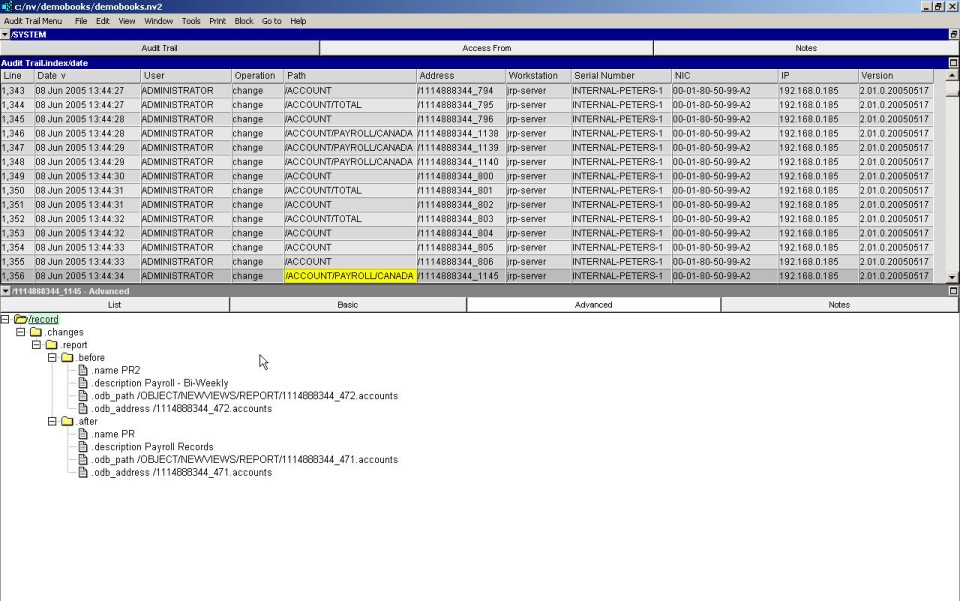
The bottom pane displays the changes that were made to the database object. The changes are displayed as a tree that represents the structure of the object itself. The tree has the same basic form regardless of whether the operation was create, change, or delete.
Each field whose value was modified by the operation is represented in the tree. For example, the tree in the figure below shows that the .address.company field changed from empty to "Advantage Inc.", .address.street changed from "132 Stolly Street" to "123 Maple Street", .address.street2 changed from empty to "Unit 5", and .active changed from empty to "inactive".
Here are some additional points about the display of audit record changes:
Fields that were not modified are not displayed.
Only the fields that actually changed during the operation are displayed in the tree. This reduces the information presented to the minimum necessary to exactly reflect what changed.
The .before values are all empty for a create operation.
Prior to its creation, the object did not exist. Empty .before values reflect this fact.
The .after values are all empty for a delete operation.
After its deletion, the object no longer exists. Empty .after values reflect this fact.
The audit tree can be expanded and contracted.
You can click on the tree nodes to expand/contract them for more or less detail.
Defaulted fields may differ from the values displayed in windows.
In figure XXX the .address.company field changed from empty to ACME Inc. However, prior to the change, if you had looked at the address view of the vendor account it would have displayed Advantage Office Supplies in the .address.company field. Yet the audit record shows the before value as being empty. This is because the .address.company field is defaulted. When it is actually empty, it instead display the account's description field value in the address view. Many fields in NewViews are defaulted so keep this in mind if a before or after field is empty in the audit record tree but displays, or displayed, as empty.
Wherever a change tree is displayed you can use the window list to switch to an Advanced or Basic view. There is also a Notes view where you can add unlimited free-form text to the audit record itself.
The advanced view displays all .before and .after values for fields that have changed. The basic view prunes all empty .before and .after fields from the tree. This reduces the size of the tree, especially in the case of create and delete operations.