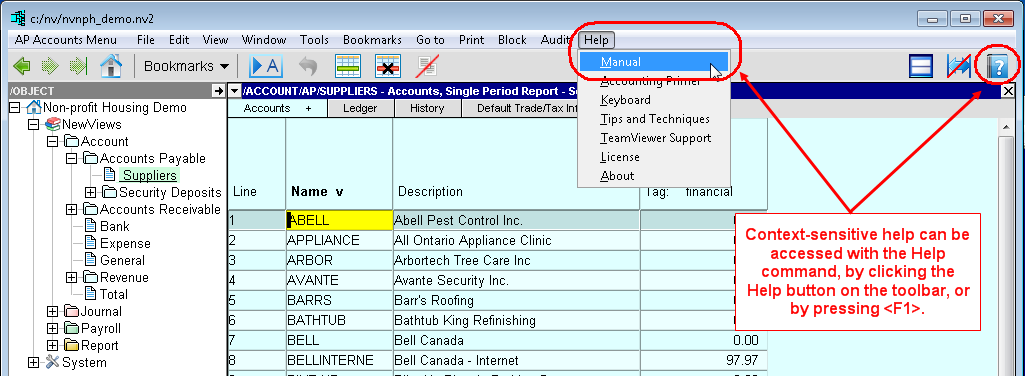
In NewViews, you can always obtain on-screen help in any of three ways:
Help is context-sensitive; when help is accessed, the relevant section of the manual is displayed.
The Help>About command provides information about NewViews and your computer system. Registered users with a Customer Support Plan are welcome to contact Q.W.Page for technical support on the use of NewViews. Refer to the web site at newviews.com for current information.
TeamViewer is a program that allows Q.W.Page customer support to view your computer screen remotely on a session by session basis (i.e. you must authorize access to your computer for any given session). Being able to view your screen enables support personnel to resolve issues much more quickly.
To run TeamViewer on your computer, follow these steps:
Call Q.W.Page customer support.
Registered users with a Customer Support Plan are welcome to contact Q.W.Page for direct on-line technical support using TeamViewer. Establish phone contact with customer support before running TeamViewer, and then remain on the phone with customer support during the TeamViewer session.
Click this link: TeamViewer On-line Support
A window like the one below will appear.
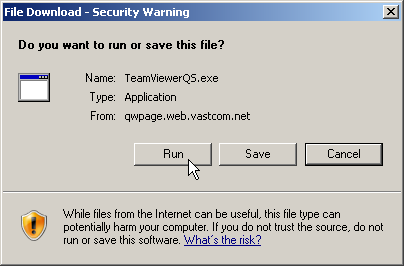
Click on the <Run> button.
A window like the one below should appear.
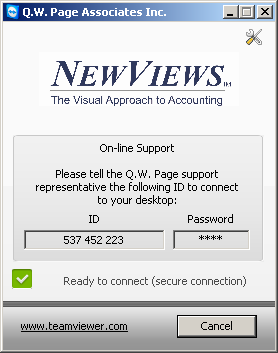
Read the 9-digit ID number to customer support over the phone.
Using this ID, the Q.W.Page customer support person can view your screen and also operate on it. Remain on the phone as your issue is identified and resolved.
Terminate the TeamViewer session.
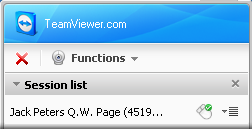
To terminate the TeamViewer session click on the red close button on the TeamViewer Server Control window like the one shown below. When the TeamViewer session is closed, your computer screen can no longer be accessed remotely through TeamViewer by Q.W.Page personnel.
Note that the TeamViewer that is run as described above is a special pre-configured version of the TeamViewer program that can never be accessed by anyone other than Q.W.Page. Using the Q.W.Page version does not prevent you from downloading the generic version of TeamViewer from the TeamViewer web site for your own use.