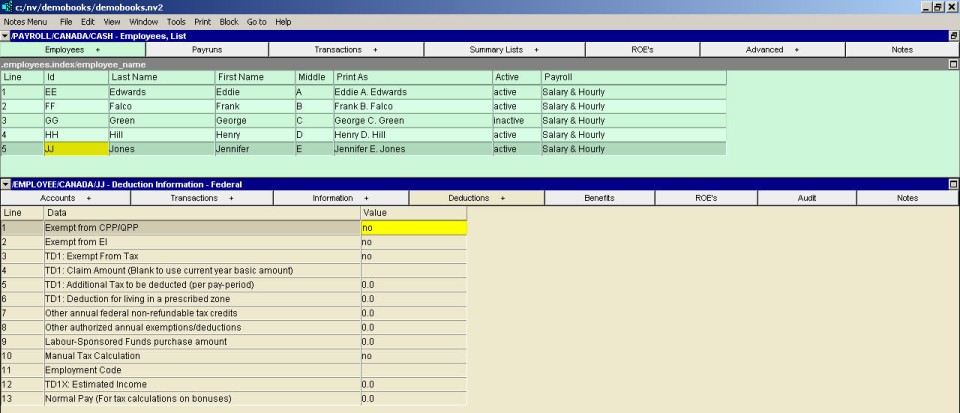
Employee - Federal Deduction Information Window
|
Line
| Field
| Value
|
1
| Exempt from CPP/QPP
| This field specifies whether the employee is exempt from CPP.
|
2
| Exempt from EI
| This field specifies whether the employee is exempt from EI.
|
3
| TD1: Exempt from Tax
| This field (from the TD1 form) specifies whether the employee is exempt from federal tax.
|
4
| TD1: Claim Amount (blank to use current year basic amount)
| This field specifies the claim amount from the employee's federal TD1 form. Only enter an amount if it is different from the current year's basic amount.
|
5
| TD1: Additional tax to be deducted (per pay period)
| If additional federal tax (flat amount) is to be deducted each pay period, the amount is entered in this field. This deducts the amount of tax plus the extra amount.
|
6
| TD1: Deduction for living in a prescribed zone
| The allowable amount that can be deducted for living in a prescribed zone.
|
7
| Other annual federal non-refundable tax credits
| The total amount of any federal non-refundable tax credits is entered in this field.
|
8
| Other authorized annual exemptions/deductions
| The total amount of any other annual exemptions or deductions is entered in this field.
|
9
| Labour-sponsored funds purchase amount
| The annual amount of the employee's labour-sponsored funds purchase is entered in this field.
|
10
| Manual tax calculation
| If the tax deduction is to be entered manually for every paycheck, enter yes in this field.
|
11
| Employment Code
| Enter the appropriate code in this box, Press <F3> to select from a list of valid codes.
|
12
| TD1X: Estimated income
| For employees on commission, their estimated income from the TD1X form is entered in this field.
|
13
| Normal pay (for tax calculations on bonuses)
| Normal pay is used to calculate tax on bonuses when there is no regular pay. The average gross pay amount per pay period is entered in this field.
|