In NV1, an account was an account. The only variations you would encounter were the normal-balance of the account, and whether the account was a total or posting account.
For posting accounts, there was no real difference between an expense account and a receivable account; both had a debit normal balance. The same was true of sales and accounts payable accounts; both had a credit normal balance.
The only things that distinguished accounts (e.g. made an expense account an expense account) were these:
Where you placed the account in your reports
Where you totaled the account
What type of transactions you posted to the account
In NV2, expense and receivable accounts are different, and so are sales and accounts payable accounts.
For example, a receivable account has a billing and shipping address, whereas an expense account does not. Payable accounts provide the means to automate payments to the vendor concerned, whereas sales accounts do not require this function.
An important part of the conversion process from NV1 to NV2 is ensuring that your NV1 accounts are imported into NV2 using the correct account type (i.e. The NV1 accounts you post sales to are imported into NV2 as sales accounts.)
During the development of NV2, a lot of effort went into attempts to automate the account "typing" process during the import, but the results were not reliable.
The first problem is the fact that everyone's NV1 books are different. With no "rules", users created accounting structures that suited them, and no "one size fits all" computer program could ever be created to understand how the books were organized and what type a given account was.
Compounding this problem, NV1 accounts (as explained above) have no distinguishing features to indicate that a given debit normal-balance account is an expense account and not a receivable account (or bank account, or ...). Relying on the account type information stored by the NOTES procedure was also insufficient; the procedure had never been run in a lot of the books we tested. Even if NOTES had been run, it didn't contain information on all of the account types available in NV2.
The only way to insure that your NV1 accounts are imported with the correct account type is for you to identify the types before exporting the books. Therefore two procedures are included in the NVEXPORT library to make this as easy as possible.
To ensure a successful conversion, you will need to take the time to run these procedures in your books before the conversion.
The ATYPE procedure sets the account type of posting accounts (individually, or in a block.)
The TATYPE procedure sets the account type for all posting accounts that total to a given total account. If run from a block of accounts, it processes all the total accounts, plus any posting accounts included in the block.
Of the two, TATYPE is the one you will probably use the most. Because it can work it's way from a total account to all of the posting accounts "below", it is an easy way to set large numbers of account's types very quickly.
The two procedures look very much alike; the only difference is what they do.
You can run ATYPE from the following locations in your books:
A block of reports on Home - all posting accounts on the reports blocked will be set to the account type chosen.
A block of accounts on a report - all posting accounts in the block will be set to the account type chosen.
Any view of a posting account - the account is set to the account type chosen.
You can run ATYPE from the following locations in your books:
A block of accounts on a report - all posting accounts that total to the total accounts in the block will be set to the account type chosen.
Note: All posting accounts in the block will also be set to the account type chosen.
Any view of a total account - all posting accounts that total to the account will be set to the account type chosen.
Note: TATYPE cannot be run from the Home document.
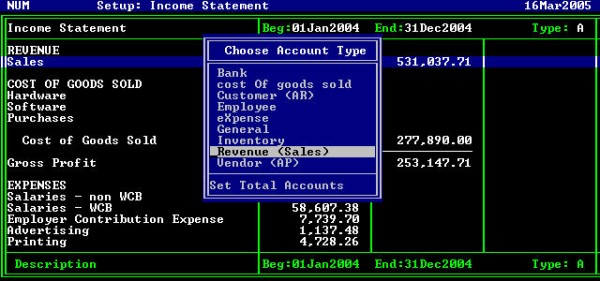
The following table explains the account types displayed in the ATYPE or TATYPE prompts.
The account types are mostly self-explanatory, but the table is supplied to provide alternate wordings for some types.
The "Key" column shows the letter you can type to quickly choose an account type (rather then cursoring up or down several times.)
| ATYPE Choice | Key | Explanation |
| Bank | B | Bank Accounts |
| | O | Cost of goods sold |
| Customer (AR) | C | Customer, Accounts receivable, debtor accounts |
| Employee | E | All employee earnings and deduction accounts. Also, all government totals accounts (if your books contain this report.) Do not include withholding and remitted accounts on the Payroll Withholdings report. |
| eXpense | X | Expense accounts |
| General | G | All accounts that do not fall into one of the other categories. Note: Accounts with no type set are assumed to be General. |
| Inventory | I | Inventory accounts |
| Revenue (Sales) | R | Sales & revenue accounts |
| Vendor (AP) | V | Vendor, supplier, debtor |
If you mark one or more accounts with the wrong type you can simply run the procedure again and choose the correct type. ATYPE and TATYPE may be run multiple times without causing any problems within NV1.