To create a new set of books (also referred to as a database), run the workstation, add a new row to the workstation login table, enter the complete file name and path for the new database in the file field, and change the .state to open.
Remember to give the file name the extension ".nv2".
This is exactly the way you open an existing database but with two differences. First, you type in the database file name and path instead of pressing <F3> to pick it from a file explorer. Second, it is assumed that the database file does not already exist.
If the database you attempt to open in this way does not exist, the following prompt appears:
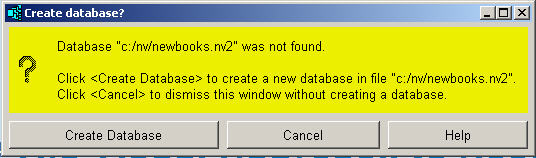
If you click <Create Database>, the database will be created in the specified folder with the specified file name. If you do not want to create the database, just click <Cancel>.
In addition, note the following:
Any missing folders are created if they do not exist.
Not only the database file, but also one or more folders in the specified path might not exist. If so, they are also automatically created when the database is created.
You can use <F3> if the database's folder does already exist.
If the folder already exists but does not contain the database you want to create, then you can use <F3> to pick it from a file explorer instead of typing it in.
Only the administrator can create a database.
Note that you are not asked to fill in the User field when creating a database. That is because the User field automatically defaults to ADMINISTRATOR when you add a new login row (unless explicitly overridden using the NewViews Edit>Default Value commands). If the user is not the administrator, then the Create Database prompt will not appear. Instead, an error message that says the database does not exist will be displayed. To create a database, the User must be set to ADMINISTRATOR. One reason for this is that an administrator is automatically added to the new database, and you are automatically logged in as the administrator when the database is created.
You cannot create a remote database.
You can only create a local database within your computer's directory. You are not allowed to create a remote database through a server for security reasons. If the Server field is filled in, then the Create Database prompt will not appear. Instead, an error message that says the database does not exist will be displayed.
A NewViews database, also called a set of books, is used to manage the accounting information for a company or organization. When a new database is created, the following happens:
The administrator is added.
A single user is added to the database with the name ADMINISTRATOR. The administrator password will be empty in the newly created database, so you can open the database as the administrator without entering a password. One of your first actions for the new database should be to set the administrator password as described below.
NewViews accounting classes are added to the database.
These classes define reports and journals, as well as various account classes such as expenses, customers, vendors, payroll accounts, and so on. System classes are also added, which include users, sessions, the audit trail, etc.
Once the database has been created, it is ready to use. You can start adding the actual accounts you will be using, then you can start adding transactions.
One of the first things you should after creating a database is to set the administrator password. Open the database as the administrator (if it's not already open) and then do the following:
Click on the root user in the main tree explorer in the left pane.
A table of users will appear in the right pane with one row per user. A newly created database will have only one row, which will be the administrator.
Click on the Password field of the row for the administrator.
Press <F3>.
Enter the password and then re-enter the same password for verification.
Click <Ok> or press <Enter>.
The administrator password will be set to the value entered. You will be prompted to enter this password the next time you open the database as the administrator.