NV2 recognizes several types of accounts:
Each type of account has its own set of rules that govern how that account is treated.
An account in NV2 can appear in two places - on the table of accounts of a particular type, and if required, on a report. Most accounts in a set of books naturally belong to a "sub-ledger". A sub-ledger is typically a long list of accounts of a given type. An example would be Accounts Payable. All vendors a company does business with are listed in the Accounts Payable sub-ledger (and in NV2 these vendors would be found in a list in the Accounts Payable folder of the NV2 Database Explorer).
The total of a sub-ledger always totals to a "controlling account" on the Trial Balance report, which in turn totals to a controlling account on the Balance Sheet report or Income Statement report. NOTE: controlling accounts are added to reports with account type TOTAL. Continuing the example of the Accounts Payable sub-ledger, a total account for Accounts Payable is added to the Trial Balance report, and a total account for Accounts Payable is added to the Balance Sheet report. Once this is done, the bottom row of the Accounts Payable sub-ledger is totaled to the Accounts Payable controlling account on the Trial Balance. The controlling account on the Trial Balance report is then totaled on to the Accounts Payable account on the Balance Sheet.
If you follow this style of account organization, most accounts can be added to the appropriate sub-ledger and there is nothing else to do (because postings to the new account will automatically total to the bottom row of the account list for the sub-ledger, which is turn totals to the controlling account on the Trial Balance report).
There are circumstances where accounts (other than Total accounts) appear on reports. A common example is the Trial Balance report. Many companies (and accountants) like to see, for example, a sprinkling of revenue, expense and general accounts on the Trial Balance, not just a single row summary for each account type. When this happens, the Report column of the account table is filled in and the account will appear on the specified report. Totalto's are then used to flesh out the "report arithmetic".
The discussion above took the view that accounts are added to the account type folders, and when necessary placed on a report by filling in the Report column. Another common way to use NV2 is to add accounts to reports and select an account type in the Account Type column. Either way the result is exactly the same. Each account is recorded only once in the database, but appears in two places.
So how should you approach building a new set of books, or understanding how Q.W. Page builds demonstration sets of books or starter databases? Here are some recommendations. Build the books "top down". Add a report for the Trial Balance, Income Statement and Balance Sheet. Work backwards, creating total accounts for Total Assets, Total Liabilities and Equity, and so on (i.e. fill in the skeletal structure of the reports using only total accounts). Then add to these reports the posting accounts of type GENERAL, REVENUE and EXPENSE that you wish to see detailed. Next, add to the reports controlling total accounts for the big sub-ledgers (e.g. Accounts Receivable and Accounts Payable). Finally, go to the account type folders (i.e. the big sub-ledgers), total the bottom row to the controlling accounts, then enter accounts for all the customers, vendors, and so on.
Accounts are added in the Account Setup window, either to account tables for reports, or account tables for specific types of account types (e.g. accounts receivable, expense, etc.). For information on adding each type of account see:
An account name can be as long as required, and contain any combination of letters, numbers, hyphens ( - ) and underscores ( _ ). Account names are not case-sensitive and are automatically converted to upper case characters. Account names used for a particular type of account must be unique (for example, you can only have one inventory account called MCK-780). However, you can have duplicate account names for different types of account (for example, you can have an inventory account, sales account and expense (cost of goods sold) account all with the name MCK-780).
Account descriptions can be as long as required, and contain any combination of characters and spaces. Most special characters can be used, except for open and closed curly braces (e.g. { and } ) and open and closed square brackets (e.g. [ and ] ).
Every account has a debit or credit normal balance.
Accounts payable accounts have a credit normal balance.
Accounts receivable accounts have a debit normal balance.
Bank accounts have a debit normal balance.
Expense accounts have a debit normal balance.
General ledger accounts can have a debit or credit normal balance, depending on the type of account.
Inventory accounts have a debit normal balance.
Sales accounts have a credit normal balance.
Total accounts can have a debit or credit normal balance, depending on the type of account.
Every account has a normal representation that can be set to one of the following values:
perpetual
Generally used for balance sheet accounts, i.e. assets, liabilities, bank, inventory, accounts receivable and payable, and so on.
When the normal representation is respected on reports, amounts for the account will be displayed as perpetual, as at the end date of the specified period.
periodic
Generally used for income statement accounts, i.e. revenues and expenses that are usually report for a particular period.
When the normal representation is respected on reports, amounts for the account will be displayed as periodic, for the period specified by the begin date the end date.
opening
Used for special accounts such as opening retained earnings, opening inventory, and so on.
When the normal representation is respected on reports, amounts for the account will be displayed as perpetual, but for the begin date of the specified period, i.e. not the end date like ordinary perpetuals.
empty
If the normal representation is empty, i.e. not specified, the account is treated as if the normal representation were set to perpetual for backward compatibility.
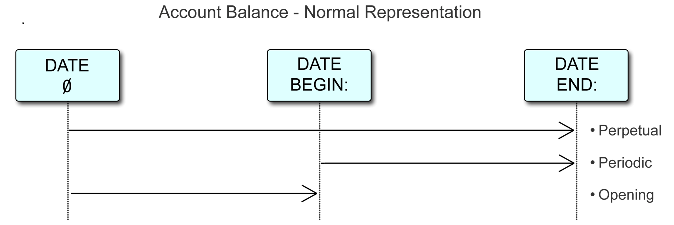
You can only set the normal representation for general and total accounts. Accounts of all other classes set the normal representation automatically since they already know what it should be. For example, bank, inventory, and receivable accounts are perpetual, and revenue and expense accounts are periodic.
So setting the normal representation applies only to general and total accounts. And even for general accounts, the normal representation doesn't have to be set, and if set, can be changed at any time.
At this time, the normal representation is mainly a display issue, allowing reports to display columnar information on financial reports in a way that fully complies with accounting tradition. This will be explained further below. However, the normal representation is fundamental to the basic nature of an account and it may be put to additional use in the future.
On any table of accounts (blue), reports being a prime example, you specify a begin date and an end date for each column. If both are specified, then the amounts are for the period specified, i.e. periodic amounts. If you leave the begin date empty, then the amounts are as at the end date, in essence covering the period from the beginning of time up to that end date, i.e. perpetual amounts.
You can display a mixture of periodic and perpetual amounts on the same report by selecting different begin/end dates for different columns. However, all amounts in each column will all be perpetual or will all be periodic.
The normal representation is put into use when you want to mix perpetual and periodic amounts in the same column. A good example is the trial balance although there are others.
The trial balance is the classic example because most sets of books have one, and because a traditional trial balance report contains a mixture of perpetual and period accounts. To comply with accounting tradition you would like to specify a period and have revenue and expense amounts displayed for that period, while at the same time, you want perpetual amounts for assets and liabilities as at the end of that same period. And you would like this mixture of perpetual and periodic amounts in the same column.
To do this you set the column's Respect Normal Rep setting to yes. If set to yes then the amount for each account in the column will be displayed according to that account's normal representation and the result is compliance with accounting tradition.
The Respect Normal Rep setting is not shown at the top of each column because it not particularly useful information for those viewing the reports, or viewing a printed copy of the report.
On a Single Period Report view you access the Respect Normal Rep setting using the Window>Define Columns command. On a Multiple Period Analysis view you position on a column and issue the View>Analysis>Column Setup>Edit Settings command.
Respecting the normal representation is unnecessary on reports for subsidiary ledgers where all accounts have the same normal representation anyway. So you do not need to respect it on a AR or AP report, or even on the income statement.
However, the trial balance contains a mixture of balance sheet accounts (perpetual) and income statement accounts (periodic). When you set the Respect Normal Rep field to yes on any column, that column will display the perpetual amounts for the end of the period, and the periodic amounts for the period itself in that column. The result displays the trial balance as normally presented in accounting tradition.
In several circumstances, compliance with accounting tradition requires the display of perpetual amounts as at the beginning of a period. The classic example of this is the treatment of retained earnings on the balance sheet. Traditionally, the balance sheet contains three separate lines for the display of retained earnings in the same column:
Opening Retained Earnings (opening perpetual).
This is the perpetual retained earnings as at the begin date for the period covered by the balance sheet. It is often called Retained Earnings Prior Period. In NewViews, this amount is perpetual but at the begin date of the period covered instead of the end date. NewViews knows that the begin date is to be used because the normal representation of this account is set to opening.
Change to Retained Earnings (periodic).
This is the change to retained earnings for the period covered by the balance sheet. It is simply the periodic amount for the period covered by the balance sheet, and its normal representation is set to periodic. The change to retained earnings is also often called Current Earnings, and it generally represents the net income for the period less dividends declared.
Closing Retained Earnings (closing perpetual).
This is the total retained earnings as the end date of the period covered by the balance sheet. It is the total accumulated retained earnings from the beginning of time up to the end date and it is often called Total Retained Earnings. It is the perpetual amount as at the end of the period covered by the balance sheet and the normal representation of this account is set to perpetual.
Note that we are talking about a period covered by the balance sheet instead of simply the as at or end date of the balance sheet. Opening retained earnings and change to retained earnings imply a period with both a begin date and an end date for the balance sheet.
Note also that opening retained earnings totals to change to retained earnings, which in turn totals to closing retained earnings. In fact, these three accounts all have exactly the same postings and would report exactly the same amounts if the same begin/end dates were specified, and if the normal representation were not respected. We use separate accounts solely for the purpose of displaying these amounts on separate lines of the same column, allowing the amounts to be extracted and displayed independently, and differently, to comply with the traditional presentation of retained earnings on the balance sheet.
If it were not for the display issue, you could extract opening, change to, and closing retained earnings side by side from a single account, simply by setting appropriate begin/end dates for each of three columns.
Finally note that all accounts on the balance sheet have a perpetual normal representation, except for the opening retained earnings and the change to retained earnings.
The trial balance contains a mixture of total accounts for sub-ledgers (often called controlling accounts), and also "general ledger" posting accounts. This includes both balance sheet accounts, i.e. perpetual accounts, and income statement accounts, i.e. periodic accounts. At the bottom of the trial balance is the trial balance proof account. After all, a traditional function of the trial balance is to ensure that the books are balanced, i.e. that they proof.
All accounts on the trial balance total to the proof account, either directly or indirectly. The balance of the proof account should be zero regardless of the date or period specified. This is your balance check or proof.
The rest of this section shows how the trial balance can be displayed in the form traditionally expected by accountants and bookkeepers, how the normal representation is used to achieve this, and finally goes on to explain the fundamentals that make it work. You can skip the rest of this section without loss of continuity. It is relevant only for the traditional display of the trial balance, and assumes that the normal representation is respected by the columns of the trial balance report.
The way the trial balance is organized in NewViews is to total all balance sheet accounts on the trial balance to the trial balance proof account. The income statement accounts on the trial balance instead total to opening retained earnings which in turn totals to the proof account. So all accounts on the trial balance eventually total to proof.
The normal representation of each balance sheet account is set to perpetual, and for the income statement accounts, to periodic. The exception is the opening retained earnings account which is set to opening.
This organization allows the trial balance to be displayed according to accounting tradition in a single column. The balance sheet accounts display (perpetual) amounts as at the end of the period covered; the income accounts display the change for the period covered (periodic); and the opening retained earnings displays the total accumulated retained earnings as at the begin date of the period covered (opening perpetual).
If you add up the amounts displayed they will total to the amount displayed for the proof. This is true, even though we are mixing perpetuals and periodics. Now we will explain why it all works.
The classic accounting equation is usually written as:
ASSETS = LIABILITIES + EQUITY
but for our purposes here we will re-write it as:
ASSETS - LIABILITIES = EQUITY
The balance sheet accounts are on the left, and the income statement accounts are on the right. In effect, we are saying that any net change to the balance sheet accounts must equal the net change to the income statement accounts.
Many transactions have a simultaneous effect on both balance sheet and income statement accounts. We use the example of a sales transaction but it is true in general. A sales transaction affects balance sheet accounts by increasing receivables and trade taxes payable, and by decreasing inventory. It affects income statement accounts by increasing sales revenue and cost of goods sold expenses.
The net change to the balance sheet accounts (the left side) will be the change to receivables less the change to inventory and the change to taxes payable. The net change to the income statement accounts will be the sales revenue less the cost of goods sold. The change to the left and right sides must be the same, and the amount of this change is most often called profit if positive, or loss, if negative.
But the trial balance, when respecting the normal representation of the accounts, displays a mixture of periodic amounts for the income statement accounts, and perpetual amounts for the balance sheet accounts. You cannot add up these amounts and expect then to total to the amounts displayed for the proof account (perpetual). But we can say the following:
Perpetual Left Side = Opening Perpetual Right Side + Change to Right Side
The perpetual left side is the sum of perpetual amounts for the balance sheet accounts. The opening perpetual right side is the opening retained earnings, the total accumulated effect on the books of all income statement accounts from the beginning of time to the begin date of the period. The change to the right side is total net effect of the change to income statement accounts for the period.
So when you add up all of the numbers on the trial balance they will in fact sum to the perpetual balance of the proof account, regardless of the fact that we adding a mixture of perpetual and periodic amounts.
In summary, the purpose of the normal representation field was to make the traditional display of the trial balance and the balance sheet possible. Retained earnings is the key connection between income statement and balance sheet accounts and it is not a coincidence that it plays such an important role in this discussion.
A common request is for the ability to prevent a data-entry operator from adding the same vendor/supplier invoice twice (which is then accidentally paid twice).
You can enforce unique transaction Ref #s, per journal, and per account. The per account capability includes control for uniqueness on the debit view, credit view, or both (i.e. the ledger view). The per journal case is just a simple yes/no.
The Unique Ref #s can be set per posting account, or per folder (and all posting accounts "below" inherit the value). Similarly, it can be set per leaf journal, or per folder of journals. Initially, for new or existing databases the value of the field is empty (i.e. no uniqueness is enforced). Setting the field will cause a check of all transactions, for all tags on all affected posting accounts (or leaf journals) to make sure none violate the new rule. NOTE: This "feature" may expose existing data-entry errors!
Some examples uses include:
Setting the branch Accounts Payable folder to enforce unique transaction Ref #s on credit view will check for duplicate purchase invoices from the same vendor.
Setting the branch Accounts Receivable folder to enforce unique transaction Ref #s on debit view will check for duplicate sales invoices to the same customer.
Setting the branch Payroll Account folder to enforce unique transaction Ref #s on ledger view will check for duplicate paychecks (and timecards) for the same employee.
Setting the branch Bank Account folder to enforce unique transaction Ref #s on credit view will check for duplicate checks for the same bank account.
Once the new rule is in place, any additions or changes to existing transactions are checked to make sure the new rule is not violated.
Finally, an empty Ref #s value never collides with anything. It will not cause a duplicate detected error.