The inventory Forecasting window is used to display inventory quantities on hand, the net of inventory purchase orders and sales orders, and the sum of the two (e.g. quantity on hand + (purchase orders - sales orders). This window is useful for determining potential problems with sales order fulfillment, in which case the quantity forecast for any given inventory item would be negative.
When a quantity or amount in the Qty on Hand or Value on Hand columns is active in the top pane, the bottom pane displays the purchase and sales invoices that result in that amount. NOTE: Sorting the table in the bottom window in reverse order by date will enable you to see the account's quantity and amount totals in the first row. To sort the table in reverse order by date, click the title of the Date column.
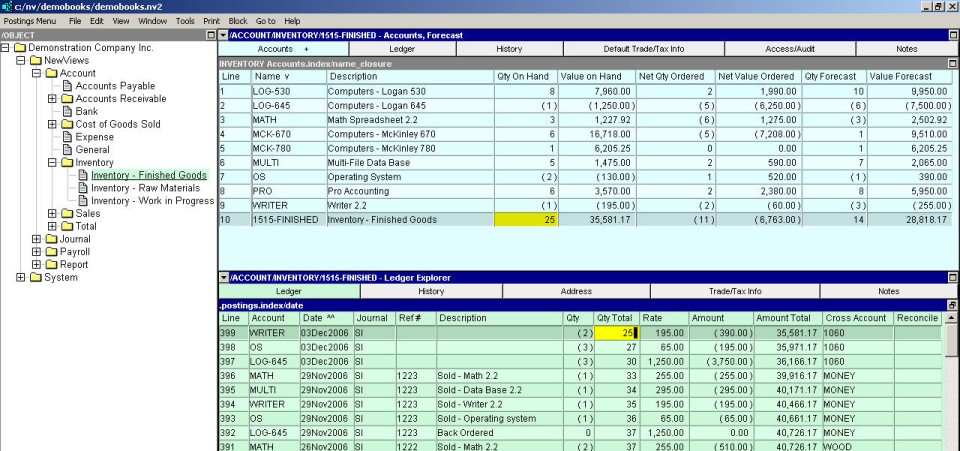
When a quantity or amount in the Net Qty Ordered or Net Value Ordered columns is active in the top pane, the bottom pane displays the purchase and sales orders that result in that amount.

The Qty Forecast and Value Forecast columns tell you at a glance when your inventory levels are low and when you are facing a potential backorder situation (e.g. a negative forecast).
If the Forecasting window identifies a potential backorder situation, the inventory Order Aging window can be used to analyze, by aging period, the open inventory purchase and sales orders that are the cause. See Inventory Order Aging for more information.
Click NewViews/Account/Inventory in the NV2 Database Explorer.
If the top right window is not the Forecasting window, click the window list button at the left of the title bar that reads /ACCOUNT/INVENTORY and choose Forecasting.
In the top pane, activate any column to see the orders for that item; the orders are displayed in the bottom pane.