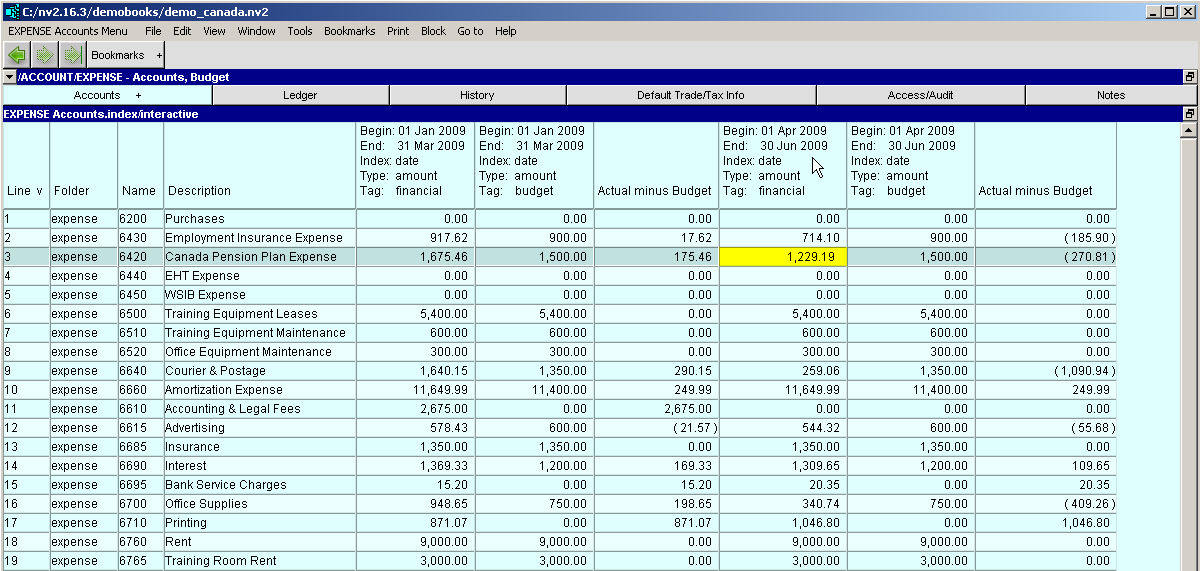
Click the report containing the accounts you want to enter budget amounts for in the NV2 Database Explorer.
Use the window list button at the left of the title bar that reads /REPORT/(report name) to switch to the Budget window.
To add Actual minus Budget (or Budget minus Actual) columns:
Select View>Analysis>New Actual Minus Budget.
Three new columns will be displayed - Actual (tag financial), Budget (tag budget) and Actual minus Budget.
Or select View>Analysis>New Budget Minus Actual.
Three new columns will be displayed - Budget (tag budget), Actual (tag financial) and Budget minus Actual.
To set the first period you want to budget for, activate any amount in the first amount column and press <F11>, the Setup Columns key, or execute the command Window>Define Columns.
Make sure that row 4 is active on the left side of the Setup Columns table (it represents column 4 of the budget table), and then activate the Begin Date field on the right side of the Setup Columns table.
Edit the Begin Date field to be the begin date for the budget period. For example, if you are
budgeting for the first quarter of 2009, the Begin Date field would be 20090101.
Remember dates are entered respecting your User Date Entry Format option.
Edit the End Date field to be the end date for the budget period. For example, if you are
budgeting for the first quarter of 2009, the End Date field would be 20090331.
Remember dates are entered respecting your User Date Entry Format option.
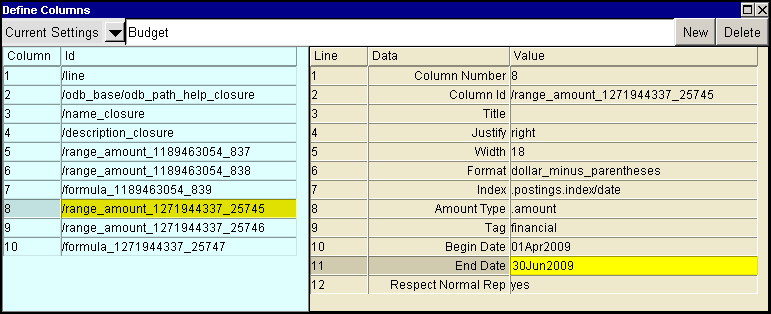
Repeat the last two steps to set the Begin Date and End Date fields for each set of three
columns.
IMPORTANT! You must set the Begin Date and End Date field in the
first column of each set of three columns. The second and third columns in the set take their settings from the first column.
Click anywhere outside the Setup Columns table to end column setup.
Enter the budget amounts for each period in the columns with the tag budget.