When a user on a workstation wants to open a remote database through a server they have to identify the server. They do this by entering a value in the server field of a login table row. The <F3> key cannot be used on the server field. So what is the value they enter in the server field to specify the server?
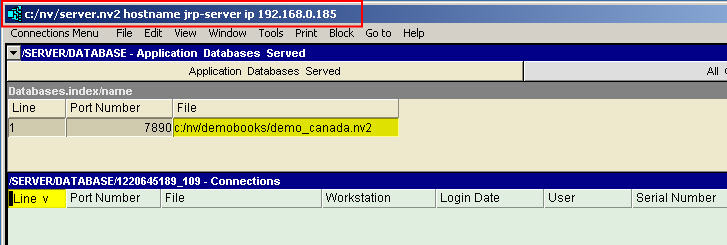
The title bar of the NewViews server window displays the server name and the server IP (Internet protocol) address as shown below. Either of these can be entered in the server field or a workstation login table row.
The above applies when connecting to the server from your LAN (local area network) or Intranet.
When connecting from outside your LAN (local area network) or Intranet, use your organization's router/gateway external IP. Your organization's router/gateway must be configured to forward incoming connections on port 7890 to a particular computer within the Intranet (the I.P. address of the computer running the NewViews server.)
To obtain your router's external IP address click here. or click here or click here
To check if your port 7890 is open click here or click here
If you are responsible for setting up and managing the server, i.e. you are the server administrator, then you will provide the server name and/or IP address to the users when they request it.
The server name and IP, as well as other network related information, is displayed when you issue the Help>About command when running the server.
Recall that the workstation login table is persistent so the user will only have to enter the server the first time they access a database on the server. The next time they want the open the database, all information, including the server will still be available in the login row, so the user will only have to change the state of the login row to open in order to open the database.
Whether you supply the name or an IP address will often be a matter of preference, but in some circumstances it can make a difference.
For example, you may be offering access remotely across the Internet and you may be doing so through a third-party Internet service provider. In some circumstances the Internet service provider may generate IP addresses for your server computer so that the address will change periodically. In this situation it may be preferable to use a name.
In other circumstances where a connection passes through a firewall, it may be necessary to an IP address.
It is beyond the scope of this document to address the wide range of possible network configurations. However, Q.W.Page customer support, in co-operation with the person responsible for your network configuration, should be able to address the issue.