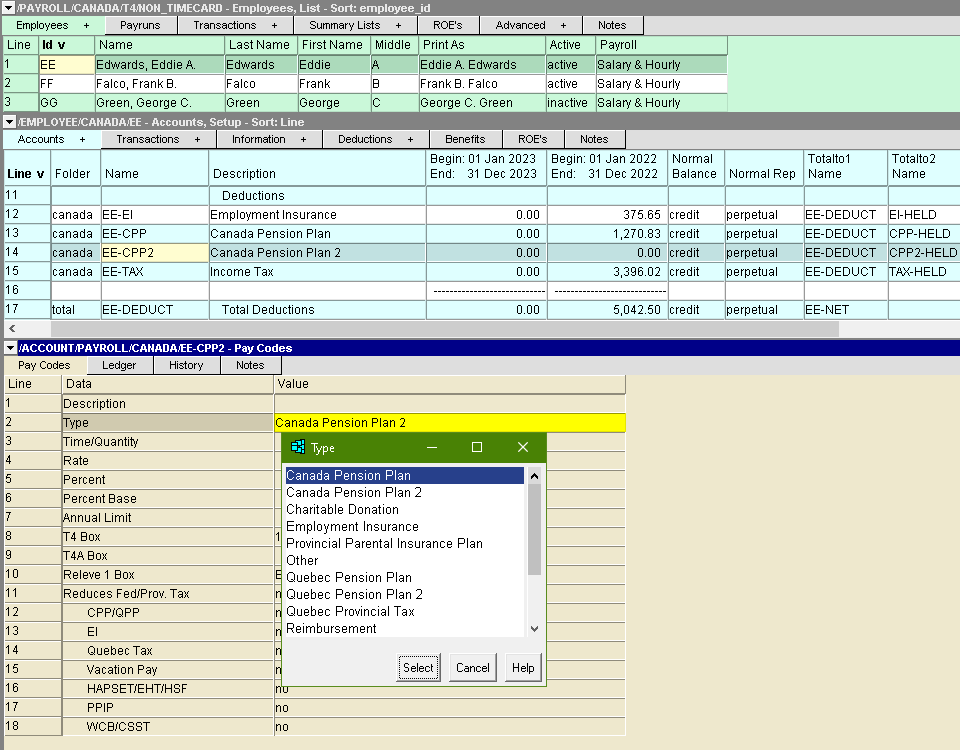
The Pay Codes for deduction (credit normal balance) accounts are:
| Pay Codes - Credit / Deduction Accounts | |||
| Line | Pay Code | Values | Comments |
| 1 | Description | The text used in the description of the posting to the account when paychecks are processed. Several "codes" can be included in the text that are replaced with amounts when the posting is created. The codes are: | |
| @T @R @Y @P @B @% | @T - Replaced with the time/quantity used to calculate deduction. @R - Replaced with the rate used to calculate the deduction. @Y - Replaced with the year-to-date total of the deduction. @P - Replaced with the perpetual total of the deduction. @B - Replaced with the calculated Percentage Base value. @% - Replaced with the Percent value. | ||
| 2 | Type | This field controls what type of deduction the account is used for. The deduction types are: | |
| Canada Pension Plan Charitable Donations Employment Insurance Provincial Parental Insurance Plan Other Quebec Pension Plan Quebec Provincial Tax Reimbursement Registered Pension Plan Registered Retirement Savings Plan Income Tax Union Dues Vacation Pay Withheld | Canada Pension Plan - The deduction is Canada Pension Plan. Payroll calculates the amount of the deduction automatically. Charitable Donations - The deduction is used to make charitable donations. Employment Insurance - The deduction is Employment Insurance. Payroll calculates the amount of the deduction automatically. Provincial Parental Insurance Plan - The deduction is P.P.I.P. Payroll calculates the amount of the deduction automatically. Other - A user-defined deduction controlled by the Time/Quantity, Rate, and Percent settings. Be sure to set the deduction description field to something meaningful when using this deduction type. Quebec Pension Plan - The deduction is Quebec Pension Plan. Payroll calculates the amount of the deduction automatically. Quebec Provincial Tax - The deduction is Quebec provincial income tax. Payroll calculates the amount of the deduction automatically. Reimbursement - The account is used to manage reimbursements owed to the employee. When a paycheck is processed, an amount equal to the balance of the account is added to the employee's check, thus reducing the reimbursement payable to 0.00. This deduction has no effect on tax calculations, nor do the amounts appear on a T4, Releve 1 or T4A slips. Registered Pension Plan - The deduction is for R.P.P. contributions. Registered Retirement Savings Plan - The deduction is for R.R.S.P. contributions. Income Tax - The deduction is combined federal and provincial income tax. (Federal only for Quebec employees.) Union Dues - The deduction is Union Dues. A user-defined deduction controlled by the Time/Quantity, Rate, and Percent settings. Vacation Pay Withheld - This type is used to designate the deduction as vacation pay withheld (to be paid out at a later date.) The deduction does not reduce taxes, nor does it appear on a T4, Releve 1, or T4A slips. | ||
| 3 | Time/Quantity | e.g., 10 e.g., input | This field is used for deductions that are based on time worked or a quantity (e.g. hours worked) multiplied by a rate (e.g. hourly rate). If the time/quantity is constant from one paycheck to the next, enter the number in this field. If the time/quantity changes from one paycheck to the next, enter input. If the deductions are a flat rate (e.g. a tool expense), leave this field blank. |
| 4 | Rate | e.g., 25 | For flat rate deductions amounts, enter the amount per pay period and leave the Time/Quantity field blank. For variable deductions, enter the rate of deduction per hour, and enter input in the Time/Quantity field. |
| 5 | Percent | e.g., 4 | To base the deductions on a percentage of the employee's wages, enter the percentage rate in this field and leave the Time/Quantity and Rate fields blank. |
| 6 | Percent Base | If this field is left blank, the percentage calculation is based on the employee's taxable income. Alternatively, an "expression" may be entered to base the percentage on selected earnings and/or deductions. The expression is composed of employee accounts suffixes (such as "REG", "TAX", etc.) combined with the arithmetic symbols "+", "-", "*" (multiplication) and "/" (division). For example, REG+OVT+COM-TAX would mean the percentage is based on the amounts posted to the accounts with the suffixes REG, OVT, and COM, minus the amount posted to the account with the suffix TAX. NOTE: The suffixes you enter must correspond to suffixes found in the employee's accounts. The suffixes of total account cannot be used in the expression. NOTE: The suffix Net may be used to base the percentage on the net amount of the paycheck at the point the percentage is encountered when processing the employee's accounts. NOTE: The characters .Q may be appended to the account suffix name to lookup the quantity instead of the amount. | |
| 7 | Annual Limit | e.g., 500 | This field is used as a safety catch to prevent the deductions from exceeding a set annual amount. This deduction is based on the gross earnings above, or the Percent Base definition. This field has no effect if left blank or if it contains 0.00. |
| 8, 9, 10 | T4 Box, T4A Box, Releve 1 Box | These fields control where (e.g. in which box) the deductions will be reported on the employee's T4, T4A or Releve 1 slip. Press the F3 function key to select the appropriate box | |
| 11 to 18 | Reduces Fed/Prov Tax, CPP, EI, Quebec Tax, Vacation Pay, EHT/HAPSET/HSF, PPIP, WCB/WSIB/CSST | These fields allow you to control whether the deduction reduces the earnings on which the deductions are based. NOTE: You control whether a deduction reduces other deductions - NV2 payroll does not impose any rules on this. (Well, one. See below.) Questions about whether or not a given deduction reduces any of these government deductions must be addressed to the Canada Revenue Agency. The only rule that NV2 does impose is this: You cannot specify that EI or CPP/QPP reduce tax deductions. While they technically do reduce tax, the reductions are built into the tax calculations and happen automatically. Allowing you to reduce taxable income using these codes would result in incorrect tax deductions. | |
See also Adding a Deduction Account