Setting up employee accounts for use with timecard payroll is very similar to setting up employee accounts for cash payroll. See Creating Employee Accounts.
The principle differences are:
An employee now has an extra group of accounts called "Wages Payable".
A wages payable account is a companion to a wages paid account. They come in pairs. Wages payable increase as timecards are entered. Wages paid increase as paychecks are created. The two accounts are contra each other, and the net at any time is the current liability balance.
Wages payable accounts and wages paid accounts are paired by name convention. A wages payable account has an "=" (equal) separator in the name, and its companion wages paid account has a "-" (hyphen) separator.
Earned wage accounts total to liability accounts instead of expense accounts.
Wage expenses are recorded on timecards (i.e. debit project/job/whatever expense, credit employee wages payable). Wages paid are created by paychecks to contra wages payable (i.e. debit employee wages paid, credit bank).
See Total Arithmetic Graphs below for more.
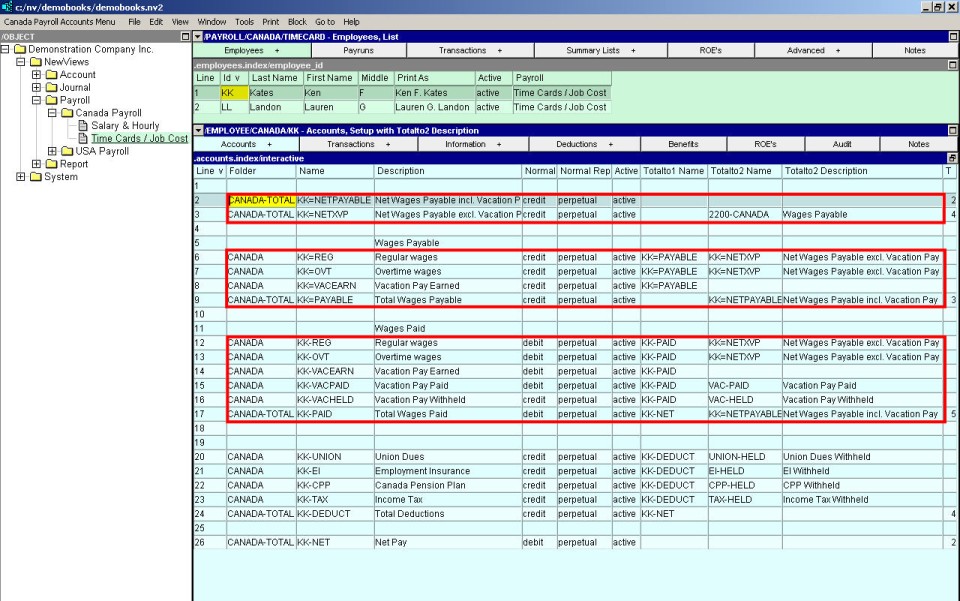
Shown above is a sample employee's accounts. Notice that wages payable and wages paid accounts come in pairs. (Ignore "Vacation Pay Paid" and "Vacation Pay Withheld" for now. Vacation pay is covered below and elsewhere).
The Totalto1 Name column and the Totalto2 Name column show the total arithmetic, explained below.
NOTE: Because of the very different account structure between the non timecard payroll and timecard payroll, we recommend that you do not attempt to change an existing employee's account structure from non timecard to timecard. Instead, we suggest that you setup a new employee.
A wage category is essentially a pair of accounts, one that has the equals (=) separator and one that has the hyphen (-) separator. Start by adding a new account to the employee's wages payable section. This account will use the equals character as the separator and will have a credit normal balance. Total this account to the employee's wages payable and to the wages payable account on the balance sheet
Next create a new account in the employee's wages paid section. This account will use the hyphen as the separator and will have the same suffix as the account with the equals separator. This account will have a debit normal balance and totals to the employee's wages paid account. This account will also total to the wages payable account on the balance sheet.
Finally, go back to the newly created wages paid account and set the appropriate rate and other information using the paycodes screen. Please note that it is not necessary to set the paycode information for the wages payable account because NewViews automatically copies the paycode settings between the wages payable account and the corresponding wages paid account.
See Adding an Earnings Account for more on setting up payroll accounts and payroll account paycodes.
See Account Setup Window for more on setting up payroll accounts and payroll account paycodes.
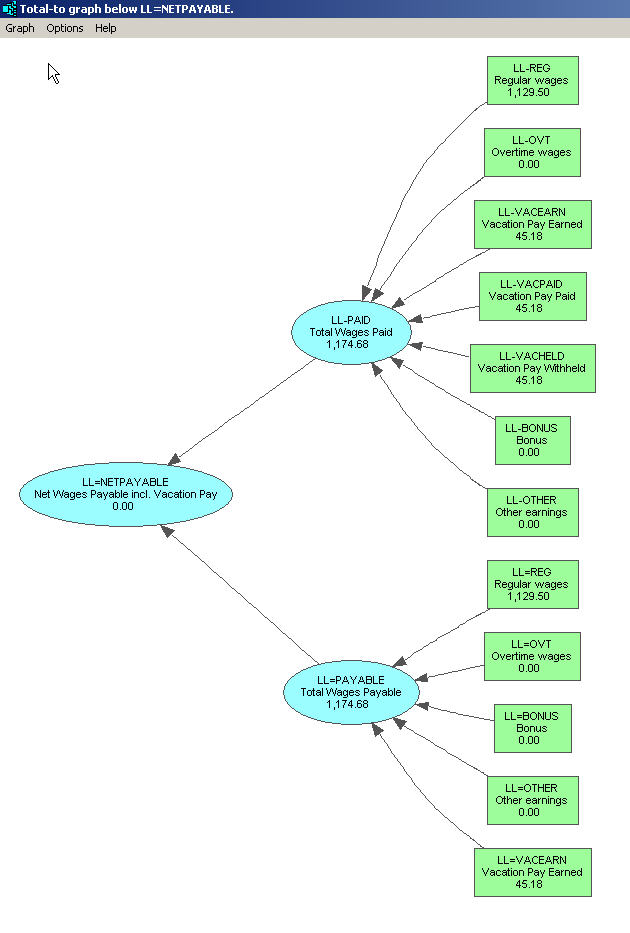
Shown below is a graph of a simple employee's report arithmetic. Wages payable (entered from timecards) minus wages paid (created by paychecks) equals net wages payable. This is sometimes called "local arithmetic", and is accomplished using the <F3> key on the "Totalto1 Name" column to select accounts to total to. See the Account Setup Window shown above.
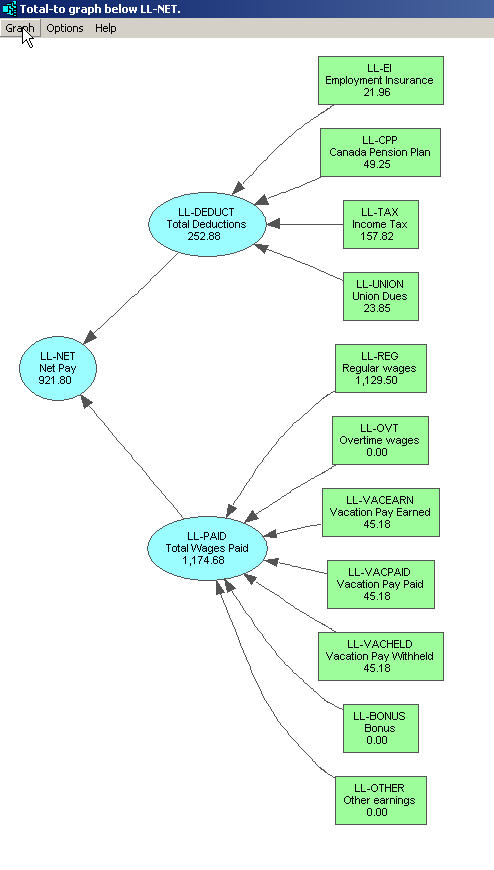
Shown below is another graph of a simple timecard same employee's report arithmetic. It completes the "big picture" local total arithmetic. Wages paid (created by paychecks) minus deductions (created by paychecks) equals net pay.
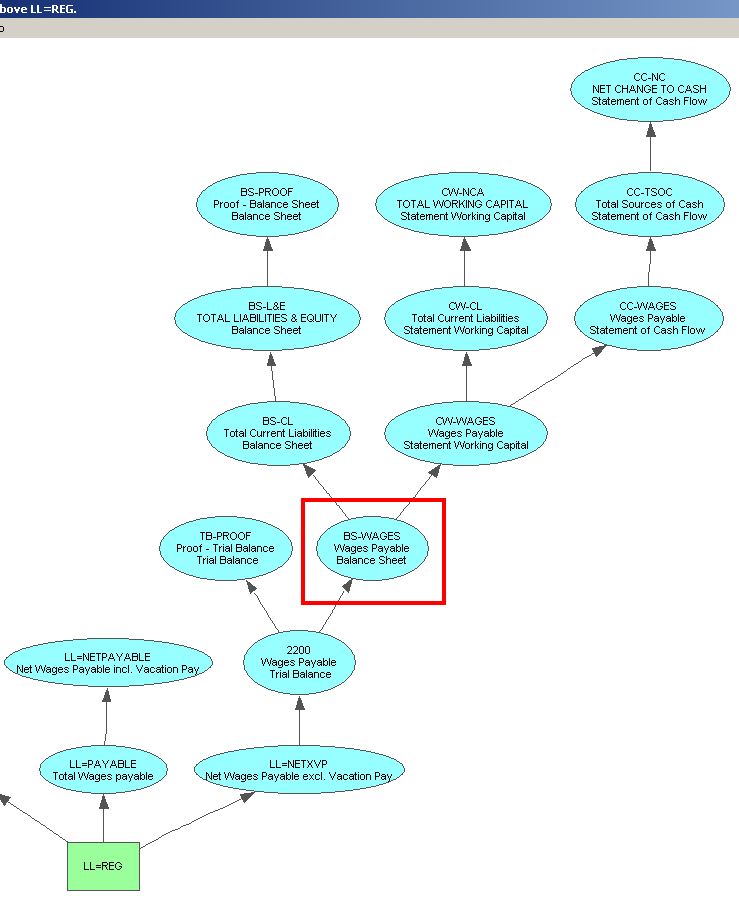
The important total to, in this example, is found in the "Totalto2 Name" column (again see the Account Setup Window shown above). The objective is to cause the employee's wages earned to eventually total to wages payable on the balance sheet. Shown below is a graph which demonstrates this. Account "LL=REG" is a wages payable account increased by entries from timecards.
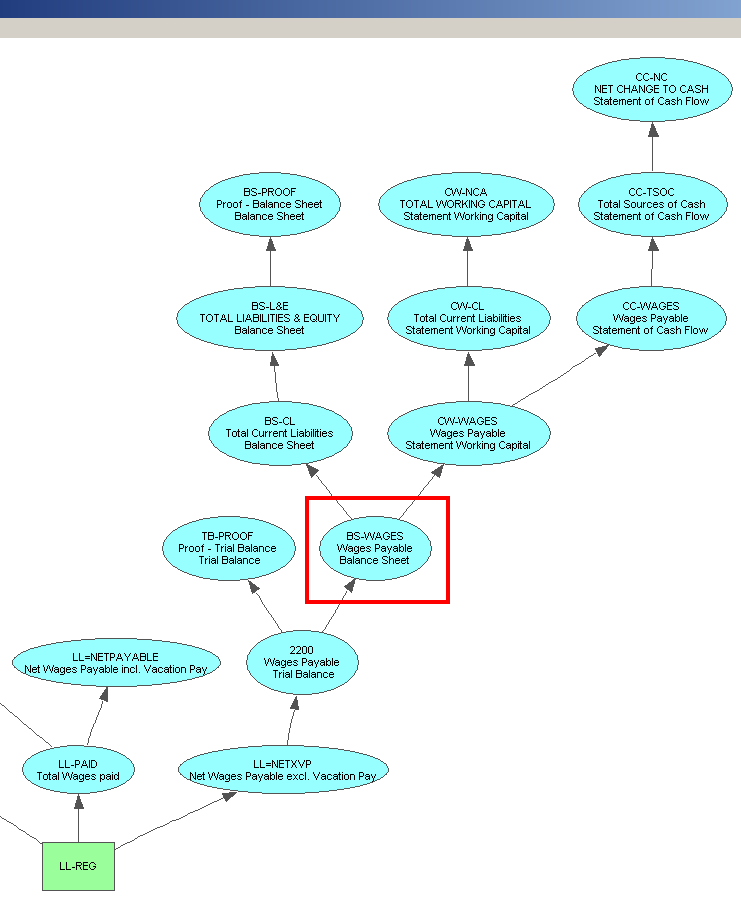
Again, the important total to, in this example, is found in the "Totalto2 Name" column (again see the Account Setup Window shown above). The objective is to cause the employee's wages paid to eventually total to wages payable on the balance sheet. Shown below is a graph which demonstrates this. Account "LL-REG" is a wages paid account increased by entries from paychecks.
Wages Payable and Wages Paid are contra (perpetual) accounts. This is why this graph is almost identical to the previous one.
For employee deductions, the objective is to cause the amounts to eventually total to liabilities on the balance sheet. Shown below is a graph which demonstrates this. Account "LL-TAX" is an income tax deduction which is included in liabilities.
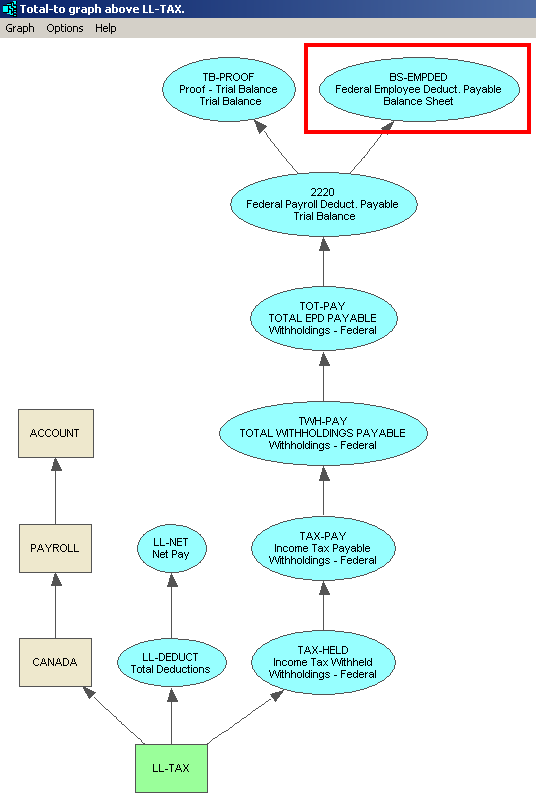
NOTE: These graphs were produced using commands available at all times in NewViews. They can be found on any table of accounts (blue). Issue the Tools>Totalto commands to explore/debug account total arithmetic.
There is a shortcoming when employee earning accounts are totaled to an expense account; there is no way to allocate earnings to different projects, jobs and so on. Many businesses and non-profits require the ability to allocate earnings, and it is for this reason that NewViews includes what is called "Timecard Payroll".
See Creating Employee Accounts for Timecard Payroll for more.