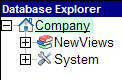
NewViews organizes all of your accounting data with several levels of documents. The database explorer is the navigation tool that allows you to go anywhere in a set of books in an instant.
The main database explorer is a file tree explorer similar to the Windows Explorer in XP/Vista/7.
A folder named "Object" is the root of the books.
The description for the root folder should be your company's or organization's name. If the name of your company is not displayed here, you can set or change it using the Company Name field in Company Address Information
Click on the hyperlinks below to navigate to other sections in the manual for additional information.
Note: A hyperlink appears blue before it is clicked and red after it has been clicked.
| Database Explorer | Folder content / comments | ||
| | Company | | The root of the books (database) |
| + | NewViews | The NewViews folder contains all the accounting data for the books | |
| + | System | The System folder contains the audit trail, session information and user information | |
| Database Explorer | Folder content / comments | |||
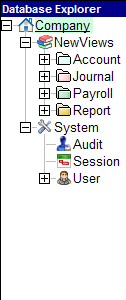 | Company | | | |
| - | NewViews | | | |
| | | Account | All posting and total accounts. Every time you create an account, it is added to this collection. | |
| | | Journal | All the journals in the books | |
| | | Odds and Ends | Settings related to NewViews, reserved for future use. | |
| | | Payroll | The payroll in the books. Payroll for Canada and the US is fully integrated in NewViews. If you use an outside third party service please post your summary transactions through a General Journal. | |
| | | Report | All the reports in the books. A report is a collection of accounts. Note: It is possible to have an account that is not on any report. | |
| - | System | | | |
| | | Audit | The full audit trail | |
| | | Session | The history of all sessions | |
| | | User | All the users and their options | |
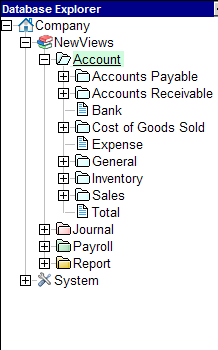
Expanding the Account folder reveals the main account types, AP, AR, Bank, Cost of Goods Sold, Expense, General, Inventory, Payroll which is hidden in this example, Sales and Total.
| Database Explorer | Folder content / comments | |||
 | NewViews | | | |
| - | Account | | When positioned on this folder, you can explore all the accounts or postings in the books in one list. | |
| | | Accounts Payable | All the Vendor accounts. There is no requirement in NV2 to have an Accounts Payable report. This account folder has specific views to deal with AP / Vendor accounts. | |
| | | Accounts Receivable | All the Customer accounts. There is no requirement in NV2 to have an Accounts Receivable report. This account folder has specific views to deal with AR / Customer accounts. | |
| | | Bank | All the Bank accounts. | |
| | | Cost of Goods Sold | All the Cost of Goods Sold accounts | |
| | | Expense | All the Expense accounts | |
| | | General | All the General accounts. i.e. accounts that don't fall into any of the other categories. | |
| | | Inventory | All the Inventory accounts | |
| | | Sales | All the Revenue / Sales accounts | |
| | | Total | All the Total accounts. i.e. accounts that have other accounts totaling to them. | |
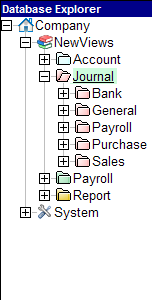
Expanding the Journal folder reveals the five main journal types, Bank, General, Payroll, Purchase and Sales.
| Database Explorer | Folder content / comments | ||||
 | NewViews | | | | |
| - | Journal | | | When positioned on this folder, you can explore all the journals or transactions in the books in one list. | |
| | | Bank | | All Bank deposit and payment transactions | |
| | | | Deposit | All Bank deposit transactions | |
| | | | Payment | All Bank payment transactions | |
| | | General | | All General transactions | |
| | | Payroll | | All Payroll transactions, checks and timecards | |
| | | Purchase | | All Purchase transactions | |
| | | Sales | | All Revenue / Sales transactions | |
Expanding the Payroll folder reveals the Canada and USA payroll and some sample reports.
| Database Explorer | Folder content / comments | |||
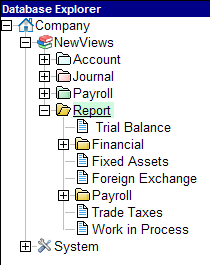 | NewViews | | | |
| - | Payroll | | Table of payrolls | |
| | | Canada | Canadian payroll, employees, paychecks, ROE, T4, etc | |
| | | USA | US payroll, employees, paychecks, W2, etc | |
| - | Report | | Table of reports | |
| | | Balance Sheet | Balance Sheet report | |
| | | Income Statement | Income Statement report | |
| | | Trial Balance | Trial Balance report | |
See The Database Explorer for more.