To become a registered NewViews user, you will need to contact technical support to register NV2 and receive your serial number to release NewViews for complete unlimited access. This should take a minute to complete and you will be up and running.
Only registered users are entitled to receive support from Q.W.Page. In addition, all registered users receive special notification of NewViews Payroll revisions and tax table updates.
Two years after a new version of NewViews is released, Q.W.Page no longer provides technical support for the old version. Therefore, it is essential that you become a registered user and that you always update to the most current version of NewViews.
If you are using NewViews Payroll, it is very important that you obtain and install the most current Payroll update, in order to avoid processing payroll inaccurately.
North American customers can call our Technical Support Lines at 905-946-9460 and select option one to register. (From outside of North America customers should dial 00-1-905-946-9460) The Support hours are:
Monday to Thursday 10:00 a.m. to 6:00 p.m. Eastern Standard Time
Friday 10:00 a.m. to 4:00 p.m. Eastern Standard Time
If you are unable to call during Support Hours, you can also register via email. Click the following link and include the following in your message:
Your NV2 Serial Number (if re-registering)
The individual or organization name the NV2 product is registered to
The Computer Nickname NV2 is installed on (see examples)
Your full name (if not identified in your email address)
The displayed lock number that appears on the registration screen
Failure to provide the above registration information can delay or deny registering your NV2 product.
Each computer is registered with an NV2 Serial number which is easy to identify if the individual/organization registering has acquired a single license. Re-registering multiple licenses can be difficult if the NV2 serial number being re-registered is unknown or lost. By identifying a nickname of the machine NV2 is installed on makes this process easier. A nickname is your internal identification in case the machine NV2 is installed on is lost or damaged. Some acceptable nicknames are:
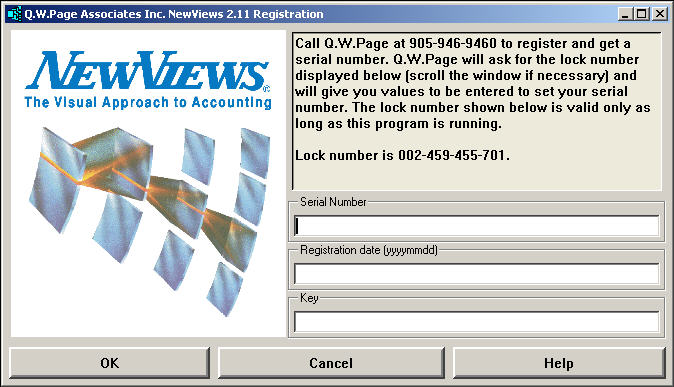
The displayed lock number is only valid at the time the registration program is executed from the NewViews 2.0 menu. If you click Cancel the lock number that had appeared becomes meaningless when the registration program is execute as a new lock number will be displayed.
You are allowed to register one backup machine.