NewViews can create and directly send Electronic mail (email). No third party software is required (e.g. Microsoft Outlook).
The ability to create an email directly from the accounting database provides additional control and flexibility.
To get email up and running you need to do five things:
Email in NewViews is sent using the printing process. Instead of directing output to a printer (or the display, or a file), you direct output to "email". Email is only sent for accounts/employees that have a valid email address. (Or transactions that reference (post to) accounts/employees that have a valid email address.)
Getting documents out (e.g. customer statements) can be a two-step process.
This is the reason for the Email Status field in the print/tool prompt. First, select Email Status active to send all possible emails. Second, select Email Status inactive to print the remainder.
The following documents can be emailed directly, as file attachments, in xls or PDF format. See email Print Settings for more.
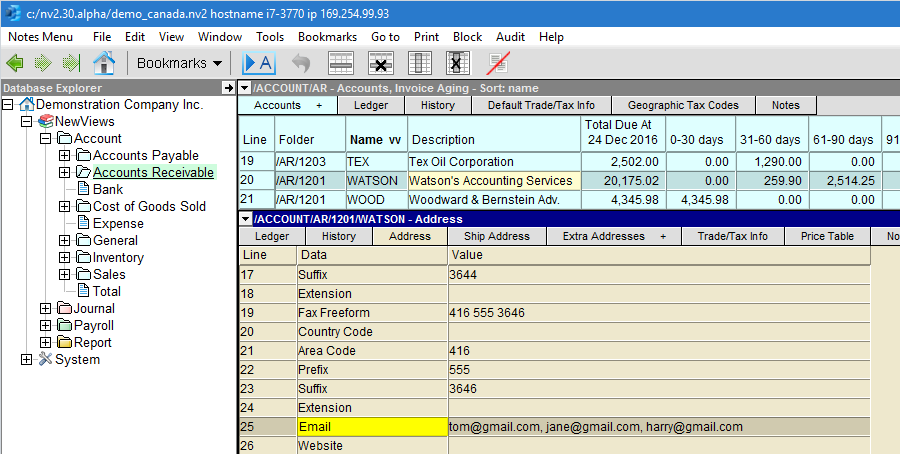
The recipient email address is found on line 25 of the AP and AR accounts address table. Multiple email addresses can be added, use a comma as the separator.
An email created by NewViews has the following elements:
The Common Email print prompt settings provide most of the information needed. The To: value is read from the account/employee, or the account/employee referenced by a transaction, and the attachment file is created by the print or mail-merge operation.
The type of attachment file (i.e. xls or PDF) is controlled by the Filename extension.
Sending an attachment as an Excel file (.xls) requires that the recipient of the email have Excel on their computer or an Excel file reader. There are also two default file formats for Excel files. By default the recipient can edit an Excel attachment.
Sending an attachment as a PDF file requires that the recipient of the email have a PDF reader. The most popular is Adobe Reader. It is available as free download at get.adobe.com/reader By default the recipient cannot edit a pdf attachment.