
If you are attempting to send a document directly from NewViews via email and the recipient is not receiving the email with the document attachment, the most common causes are:
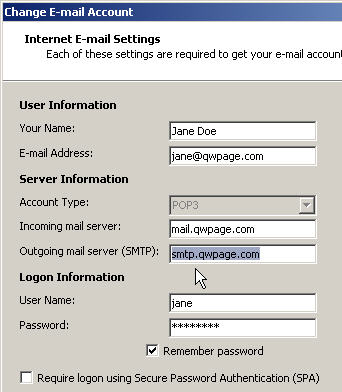
If you are able to send and receive email in a third party program like Microsoft Outlook from your computer but not from NewViews, then it could be due to a Print document prompt configuration problem.
If Microsoft Outlook is able to send email, copy the following values from Outlook to NewViews.
Check the recipients email address on line 25 of the Address of the account.
Check your spelling. Check for extra characters on the end of the address,
such as a trailing period.
The last character of the address MUST ALWAYS be a letter or number and is never a
punctuation.
Check the SMTP server name on line 1 of the Email Setup
prompt.
NewViews needs the name of a valid SMTP email server to transmit email.
This should be set to a fully qualified domain name.
We use smtp.qwpage.com for ours.
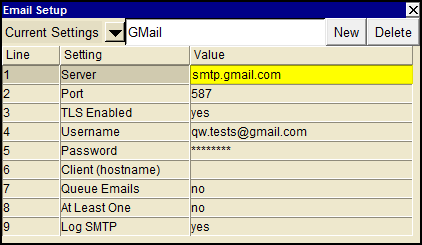
Check the port number on line 2 of the Email Setup prompt. NewViews needs the port number of your SMTP server, 25 is the default. However your IT department or your ISP may be using another port, e.g. 1025 or 587
Email Setup Username or Password not filled in or incorrect.
The specified address is no longer valid, did the recipient move? Or is it one of those addresses that only works for a limited time?
The specified mailbox is full or disabled, you need to wait or contact the mailbox holder by other means and alert them of the problem.
Mail was rejected because of its size, try sending something smaller with only text and no attachments and see if that works.
Your organization's mail servers may not be accessible from outside your office network. If this is the case you should create a new Print document prompt setting with the SMTP server that works from your home email account.
Open up the settings of third party program like Microsoft Outlook at home and copy the Outgoing mail server (SMTP) name and port number.
From within NewViews while the Print document prompt is displayed, click on the New button, (see Print/Tool for details) and add an email setting for HOME.
GMail, Live HotMail and Yahoo Mail are just three Internet based email products.
If you have an account with one of these you may not be using Microsoft Outlook.
and instead use one of the settings below.
| | Server | Port |
| GMail | stmp.gmail.com | 587 or 465 |
| Live Hotmail | mx1.hotmail.com | 25 |
| Yahoo | smtp.mail.yahoo.com | 25 |
Check that your operating system's firewall is not blocking port 25.
If your ISP is blocking port 25, you may not be able to send email using NewViews. Some ISPs do this so that you are forced to use their email servers when sending email, as an attempt to prevent spam.
Another reason mail servers may reject mail from your mail server is that it is listed on a spam RBL (Realtime Blackhole List) list. There are many spam RBL lists on the Internet that keep track of servers reported to send out spam or have been verified as an open relay.
To see if your servers ip is listed, do a search for sites that allow you to check an ip against multiple RBL lists. You may want to just go to a search engine and type in something like 'multiple spam RBL list' or something along those lines.
If your email program at the office is not working please contact your IT staff or ISP to correct the problem.
If you are still having trouble sending messages from NewViews, please contact our customer support for help with this issue.