
 icons have been replaced with
six new icons, four maximize
icons have been replaced with
six new icons, four maximize 


 icons
and two restore
icons
and two restore 
 icons.
Allocations are a general purpose mechanism that let you allocate individual transaction detail items for a wide variety of purposes.
Allocations are most often used to allocate transactions to different projects, funds, departments, activities, profit centers, branches, divisions, or any other criteria that applies to your organization.
To use allocations you first add allocation tags to the set of books, say one for each project. Then, as you add transactions, you allocate them to a project by picking from the list of projects.
See Partitions and Allocations for more.
You can drill down with a double click on any table row.
Double clicking a table row is the same as pressing <F6>, Expand.
Double clicking a workstation login row is the same as pressing <F3>, Open.
Double clicking a table column title is the same as pressing <F11>, Define Column.
Double clicking an account table multiple column analysis column title is the same as executing a View>Analysis>Multiple Column Setup command.
Double clicking an account history table column title is the same as executing a View>Analysis Settings command.
Double clicking a cell on a table with numbered fields (e.g. print and tool prompts, Tax Info, etc.) is the same as pressing <F3>.
See Mouse Shortcuts for more.
Foreign currencies translation can now be automated. NewViews has a new command to synchronize foreign currency accounts.
See Foreign Currency Translation for more.
NewViews can now print an aged payable/receivable list for a prior period (i.e. what were aged payables/receivables several months ago).
See Historic - Aged Receivables for more.
Includes Canada July 01, 2010 tax calculation update.
Includes Newfoundland and Labrador and Nova Scotia July 01, 2010 tax calculation updates.
All Newfoundland and Labrador and Nova Scotia payroll users will require this version to process payroll after July 1st, 2010.
Includes US January 01, 2010 tax calculation update.
Includes D.C. and Missouri January 01, 2010 tax calculation updates.
All D.C. and Missouri payroll users will require this version to process payroll after January 1st, 2010.
Includes US July 01, 2010 tax calculation update.
Includes Arizona July 01, 2010 tax calculation updates.
All Arizona payroll users will require this version to process payroll after July 1st, 2010.
The Print>Account Ledgers command is used to print the ledgers of one or more accounts, for a specific date range. The command has been split into simple and advanced. Several new options have been added.
See Print Account Ledgers for more.
Budgeting has been updated. The new command View>Analysis>New Column>Budget Monthly will create a new budget column that divides the date range for the column into monthly entries.
See Budget Monthly for more.
The Flows report prints increases and decreases to an account, summarized by cross account. The report shows the account's opening balance, a list of increases for each "sources" cross account and total increases. Next it shows a list for each "uses" cross account and total decreases, followed by the account's closing balance.

See Flows Report for more.
See HST - Ontario and British Columbia for the latest information on your Trade Tax settings.
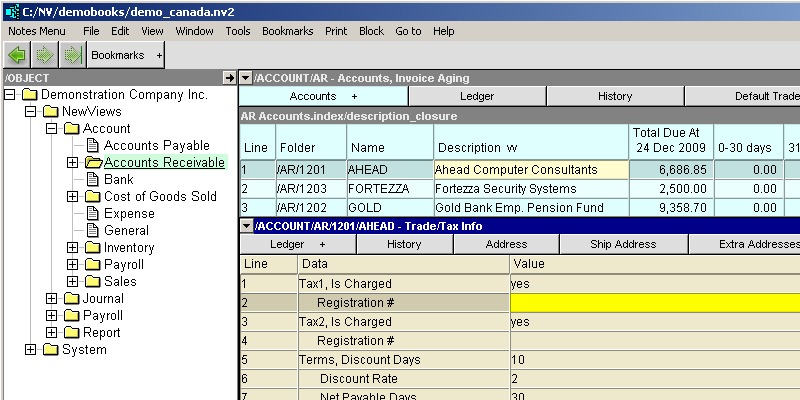
Two new Tax Registration Id fields have been added to AR Customer accounts.
The default maximize/restore icons have been replaced with
six new icons, four maximize icons
and two restore icons.
See Maximizing/Restoring Windows for more.
Two new aging views have been added to the an account's ledger.
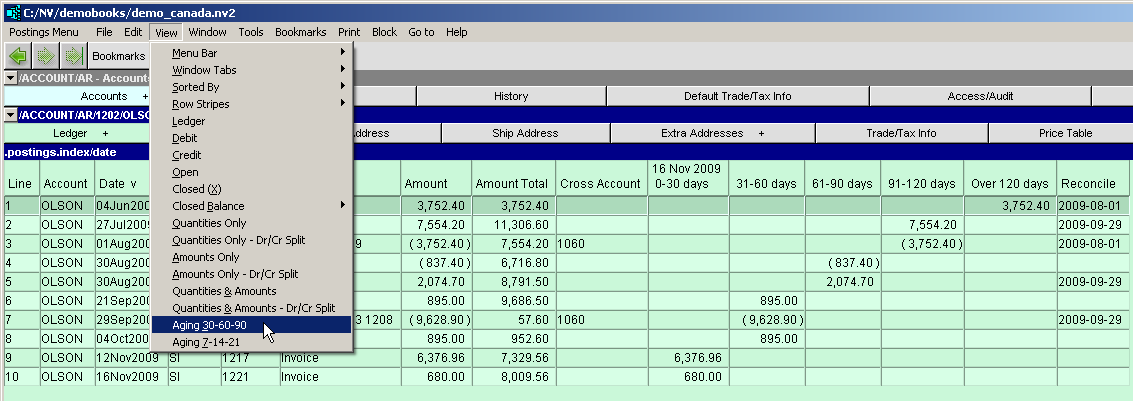
See Ledger Aging View for more.
Added the Type and the Sub Accounts fields to the Account Setup view.

Updated the EFT code for Canadian Royal Bank of Canada RBC customers. This update implements the new NACHA International ACH Transactions IAT rules for electronic payments destined to USA Banks.
This update only affects cross border payments from Canada to the USA. In order to make use of the new update the address field Country for Vendors or Employees must be set to USA.
Added the Type and the Sub Journals fields to the Journal Settings view.

The NewViews install now provides three new starter templates.
See Starter Setups for more.
The NewViews install now provides non-profit demo books.
This demo set of books is a sample of a Multi-sector Service Agency.
Included are four sector examples;
See Non-Profit Demo Books for more.
Customer support can access your screen using TeamViewer.
See Customer Support using TeamViewer
F3 can now be used everywhere you would choose a tag.
If a table has rows selected (or marked in a block), active row highlighting is disabled. (It was too difficult to see exactly which rows where selected and which were not)
Window title bars used to be blue (i.e. active) for every window in the "keyboard focus path", from the outermost window, nesting in to the window that will receive your keystrokes. Many users had difficulty determining which window was "active". So now, only the window that will receive keystrokes has a blue title bar.
Budget entries through the book of final entry will now generate negative values for credit postings.
By default, administrator can now also perform single-user backups.
EFT USA Bank Information now allows for 10 digit values in the Immediate Origin ID and Company Identification fields.
Bookmarks are now database-anchored.
In the prior version, bookmarks were window-anchored - meaning that table row numbers were saved regardless of what data was in the row. This meant that returning to a bookmark at a much later date would arrive on the same row number, even if the data had shifted due to insertions, deletions, or block moves, so you would only arrive "in the vicinity of" the original data. This version is instead anchored to the underlying data so you may land on a different row but you will land on the same data item.
A flip-side scenario for those who place bookmarks at the top of a table of transactions or postings sorted in reverse date order (i.e. you always want to land on the most recent stuff, and you don't want your bookmark "walking down the screen"): you will need to change (Re-use) these bookmarks.
For each of these bookmarks, execute a Bookmarks>Manage command and go to the bookmark. Then use the up arrow key to move the active cell into the table title row. Now execute another Bookmarks>Manage command and press the Re-use button. The old bookmark (which will walk down the screen) is replaced by the new one (which won't).
By making this change, you can have both types of bookmark behavior.
The Respect Normal Representation setting for an account amount column will be displayed in the column title. See Account Normal Balances for more.
In the database utilities, the reorganize_database command now displays a confirm dialog when the operation is completed.
An inadvertent error could occur when deleting a total account.
If an account was untotaled from another account, say parent total account A, then a subsequent attempt to delete total account A would fail with the message:
"Attempted to delete index .posting.index/id xxx with XXX records."
This release fixes the problem.
The ability to duplicate and add post-dated transactions did not work for timecards.
You could not duplicate timecards or add recurring post-dated timecards if the timecard you were attempting to replicate had been paid by a paycheck. Any reference to a paycheck is now set to empty on replicated timecards and the problem is fixed.
Text widget (Notes View).
The [Tab] key now correctly moves eight characters to the right. The [Arrow Up] key now correctly positions the screen if the vertical scroll bar is visible. The [Insert] key now correctly inserts a line and positions the cursor on the left margin.
Print>Detail Windows crashed when it encountered a text line.
This release fixes the problem.
Edit>Cut to move transactions detail items from one transaction to another was allowed, and databases could be corrupted.
This release prohibits the operation. A future release will enable it.
Clicking a column title to change the direction of a ledger controlled by a blue table cell caused an error.
This release fixes the problem.
PDF file creation, using MSWord templates, was not respecting the template boundary in a multi-page template.
This release fixes the problem.
Mail merge PDF filenames where not validated.
This release fixes the problem.
Aging reports that reached too far into the future generated errors.
This release restricts the forward reach to the year 2035. A future version will correct the problem.
Extra address components did not appear on templated printouts.
This release fixes the problem.
Some Single Period Report columns disappeared.
This problem was caused by a quirk in Multiple Period Analysis. Any table of accounts can perform multiple period analysis by executing the View>Analysis>Multiple Column Setup command. Analysis columns created this way are appended to the columns already present. For example, you could switch to the view of accounts that displays contact information, execute a View>Analysis>Multiple Column Setup command and create six columns displaying sales for the last six months.
Whenever you switch to a new view (column layout) of accounts, the multiple column setup is examined and "refreshed". However, when you switched to a Single Period Report some columns where removed by mistake.
This release fixes the problem.