The ASC 830 rules, suggest that the Assets and Liabilities be translated at the current exchange rate at the Balance Sheet date(s) and posted to the Unrealized Foreign Exchange Adjustment account in the equity section of the Balance Sheet. The Revenue and Expenses should be translated at the weighted-average exchange rate for the period and posted to the Foreign Exchange Gain / (Loss) account on the Income Statement.
Two reports, two rate tables and two journals are provided to comply with ASC 830 in the demonstration books.
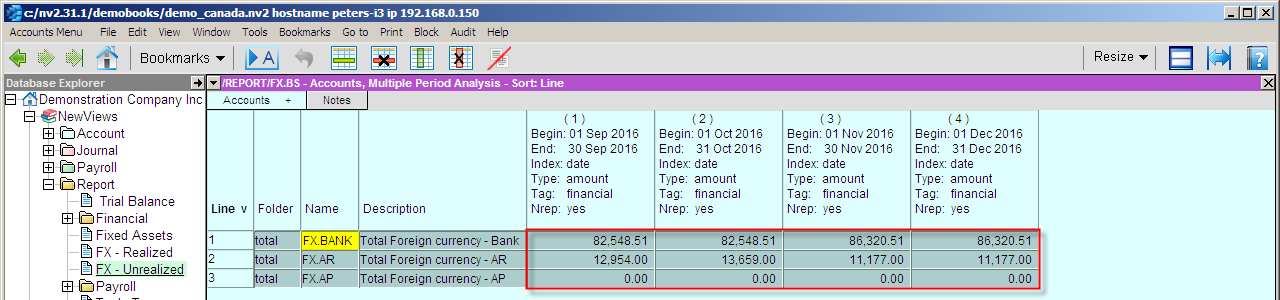
With the foreign exchange rates on the notes view of the report or in an Excel spreadsheet or text file, navigate to the foreign Exchange report and switch to the Multiple Period Analysis, view.
Reminder, the foreign exchange rates change on a daily basis, please update your rates table on a regular basis from the Internet.
Set the number of columns equal to the number of transactions to be synchronized. Below is a typical report set to six months. Assuming the date is January 2, 2017, we need to update/synchronize all reports up to Dec 31, 2016. However assuming that some entries may have been added, edited or deleted in the last 4 months of 2016 we should re-synchronize that entire date range.

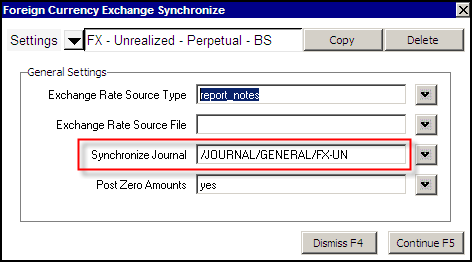
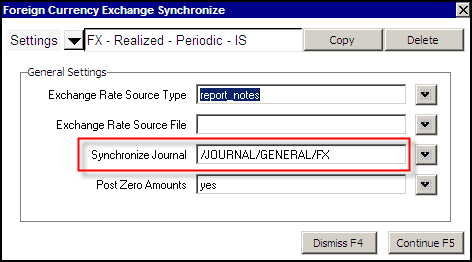
You should be consistent with the resolution used, e.g. if you use monthly, stay with monthly. Should you wish to switch and use daily or weekly resolution, delete any synchronization transactions in the same period you are re-synchronizing.
| Foreign Currency Exchange Synchronize | |||
| Line | Field | Options | Value |
| 1 | Exchange Rate Source Type | report_notes file | report_notes - will look in the Notes view of the report for the exchange rate values. file - will look in the file specified for the exchange rate values. |
| 2 | Exchange Rate Source File | qw_key F3 | The file name that contains the exchange rate values. |
| 3 | Synchronize Journal | qw_key F3 | The journal to be used for posting the Foreign Exchange synchronize transactions. |
| 4 | Post Zero Amounts | yes no | yes - will create zero amount transactions. no - will not create zero amount transactions. |
You are required to use separate journals for each foreign currency exchange rate. As shown above, one journal for realized FX on the income statement (weighted-average) and one journal for unrealized FX on the balance sheet (period-end). If your books are in Canadian Dollars as the functional currency and you track both US dollars and Euros, setup and use at least three separate synchronize journals.
The command Tools>Foreign_Currency pictured above, is used to synchronize the accounts/books. The tool creates a journal entry for every column set on the Multiple Period Analysis view of the report. Should you have six monthly columns displayed (as above), then six transactions will be created or updated on the journal specified.
Using the Foreign Currency Exchange Synchronizer Tool is harmless. If you have existing foreign exchange synchronize transactions for the 12 months of 2009 and run the synchronizer for the last 2 quarters in 2009, we will:
Below we display the results of using the Tools>Foreign>Currency command on an analysis view for a six month period. The transactions on lines 7 to 12 where added or updated. Highlighted is one of the transactions, the July 31, 2009 entry. Each transaction will have detail items equal to the number of accounts on the Foreign Exchange report.
We recommend that you leave option 4 (Post Zero Amounts) in the Foreign Currency Exchange Synchronizer prompt set to yes. This will assist you when reviewing the Foreign Exchange conversion accounts (1099, 1299, etc) ledger. Should you find a zero amount transaction, it would indicate that:
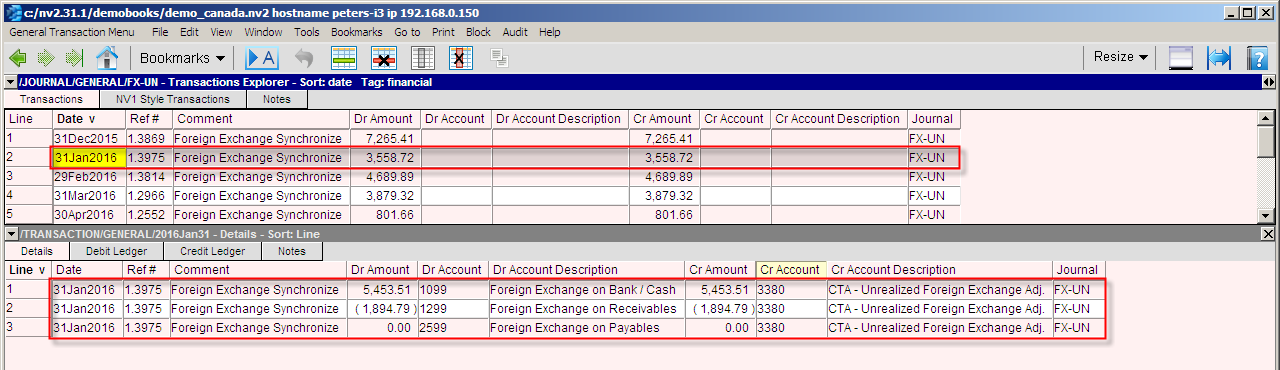
Note: For simplicity's sake these examples have been shown with monthly conversions. The Foreign Currency Exchange Synchronizer will create transactions based on the settings of the Multiple Period Analysis view in effect at the time you run the command. The analysis view may be set to daily resolution, then your books will be in sync every day of the year.