Adding Opening Entries
Adding Opening Entries to a new set of books is normally done once.
In NewViews the simplest way is to enter opening balances on each of the
-
general ledger accounts, i.e. banks, prepaid expenses, liabilities, etc
-
individual customer and vendor accounts
-
income statement accounts (final balance of prior period)
-
prior period retained earnings
Here is a quick method of creating the opening entries using the budget view.
Amounts can be entered on blue tables of accounts in the budget journal for a single period and then moved to a financial opening entries journal.
-
Set the blue table of accounts or the report to the budget view.
-
Set the ending date in the first amount
column to the opening balance date, e.g. Dec 31, 2009
-
In the second column "budget" enter the balance of the account as at the opening balance date.
-
Go to all necessary accounts or reports and enter all balances.
-
Go to the root general journal and create a new opening entries journal with partition tag financial.
-
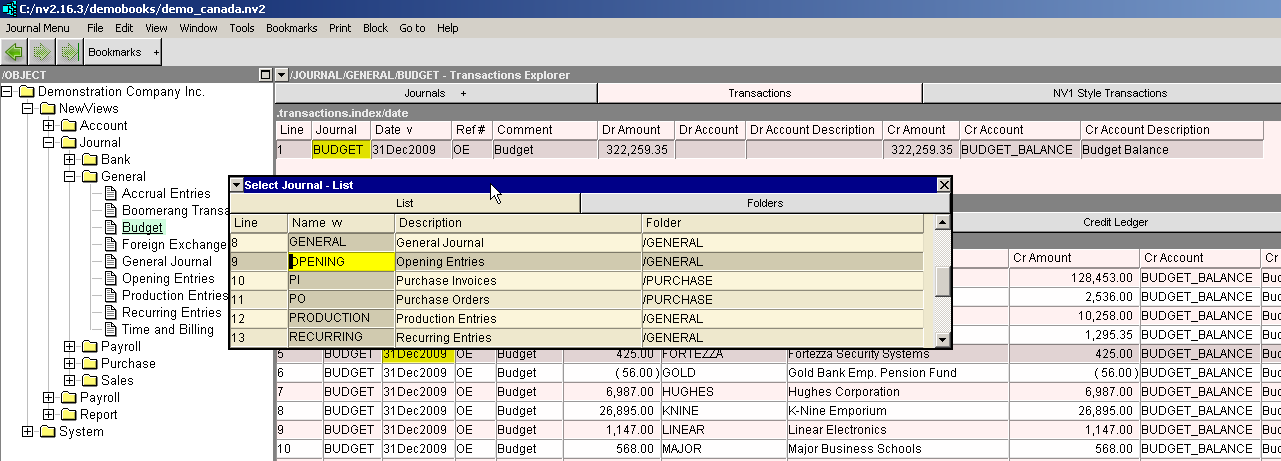
Go to the budget journal and place the cursor on the Journal column of the transaction.
-
Press <F3> to move the budget transaction to the new opening entries journal. (see screen shot below)
-
Go to the Opening Entries journal and replace the comment "budget" with "opening balance".
-
Replace the cross account "budget_balance" with "journal_bal".
Copyright (c) 2003-2026 Q.W.Page Associates Inc., All Rights Reserved.