The Flows report prints increases and decreases to an account, summarized by cross account. The report shows the account's opening balance, a list of increases for each "sources" cross account and total increases. Next it shows a list for each "uses" cross account and total decreases, followed by the account's closing balance.
This is a generated report using Print Account Ledgers Advanced.
For example, if Flows is run on a bank account the report would list customer accounts in the increases section, and supplier accounts in the decreases section. For each customer account the amount printed would be the total of all payments they made to you. For each supplier account the amount printed would be the total of all payments made to them. If you wrote a check to a customer (for a refund), that customer's name would also appear in the decreases section of the report.

Position on the account(s) at the blue table level.
Block the account(s) you wish to include on the report.
Use the Print>Account Ledgers>Advanced command.
Set the date range on lines 7, 8 and 9 on the Print Account Ledger prompt.
Set the flows settings on lines 15 to 19 as follows.
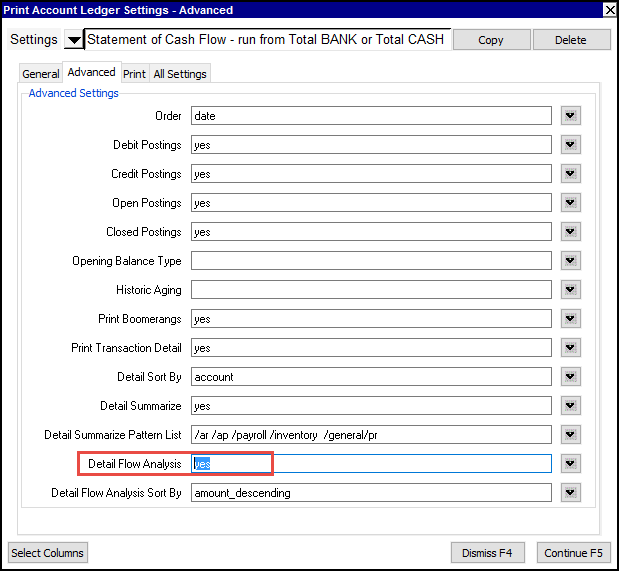

| Print Account Ledger Settings | |||
| Line | Field | Values | Comments |
| 1 - 13 | See Print Account Ledger for details on the field options 1 to 14. | ||
| 14 | Print Transaction Detail | no yes | this field must be set to yes to generate a flows report. |
| 15 | Detail Sort By | date account | this field must be set to account to generate a flows report. account - transaction details are sorted by cross account |
| 16 | Detail Summarize | no yes | no - full details are printed yes - transactions details are summarized see note below on Total Increase and Decrease values |
| 17 | Detail Summarize Pattern List | account path * ? | An optional pattern list may be entered to summarize transactions see note below on Pattern List |
| 18 | Detail Flow Analysis | no yes | no - prints default account ledger details yes - this field must be set to yes to generate a flows report |
| 19 | Detail Flow Analysis Sort By | amount_descending name description path | amount_descending - default sort order, sorts the transactions by value name - sorts the transactions by the cross account's name description - sorts the transactions by the cross account's description path - sorts the transactions by the cross account's path |
| 20 - 28 | See Print Account Ledger for details on the remaining field options. | ||
When you set "Detail Summarize" to "yes", transactions in the "Increases" and "Decreases" sections are summed and the resulting number then appears in either the "Increases" or "Decreases" section, depending on its value. Because of this, the total increases and decreases when "Detail Summarize" is set to "Yes" may be different then when it is set to "No".
This feature allows you to summarize transactions that match a particular pattern as one single transaction. The pattern entered may be a literal pattern (i.e. an exact match) or use wild card characters (* and ?). The asterisk character ("*") substitutes for any zero or more characters, and the question mark (?) substitutes for any one character.
| Wildcard Examples | ||
| Wildcard | Example | Returns |
| | /ar | this will summarize all A/R transactions as a single transaction |
| | /ar/1201 | this will summarize all A/R transactions that are in the 1201 branch as a single transaction |
| | /ar/12* | all A/R transactions that are in any branch that starts with the numbers 12 will be summarized as a single transaction |
| | /expense/67* | summarizes all expense transactions where the first two characters of the account name is 67 as a single transaction |
| | /ar /expense/67* /payroll | this will summarize all A/R transactions as a single transaction summarizes all transactions of type expense starting with 67 as a single transaction summarizes all transactions of type payroll as a single transaction |
| * | sun* | sung, suns, sunset, sunrise, sunny, sundial this will summarize all transactions posted to accounts with a path starting with sun as a single transaction |
| | s*n | sin, son, sun, soon, scan, skin, stun this will summarize all transactions posted to accounts with a path starting with s and ending with n as a single transaction |
| ? | sun? | sung, suns this will summarize all transactions posted to accounts with a path four (4) characters in length starting with sun as a single transaction |
| | s?n | sin, son this will summarize all transactions posted to accounts with a path three (3) character in length starting with s and ending with n as a single transaction |