In the Troubleshooting Windows 7, 8.1, 10 & 11 section, we will list issues regarding the operation of NewViews on the current Microsoft platforms.
NewViews original program development was finalized on the Microsoft Windows 2000 platform. Current 2025 updates, service packs and new versions are developed on the Windows 7 and 10 platforms. Testing of NewViews versions is performed on Microsoft Windows 7 and 10.
Currently 2025 Microsoft is shipping close to 20 versions of Windows 7, 8.1 and 10 versions of Windows when you count all 32-bit, 64-bit, workstation and server versions. To the above list add the Windows Service Packs and Windows Virtual PC emulations. Last, but not least are the Apple Macintosh computers running Parallels Windows Virtual PC.
| Microsoft Window's Family | |||||
| Name | Version | released | type | market share (March 2022) | support ends |
| Windows XP | NT 5.1 | Oct 2001 | 32/64 bit | 0.0% | 2014 |
| Windows Vista | NT 6.0 | Jan 2007 | 32/64 bit | 0.0% | 2017 |
| Windows 7 | NT 6.1 | Oct 2009 | 32/64 bit | 3.4% | 2020 |
| Windows 8 | NT 6.3 | Jun 2012 | 32/64 bit | 1.4% | 2023 |
| Windows 10 | NT 10 | Jul 2015 | 32/64 bit | 67% | 2025 |
| Windows 11 | NT 10 | Oct 2021 | 64 bit | 10% | 20?? |
Windows XP is versioned as 5.1, Windows XP is an updated version of Windows 2000 (NT 5.0). Windows Vista, 7, 8 and 8.1 are versioned as 6.0, 6.1, 6.2 and 6.3. So Windows 7 and 8 are updated versions of Windows Vista.
UAC or User Account Control is the main new feature introduced in Windows Vista (NT 6). UAC is a security feature, it monitors and protects against changes to the operating system of your computer. This is the feature that pops up those annoying prompts.
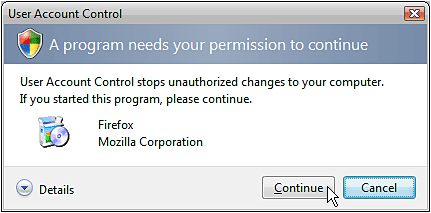
UAC is intended to assist home users and small businesses, where there is no properly trained computer administrator around to set up and maintain the computer.
UAC can get in the way when accessing your temp directory. When using NewViews in a multi-user setup we strongly recommend a shared folder for printing templates to simplify the control and use of your document templates. UAC can get in the way on small networks in simply sharing a common file folder.
Installing NewViews is straight forward. However on some systems, depending on the version of Windows and security settings, UAC can get in the way when installing a program. You may need to install the program as the Administrator. See Installing NV2 for more. When you use the Administrator account to install NewViews, it may set your shortcuts to run as Administrator. This may cause a problem with printing while using remote desktop, see below.
Remote Desktop is a Windows feature that can display the screen of another computer (via the internet or network) on your own screen. It is used mostly for remote control and file transfer between computers. Other non-Microsoft programs available are: TeamViewer, GoToMyPC, pcAnywhere, VNC, etc.
There are two basic methods of working with NewViews from outside the office while the data is at the office.
Method 1 above is the fastest. This is how NewViews is intended to be used. A direct NewViews connection between your remote computer and the data file via a NewViews server at the office. You will not be moving millions of screen pixels across the internet, and the mouse and cursor commands run at full speed.
Method 2 is slower, all mouse and keyboard commands need to be transmitted to the remote desktop. This causes sluggish movement of the mouse and cursor. Also your screen on the remote computer may not match the size of your office computer requiring image scaling.
When printing from outside the office, the printers connected to the outside computer will be used. You will be using the printing templates on your outside the office computer. You control the printer directly, insert paper, forms and checks as required. If the printer jams, you can clear it.
However Method 2 above has one advantage, if you need to print to your office printer. With Remote Desktop it is like sitting at your office desk, and all printing will function as if you are at the office desk. This includes all your office printers, printing templates, etc. You will need the assistance of some one at your office to load the paper and fix printer jams, etc.
Recently we came across the following bizarre scenario. A user runs a Windows XP workstation on a LAN running NewViews multi-user. The printing templates are in a shared folder on the server mapped as drive (K). Occasionally the user connected from outside the office using Remote Desktop and prints to the office printer.
The office computer is upgraded to Windows 7. Same NewViews installation, same shared printing folder mapped as drive (K), same access with Remote Desktop, same network server, same user name and password. Now we can not print to the office printer.
Now, only the local drives are available to NewViews when viewed via Remote Desktop. When working at the computer directly, the mapped drive (K) are available to NewViews. In both cases Windows Explorer displays the mapped (K) drive.
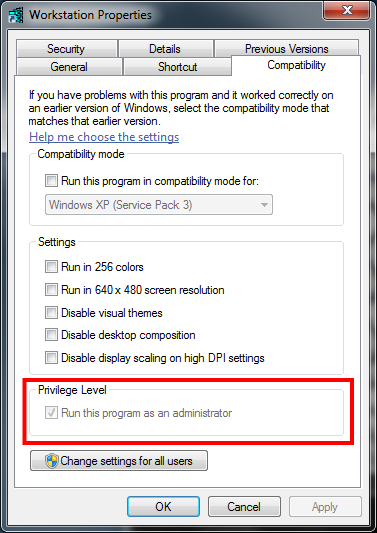
Our solution is to change the NewViews Workstation short cut properties. One of the properties of the NewViews Workstation shortcut is the Privilege Level. There is a check box for Run this program as an administrator. In all other cases we have come across, with this box checked NewViews runs with greater privileges. However when NewViews was run as an administrator and the computer was accessed via Remote Desktop the mapped drive (K) (with the printing templates) was not accessible, and therefore the user could not print to the office printer with the default printing templates.
With the Run this program as an administrator unchecked, the mapped (K) drive was accessible working directly and via Remote Desktop. Conclusion: UAC is complicated. The above is contrary to common sense.