The T4A Summary is printed from the T4A List window:
Position on the appropriate Payroll. If your organization has one remittance number for payroll deductions, you may position on the parent Canada Payroll folder. This will ensure that all recipients from all sub-payrolls are included.
Click on the Summary Lists tab and choose the T4A's list. Check the year in the bottom row left corner of the T4A List table.
If the year is not correct, change the year setting in the Advanced tab Payroll Settings window on line item 10 T4/Releve 1 Reporting Year.
Issue the menu command Print>T4A>Summary
Fill in the print settings window as described below.
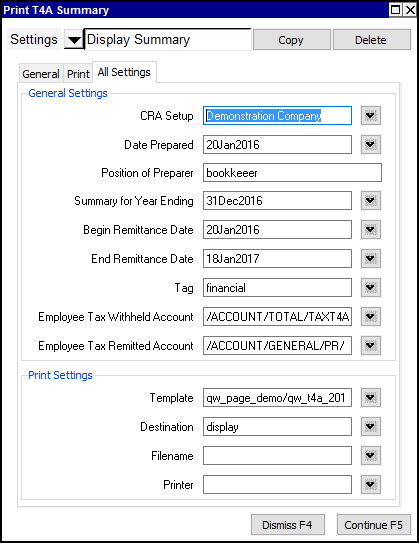
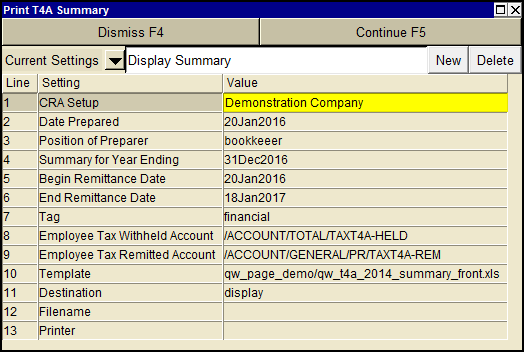
| Print T4A Summary | |||
| Line | Field | Value | |
| 1 | CRA Setup | Select the appropriate settings from the CRA Setup. | |
| 2 | Date prepared | Enter the date that the T4A summary is being prepared. | |
| 3 | Position of preparer | Enter the position of the preparer to be printed on the T4A summary. | |
| 4 | Summary for year ending | Enter the year end date for which you are filing the return. | |
| 5 | Begin remittance date | Enter the date of the first withholding remittance made to the government. The date entered must include the first remittance of all deductions and contributions for the year in which the T4A summary is being generated. For example, if payroll withholding and contributions for each month during 2007 were remitted on the 15th of the following month, the date would be set to Jan 20, 2007 | |
| 6 | End remittance date | Enter the date of the last withholding remittance made to the government. The date entered must include the last remittance of all deductions and contributions for the year in which the T4A summary is being generated. For example, if payroll withholding and contributions for each month during 2007 were remitted on the 15th of the following month, the date would be set to Jan 19, 2008 | |
| 7, 8 | Employee Tax Withheld/Remitted Accounts | The Withheld account is the credit normal balance account that the employee tax deduction account totals to. The Remitted account is the debit normal balance account used to record the amounts remitted for Tax. | |
| 9 | Template | The template to be used to print the T4A summary. Press <F3> to select the template from an explorer (double click to select). | |
| 10 | Destination | display file printer file_xml | display - exports to Excel and opens Excel for a preview. file - sends output to the file specified in Filename. printer - sends output to the printer identified by Printer. file_xml - sends output to an xml file for transmittal to Revenue Canada. |
| 11 | Filename | The output file name. The file type must be {".xls"}, {".xlt"} or {".pdf"}. Important see note on Output File Names options. | |
| 12 | Printer | If Destination is printer then output is sent to the printer specified here. If this field is empty then output will be sent to the Windows default printer. Press <F3> to select from a list of available printers. NOTE: To clear the Printer field Press <F3> to select from the list of printers, and click on <Cancel> | |