NewViews has the following command line options that can specified when NewViews is run from a Command Prompt window. They can also be specified in a Window shortcut as shown in the figure below:
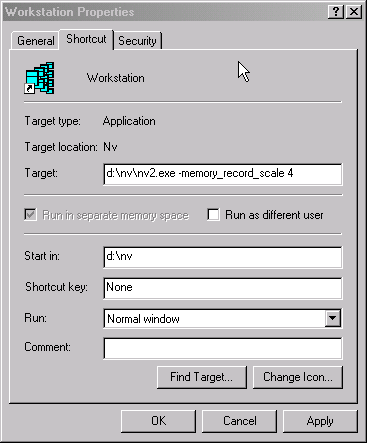
You can add options when running NewViews from a command line but more often NewViews or its utilities are launched from the Windows start menu. To add an option to a Windows start menu item, right-click on the desired Windows start menu item, say one that launches NewViews or database utilities, and select Properties. Select the Shortcut notes tab and then add the option to the contents of its Target: field.
The command line options are:
-server
Runs NewViews as a server.
-multi_port
If -multi_port is specified at the time a new server database is being created, more windows are displayed and you have complete control over the ports used to offer databases to remote users. See screen below.
-file {workstation file}
Runs NewViews using the workstation specified by workstation file instead of using the default workstation file.
By default, i.e. when -file is not specified, NewViews opens workstation.nv2, found in the installation folder.
Note, when -server is also specified then NewViews opens the server in the specified path. By default, i.e. when -server is specified but -file is not, NewViews opens server.nv2, found in the installation folder.
-about
If -about is specified, NewViews displays help information similar to the Help>About command. This is useful for quickly determining the program version, serial number, and various system and environment information, without the need to open a workstation or server.
-script {scriptpath}
Instead of opening a workstation or server, NewViews runs the script specified by scriptpath.
This allows NewViews to be run like a wish shell, a term familiar to Tcl/Tk programmers, The full NewViews library available to any script run in this manner.
-register
If -register is specified then the registration window is displayed. This allows you to register NewViews or view your registration status if already registered.
-create
Creates a new workstation, or a new server if -server is specified. If -file is also specified, the workstation or server is created in the file following -file. Otherwise workstation.nv2 or server.nv2 is created in the NewViews installation folder. If the database already exists, it is replaced by the new database.
Note, -create is used only to create a workstation or server database. To create an application database just specify a file path of a non-existing database in a workstation login row. You are asked if you want to create a new database as the specified file.
-template_print_speedup
Runs NewViews with the fast print code introduced in version 2.20 service pack 1.
By default, i.e. when -template_print_speedup is not specified, NewViews runs with the original print code which can run slowly with Microsoft Excel® 2007 (version 12) or 2010 (version 14).
The fast print code is a work in progress, if your templates are not behaving as predicted, try running NewViews without the speedup.
-memory_record_scale SCALE_FACTOR
NewViews has a command line option that lets you increase the amount of memory that NewViews will use. The purpose is to make NewViews run faster. Generally, you only want to increase memory above normal defaults for long-running operations that you want to speed up, such as several database utilities operations, or importing from NV1.
The option is followed by a scale factor that multiplies the amount of memory used by the internal record cache. Suppose you run NewViews from a command line as follows:
d:\nv>nv2 -memory_record_scale 2
This will double the number of records cached by the underlying internal indexed file system cache.
Caution is advised when adjusting memory consumption and some trial and error may be necessary depending on the operation performed and the size of memory available on your computer system. Here are some guidelines:
Scale factors that are too large may result in errors.
A scale factor that is too large will exhaust underlying operating system resources (despite the virtual memory system) and result in corresponding error messages followed by NewViews shutdown.
A rough guideline is never to use scale factors greater than 2 on systems with system 1 gigabyte of memory, and do not exceed 8 regardless of memory available.
Only increase memory when you are running NewViews alone.
If you are running other programs on the computer that is running NewViews, then increasing memory consumed by NewViews might not do any good. NewViews and the other programs could start to compete for the available memory and thrashing could occur as Windows switches between processes, defeating the purpose of the option. So you typically want to increase memory when you are dedicating a computer to a long-duration NewViews task such as an the database utilities reorganize_database operation and you have few, if any, other applications running on the same computer.
Some trial and error may be necessary.
It is difficult to predict the performance improvement because it is dependent on the organization of data and will vary from database to database. It is also dependent on the operation being performed. Basic performance testing suggests that you may achieve performance improvements of between 2 to 6 times faster.