This chapter is an introduction and over view of payroll in NewViews with links to the main section in the manual.
Payroll - a list of employees receiving wages, with mandatory government deductions and tracking the withheld, accrued and liability amounts to all involved.
Sounds simple, well it can be with NewViews.
An employee's net pay check is equal to the employees’ wages less mandatory government deductions. The employer in most cases must match a portion of the deductions and remit the withheld and employer portions on a regular schedule to the government. Below is a simplified table that shows the employee and employer portions of a $750.00 paycheck.
| Payroll - who pays for what ? | |||||
| Category | Comments | employeE contributes | employeE amount | employeR contributes | employeR amount |
| EARNINGS | |||||
| Wages | Including, salaries, commissions and other remuneration. | no | | yes | 960.00 |
| Statutory holidays | Including Vacation Pay, etc | no | | yes | 40.00 |
| Total Earnings | 1,000.00 | ||||
| DEDUCTIONS | |||||
| RPP / 401K | Pension plan deductions | yes | 80.00 | optional | 80.00 |
| CPP / FICA | mandatory pension and social security tax | yes | 50.00 | yes | 50.00 |
| EI (Canada only) | mandatory (un)employment tax | yes | 20.00 | yes | 28.00 |
| Tax | mandatory payroll tax | yes | 100.00 | no | |
| Total Deductions | | 250.00 | | 158.00 | |
| OTHER | |||||
| FUTA (US only) | unemployment tax | no | | yes | 25.00 |
| ETT / SUI/ SDI / WCB | Disability / Training / Workers Compensation levy | no | | yes | 25.00 |
| Total Other | | | | 50.00 | |
| EmployeE NET Check | | 750.00 | | | |
| Total EmployeR Cost | | | | 1,208.00 | |
So what does it take to handle all the above portions accurately, simply and automatically. Well it is all fully integrated into NewViews, here is what we need to do the job.
NewViews payroll contains both Canadian and U.S.A. payroll. Both can be used in the same set of books. Below is a summarized overview of how payroll works in NewViews. For the full details of payroll Click Here.
NewViews has two basic types of employees, standard and timecard or job-costing.
See Employees - Canada for more.
See Employees - US for more.
An employee has a collection of accounts.
There are two preset employee profiles that can be used to setup new accounts for an employee.
While positioned on an employee's account table, issue
Block>Paste>Current Settings and select either the
Sample - non timecard or Sample - timecard profile.
See Block copy/Paste for more.
There is no limit to the number of earnings or deduction categories per employee.
Employees do not need to fit one mold.
Some employees may have one earnings account, others may require a dozen earning accounts.
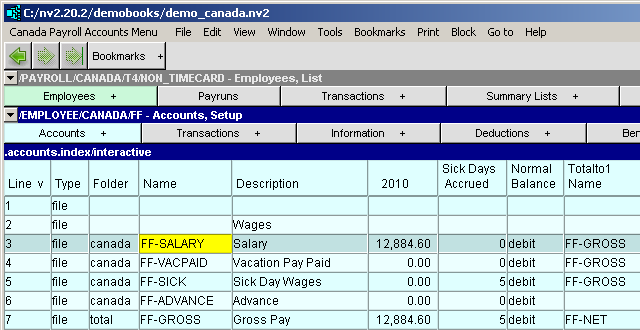
See Employee accounts - Canada for more.
See Employee accounts - US for more.
Salaried employees do not require input or adjustment on a weekly/bi-weekly basis. For all hourly (non timecard) employees there is the PAYLIST table. It is used on a weekly/bi-weekly basis to enter all the regular, overtime, statutory, holiday, etc. hours per employee.
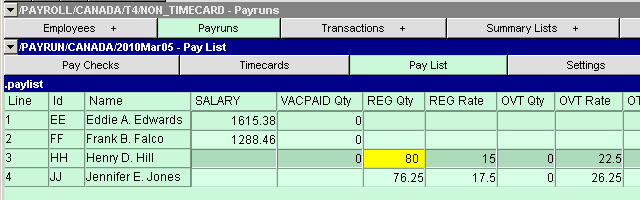
See Input of hours/wages - Canada for more.
See Input of hours/wages - US for more.
Once all the hours and/or timecards have been entered, it is time to process the payroll. A preview window displays a preview of each payroll check for each employee. Once the pay checks have been posted, block all the checks and print them. You can also run a custom payroll report that lists all employees, all checks and all deductions.
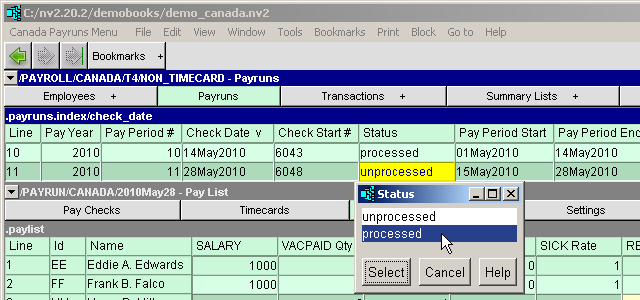
See Processing of hours - Canada for more.
See Processing of hours - US for more.
On a regular basis, monthly or quarterly the organization is required to remit the withholdings to the government and non-government agencies. A withholdings report list the amounts due and the menu command Tools>Pay Withholdings available in the title-bar of a payroll window.
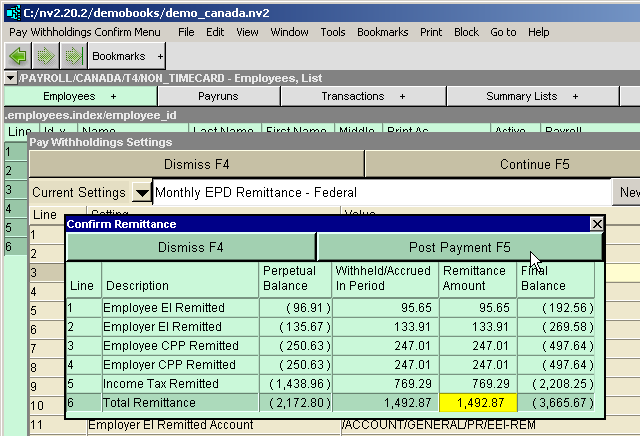
See A withholding report - Canada for more.
See A withholding report - US for more.