Running the NewViews Workstation
NewViews can be run as a workstation or as a server.
Information on running NewViews as a server for a multi-user installation can be found in the section
The NewViews Server in the NewViews manual.
You run NewViews as a workstation to access one or more sets of books.
-
In a stand-alone, single user installation, books are stored on the local hard drive,
or a peripheral storage device that is connected to that computer.
-
In a multi-user installation, books can be stored on the local hard drive/peripheral
storage device (local access), or on any computer on which the NewViews server has
been installed (remote access).
Any number of sets of books can be open simultaneously, even with a single user installation.
In a multi-user installation, any combination of local and remote sets of books can be open
at the same time.
To run NewViews as a Workstation:
-
On your Windows desktop, choose Start>Programs>NewViews 2.0>Workstation.
-
If a password has not been set for the workstation, the following banner appears.
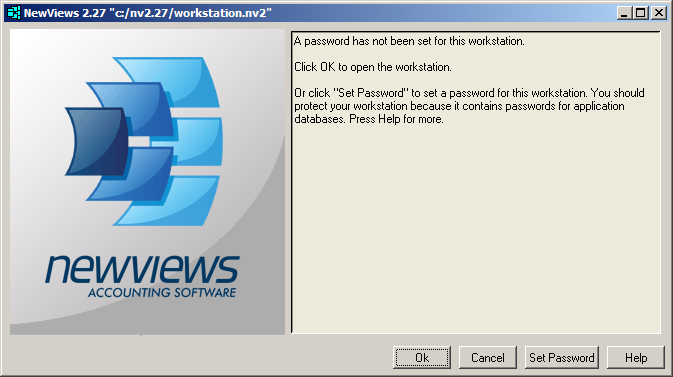
Click <Set Password> to set a password for the workstation.
You will be prompted to enter and verify the password you choose.
Click <OK> when you are done.
Setting a password helps to protect unauthorized access to the workstation and is
strongly recommended.
You also have the option of changing the password. NOTE: You must know the current
workstation password in order to change it.
-
If the workstation already has a password, you will be prompted to enter it.
Click <OK> when you are done.
-
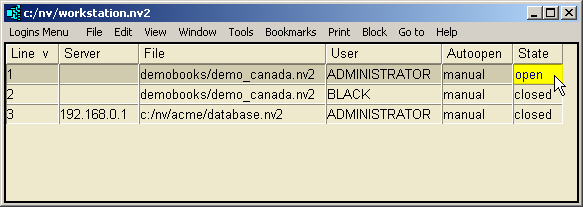
The workstation login table is displayed.
Copyright (c) 2003-2026 Q.W.Page Associates Inc., All Rights Reserved.