Setting an Administrator Password for the Books
Each set of books can have any number of users, including an Administrator.
Each user can, and should, have a password.
Once a password has been set for a user, they cannot open the books without supplying the appropriate password.
Generally, only the Administrator can add or change passwords for users.
To set the Administrator password:
-
Open the books as the Administrator
(i.e. ADMINISTRATOR should be specified in the User field in the NewViews Workstation login table).
-
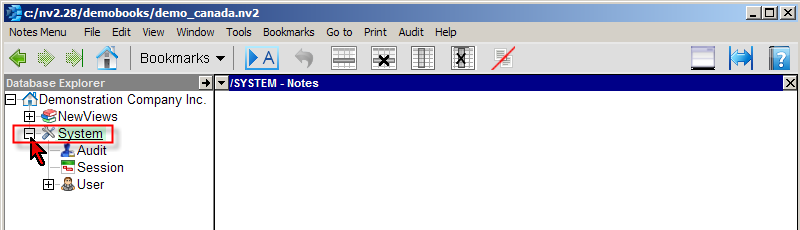
Using the Database Explorer in the window on the left, expand the System folder by clicking the +.
-
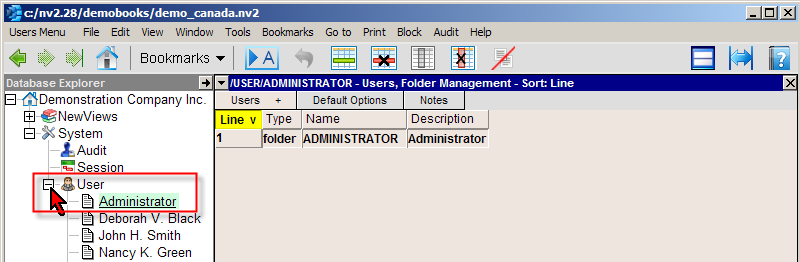
At least one user, Administrator, should be displayed directly beneath the User folder. If no users are displayed, expand the User folder by clicking the +. Click on Administrator.
-
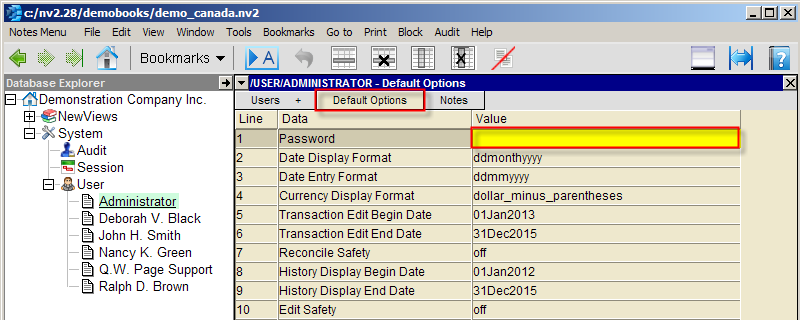
Click the Default Options tab at the top of the window on the right.
-
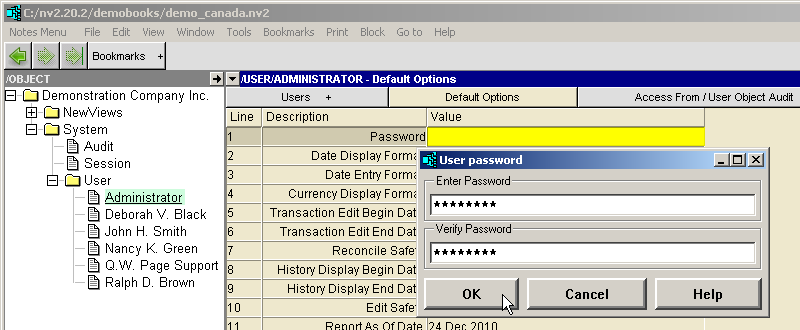
Position on the Password field and press <F3>. Enter the password in the Enter Password box, then again in the Verify Password box.
When you are done, click <OK>.
-
When prompted, click <Set Password>.
For information on setting other user options, see Setting User Options.
For information on adding users, see Adding a New User.
Copyright (c) 2003-2026 Q.W.Page Associates Inc., All Rights Reserved.