Report arithmetic in a set of books is also known as the totalto structure, and refers to the way amounts are totaled on reports. The reporting structure in a set of books is controlled using the Totalto and Normal Balance fields of accounts.
An account can total to another account on the same report, or to an account on any other report. The ability to total an account on one report to an account on another report is the foundation of integration in NV2.
For instance, you use a Totalto field to link the change to retained earnings account on the income statement to the retained earnings account on the balance sheet. You also use Totalto fields to link total amounts on subsidiary ledgers and schedules to controlling accounts on the trial balance.
When changes are made to an account (i.e. transactions are added, modified or deleted), these changes are not only reflected in the balance of the account that had been changed, but also in the balance of all accounts to which that account is totalled. This is called the rippling effect. If those accounts, in turn, total to other accounts, the changes ripple onward until they reach an account that doesn't total to any other account (i.e. its Totalto fields are blank). In this way, every account and every report in a NewViews set of books is instantly and automatically updated in real-time.
When an account totals to another account that has the same normal balance, the amount is added. When the normal balances differ, the amount is subtracted.
In most sets of books, the report arithmetic conforms to the general structure shown below:
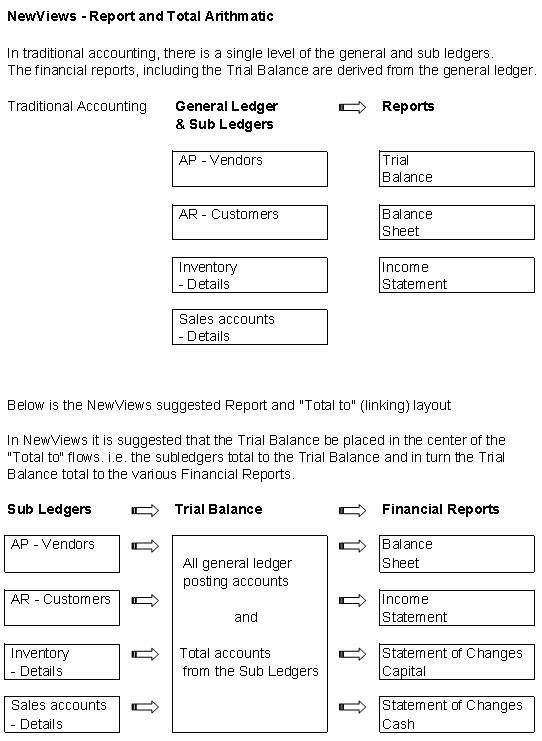
An account that does not have any other accounts totaling to it is considered a posting account. In a typical set of books set up with NewViews, most of the posting accounts are found on subsidiary ledgers (e.g. individual vendor and customers’ accounts on the AP and AR subsidiary ledgers), as well as on the general ledger/trial balance. Transactions may only be added to posting accounts.
When an account has any one or more accounts totaling to it, it is considered a total account. In a NewViews set of books, most of the accounts on the financial statements (e.g. the balance sheet and income statement) are total accounts.
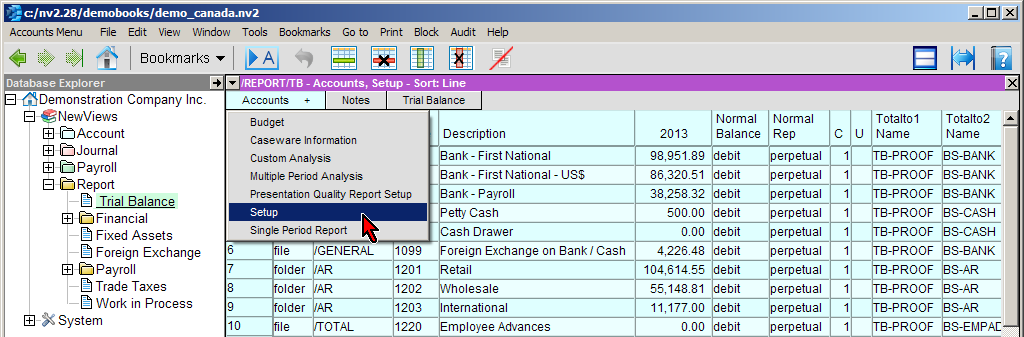
Each individual account can total to up to four other accounts. Totalto fields for accounts are filled in (or edited) on the Setup view of reports.
The example below shows the totaltos for two bank accounts on the setup view of the Trial Balance.
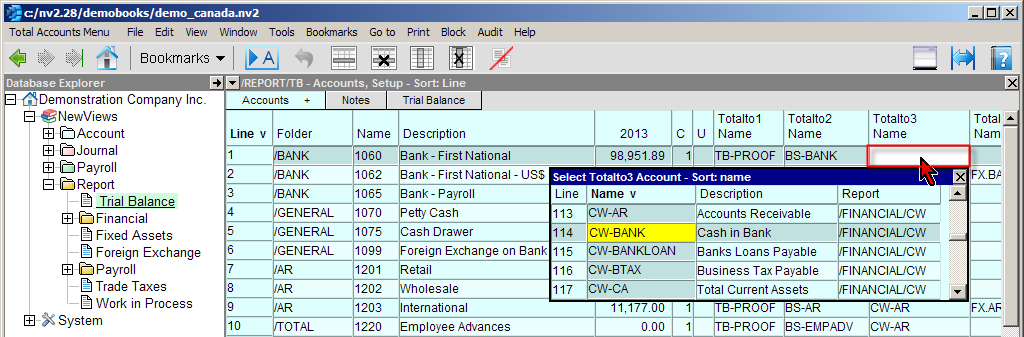
Line 1, account 1060 has two totaltos; TB-PROOF (an account on the same report, i.e. the trial balance), BS-BANK (an account on the balance sheet).
Line 2, account 1062 has three totaltos; TB-PROOF (an account on the same report, i.e. the trial balance), BS-BANK (an account on the balance sheet),
FX.BANK (an account on another financial statement).

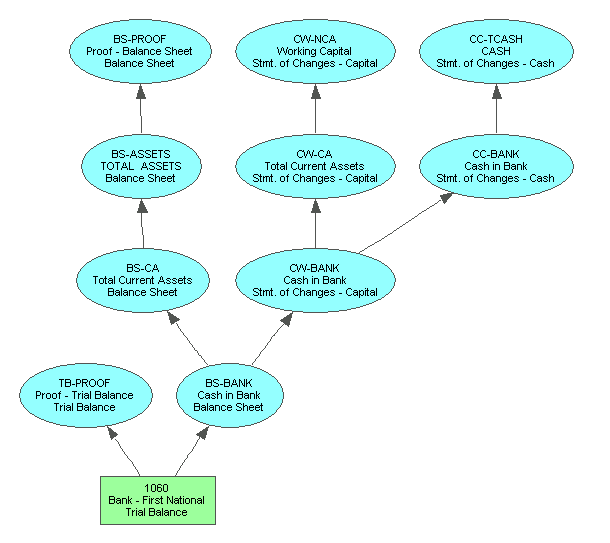
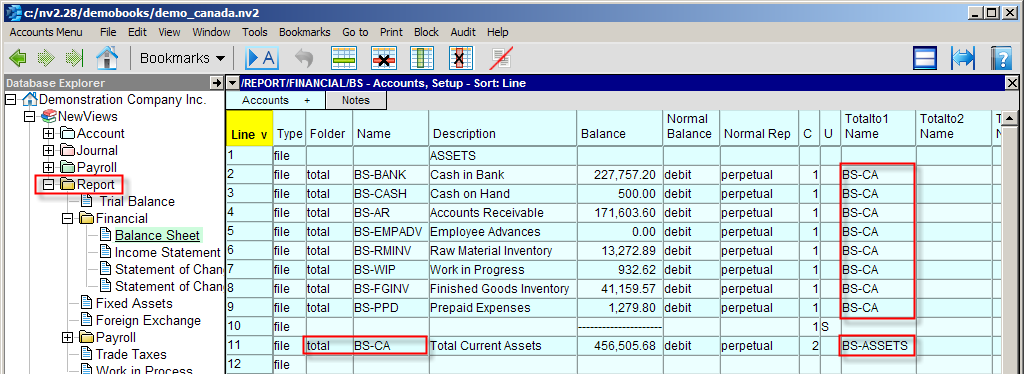
Below is an example of report arithmetic which shows the totaltos on the setup view of the balance sheet. Each current asset account totals to BS-CA, the total current assets account on the same report. The BS-CA account totals to account BS-ASSETS, which is the total assets account on the balance sheet.
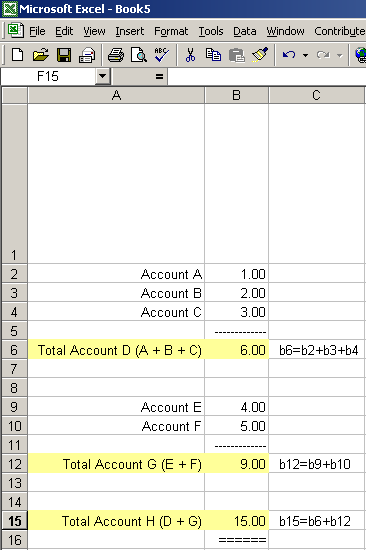
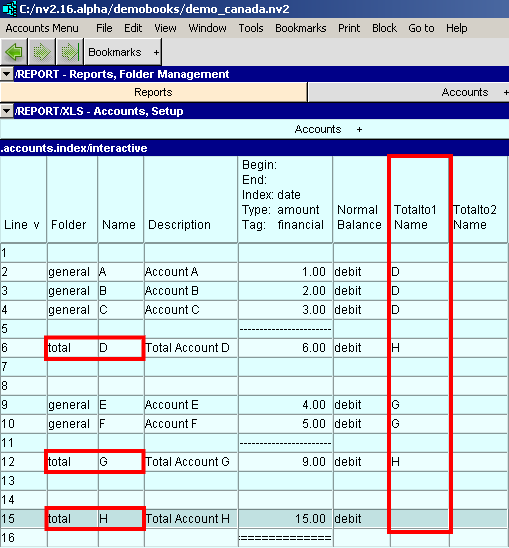
Another way to think about report arithmetic is by using a spreadsheet analogy. Shown below is an Excel spreadsheet with two groups of accounts and three formulas. In NewViews you use the totalto structure to accomplish the same results.
| | |
| Totalto Structure | |||
| Line | Excel | NewViews | Comments |
| 2 | value | general account | Accounts A B and C totalto fields are set to account D |
| 3 | value | general account | |
| 4 | value | general account | |
| 6 | formula | total account | Account D's totalto field is set to account H |
| 9 | value | general account | Accounts E and F totalto fields are set to account G |
| 10 | value | general account | |
| 12 | formula | total account | Account G's totalto field is set to account H |
| 15 | formula | total account | Account H's totalto's are blank |
When you add accounts to reports, you do not have to fill in their Totalto fields right away. You can add all your accounts first, then fill in the Totalto fields later to set up your report arithmetic. In fact, report arithmetic can be changed at any time by editing the account names in Totalto fields. When the report arithmetic is changed, all accounts that are impacted by the rippling effect will be adjusted automatically.
For more information on report arithmetic, see Totalto Structure.
When you convert a set of NV1 books to NV2, the report arithmetic is automatically preserved. You can still, however, make any required adjustments at any time as described below.
In a set of books based on a Starter Template, the report arithmetic has already been set up for you. If you change that names of any accounts to meet your own naming conventions, NewViews will change these account names wherever they appear in the books, including in the Totalto columns on reports. In this way, the integrity of the report arithmetic will be preserved.
However, it is likely that you will want to add new accounts to existing reports, or new reports with any number of new accounts. In these cases, you will need to set up the report arithmetic for the new accounts, and possibly change the report arithmetic that is in place for existing accounts in order to adjust the flow of rippling.
For information on changing account names and adding new accounts, see Adding Accounts.
For information on adding new reports, see Adding Reports.
Before setting up the report arithmetic for an Empty set of books based, you should do the following: