NewViews can now produce presentation quality reports. A new account table view can be installed to control the creation of HTML documents. A new Print>Presentation Quality menu command will output reports to an HTML file, and optionally launch your default browser to view and/or print the result.
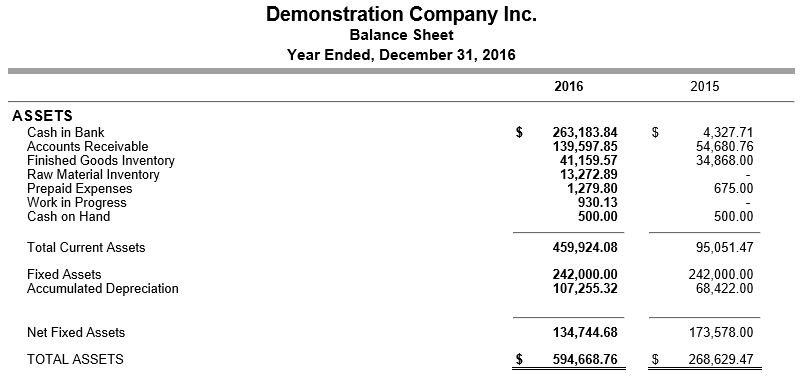
See Presentation Quality Reports for more.
See Canadian Federal & Provincial Constants for more.
See USA Federal & State Constants for more.
Payroll Report can now print paychecks with freeform check stubs.
The Print>Payroll Report prompt now lets you specify paycheck in the Detail Level field. This, together with new templates (provided), allows you to print paychecks with complex, freeform check stubs. It can also be used to print or email EFT payment detail advisory slips.
See Custom Payroll Reports - Paychecks for more.
Caseware Export can be used to export data to the Caseware Working Papers program.
See Caseware Export for more.
During the installation of NewViews, the TeamViewer program is now installed automatically, and added to the Start menu.
The TeamViewer program enables Q.W.Page customer support personnel, supervised by you, to "drive" your computer remotely, while you watch and discuss problems so they can be diagnosed and resolved efficiently. Note that support personnel CANNOT access your computer remotely unless you initiate a TeamViewer session at your end and provide them with a TeamViewer "ID" identification no. The connection lasts only as long as you wish, and when terminated your computer cannot be accessed by Q.W. Page. It is safe and secure.
A backup reminder days field has been added to each user's options to control the backup reminder period. For example, changing the backup days to 7 would bring up a reminder if the database had not been backed up for a week. Changing the value to zero disables the backup reminder; it can be turned back on by changing it to a non-zero value. In addition, for convenience, you can now change the backup reminder days in the reminder dialog window.
See Backing Up for more.
Microsoft Excel .xlsx and .xltx files can now be selected everywhere as printing template files.
Microsoft Word .docx files can now be selected everywhere as mailmerge template files.
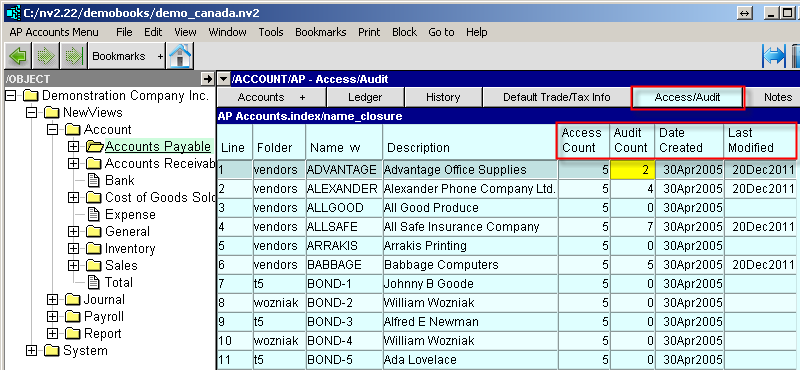
Four new columns have been added to all Access/Audit tables:
Access Count - the number of users with access to the object.
Audit Count - the number of audit records for the object.
Date Created
Last Modified
These columns show information that is already available in the detail window pane, but they bring the information out of the "cracks" and make it easier to see things at a glance.
When switching from one general journal to another, the transaction window tab selected does not change.
There are two window tabs for the two ways to view/use general journal transactions. The default behavior used to automatically activate the Transactions window tab (when a "leaf" journal was selected). This was extremely annoying when you were working in the NV1 Style Transactions window tab because switching from journal to journal also required a reselect of the NV1 Style Transactions window tab.
<Ctrl+A> now selects all items.
The following issues have been addressed:
Printing to display with an invalid printer selected caused an error.
The Workstation File menu displayed Close twice.
Double clicking a workstation table row, when the table is sorted in reverse order, now opens the correct set of books.
Underlines on the ledger and transaction view menus have been corrected.
The option to skip zero balance accounts when printing account ledgers now works correctly.
Selections that were not working as blocks in some places has been fixed.
Print>Account Ledgers will now skip "no item" TOTAL accounts, if so directed.
A timing bug in a block paste preview involving deleted data has been fixed.