NewViews can display an aged receivable list for a prior period (i.e. the status of aged receivables several months ago). The same applies to an aged payable list.
Accountants or auditors often ask for aged payables and aged receivables reports as they appeared at the end of the prior fiscal year, usually several months after the year has ended. Typically, many invoices have been paid in the time since year-end, so if you forgot to create aged reports at the end of the prior year, you will not be able to provide this information.
NewViews can "unravel" what's happened since the last year-end (or any past date), and provide the aging reports as they would have appeared if printed in the past. A Historic Aging view can be installed for any table of accounts for which you maintain open/closed views (i.e. reconcile items as they are paid). It will likely be most useful for Accounts Payable and Accounts Receivable, but it can also be used in other circumstances (e.g. Work in Progress, etc.).
Note: The Historic Aging View will only work properly if unique values are used to reconcile payments with the items being paid. For example, if R is always entered in the Reconcile field, NewViews will not be able to determine which payment was reconciled with which invoice as at a specific date. Ideally, a date (e.g. in the format YYYYMMDD) or some other incrementing value should be used to reconcile payments with invoices.
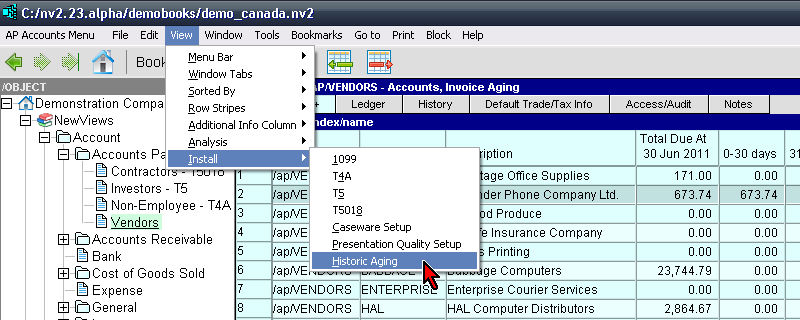
The command View>Install>Historic Aging can be issued on any table of accounts, and it will install a view with columns for aging transactions that were open as at the date set on the User's Option Report as of Date. Postings that were closed between the Report as of Date and "now" are considered open for the purpose of this view.
The historic aging view has two total columns. The Balance At (date) column is displaying the ledger view. The Total Open At (date) column is displaying the open view. The two amounts (ledger / open) must be identical, if not then an invoice or payment is not reconciled properly.
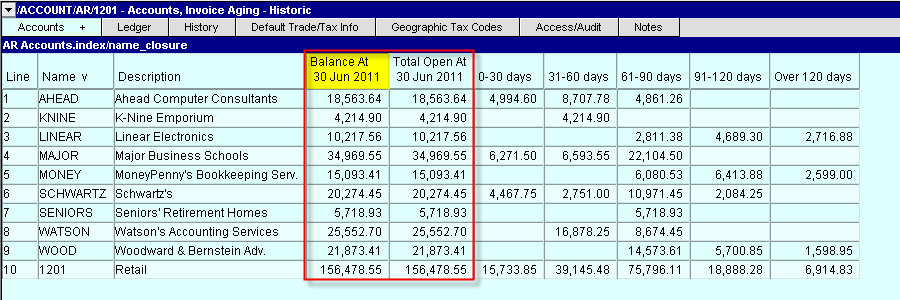
The Aging columns values are calculated, there are no detail views for the individual aged amounts. To get more information use the Print>Account Ledgers>Advanced command to generate an aging report.