Position on the Accounts Receivable aging report.
Block the accounts you wish to include on the report.
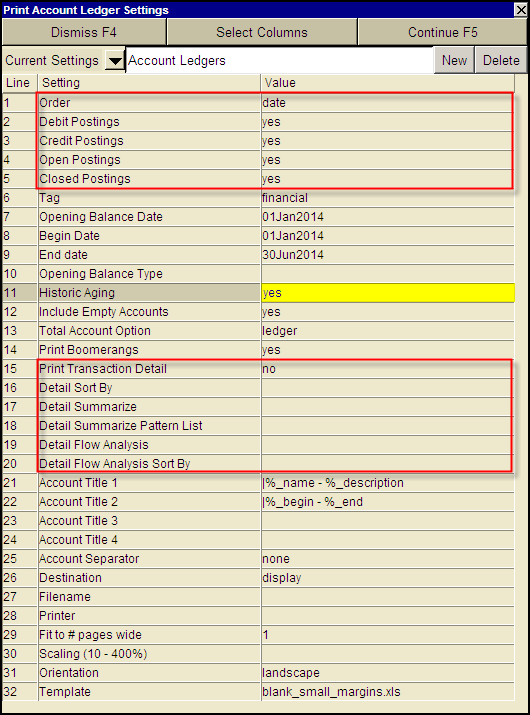
Use the Print>Account Ledgers>Advanced command with the following settings.
NewViews can print an aged receivable list for a prior period (i.e. what were aged receivables several months ago). The same applies to an aged payable list.
This is a generated report using Print Account Ledgers.
Position on the Accounts Receivable aging report.
Block the accounts you wish to include on the report.
Use the Print>Account Ledgers>Advanced command with the following settings.
| Print Account Ledger Settings - Historic Aging Report | |||
| Line | Field | Values | Comments |
| 1 | Order | date | The postings are printed in this order. Only date order is allowed in this version. |
| 2 | Debit Postings | yes | yes - debit postings are printed. |
| 3 | Credit Postings | yes | yes - credit postings are printed. |
| 4 | Open Postings | yes | yes - open (unreconciled) postings are printed. |
| 5 | Closed Postings | yes | yes - closed (reconciled) postings are printed. |
| 6 | Tag | financial | specified - only postings with the specified partition tag are printed. financial, order, and budget are built-in tags but you can add custom tags as well. |
| 7 | Opening Balance Date | | The opening amount balance is the value of the running balance of the day prior to this date. i.e. when the date is set to Jan 01, 2010 we return the running balance value from Dec 31, 2009 |
| 8 | Begin Date | | Only postings dated on or after the begin date are printed. See Setting Begin and End Dates |
| 9 | End Date | | Only postings dated on or before the end date are printed. See Setting Begin and End Dates |
| 10 | Opening Balance | zero open closed ledger all_closed | If you are in the open view and select all_closed. The running amount total column will include the sum of all reconciled items. If you select zero, the running amount total column will only include the sum of all unreconciled items. See Ledger/Posting Table Views - Opening Balance for more. |
| 11 | Historic Aging | yes no | yes - to print an aged analysis report as at the End Date set in line 9. |
| 12 | Include Empty Accounts | yes no | yes - any account for which no postings match the selection criteria, is simply skipped. no - prints accounts (headers only) even when there are no postings. |
| 13 | Total Account Option | ledger breakdown | ledger - total account ledgers are printed. No attempt is made to print the sub-tree that totals to any total account. breakdown - total accounts are not printed but instead each posting account in the sub-tree that ultimately totals to it is printed. |
| 14 | Print Transaction Details | no yes | no - only the ledger level is printed, detail lines are skipped. |
| 15 - 28 | See Print Account Ledger for details on the remaining field options. | ||
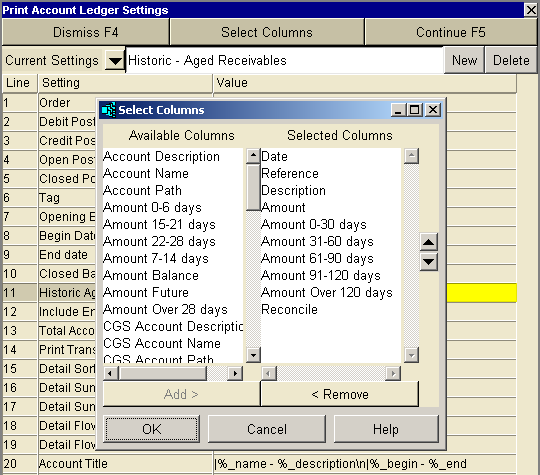
As with all Print Account Ledger reports, there are many optional columns to print. We recommend the minimal inclusion of the 10 columns displayed below.
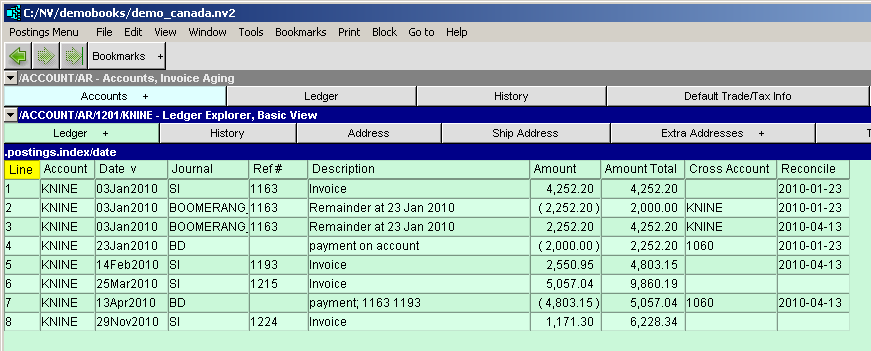
The customer ledger below shows a payment made on April 13, 2010 for invoices in January and February. Both the April payment and invoices are reconciled. The ledger shows one March and one November invoice not paid (unreconciled).
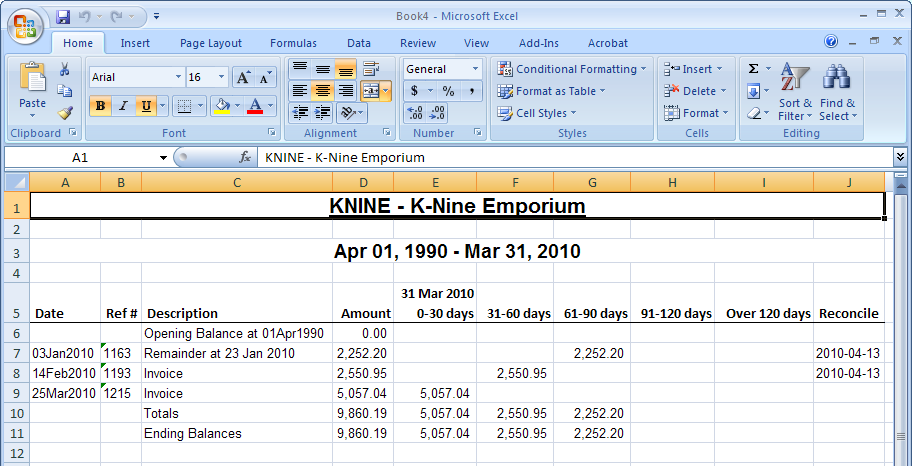
With Historic Aging set to yes and the dates as shown above, a Historic Aging report can be printed. The report will show the ledger as if time was rolled back to the date set in the printing prompt, March 31, 2010.
Below is the aging report with the invoices not paid as at March 31, 2010 aged as at the same date. If an invoice was paid (reconciled) beyond March 31, 2010 at the time of the report, the reconcile will display the reconcile value.