Data can be imported from Excel .CSV files.
Example 1.
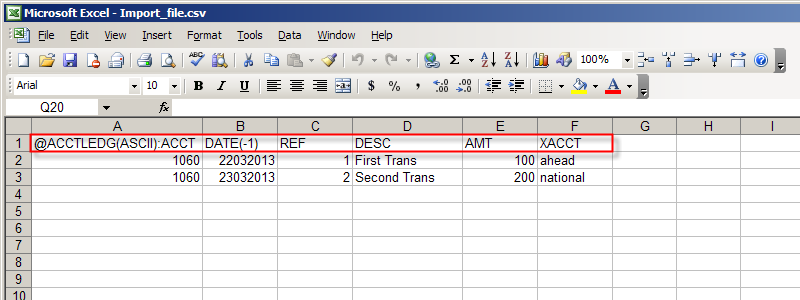
An import file with two simple transactions.
The transaction is imported into a general journal called "IMPORT_RECORDS".
Both transactions are debiting account "1060", and crediting accounts "ahead" and "national" respectively.
Example 2.
An import file with a single complex transaction.
The transaction has one credit posting and multiple debit postings.
The transaction is imported into a general journal called "GJ".
This is an "Credit" entry posted to account "2110".
The Expense Accounts are "6200", "6420", "6425", "6430", "6435", etc.
The transaction date is June 3o, 2014.
The Amounts are 16,000, 1,800, 1400, 930, 2500, etc.
The Amount of the "2110" posting is the sum of values in column "F".

Example 3.
An import file with a single sided budget transactions.
This entry has a posting to the budget_balance account.
The budget_balance account is a place holder to allow for one sided budget entries.
The transaction is imported into a general journal called "budget".
These are one sided entries, the Debit account is "budget_balance".
The Expense Accounts are called "6640", "6660" and "6690".
The Budget Entry date is Dec 31, 2013.
The Amounts are 8,000, 10,000 and 20,000 respectively.

Example 4.
An import file that will create new accounts.
The new accounts shown below are created on the "AR" report and are of type "AR"
There are 6 new "AR" accounts with the names c101, c102, c103, etc...
with the descriptions, Customer 101, Customer 102, Customer 103, etc...
The normal balance of all accounts is debit, no Totalto(s) are specified.
Note: the UL (underline) column is not blank, it contains a "space" character.

Example 5.
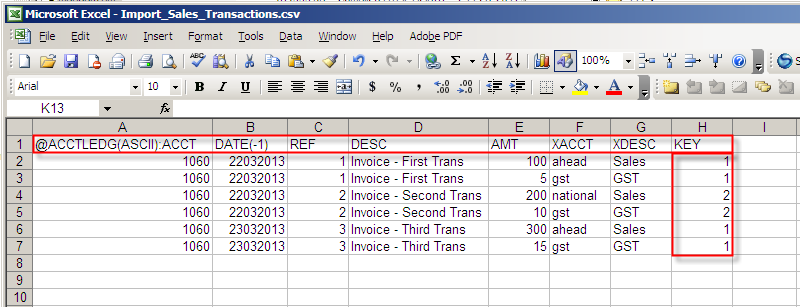
An import file with three complex sales transactions.
These are three invoices with GST.
The field "KEY" at the end of the record is evaluated from one transaction to the next as well.
If the value of the KEY field changes, then a new transaction is started even if the first four
fields are the same as the prior record. The KEY field can have any alphanumeric values you want,
only a change in the value from one record to the next is significant.
The five example files shown are part of the NewViews install. The files are located in the misc folder. The folder misc is created as a sub-folder of the installation folder. (misc contains keyboard templates and excel import samples for use with NV2).