A common Accounts Payable task is add interest on one or more liability accounts
(i.e. accounts with deposits).
-
Position on any table of accounts (blue).
This can be anywhere accounts appear as rows of a (blue) table, including reports.
-
Either position on the account you want to add interest for or else mark a block of accounts.
If no block is marked then the current account is processed.
If you want to explicitly select a number of accounts to be processed then
use the Block>Start and Block>End commands
to mark the accounts in a block.
Note: total accounts and branch folders will be skipped.
-
Issue the Tools>Charge Interest>Balance command.
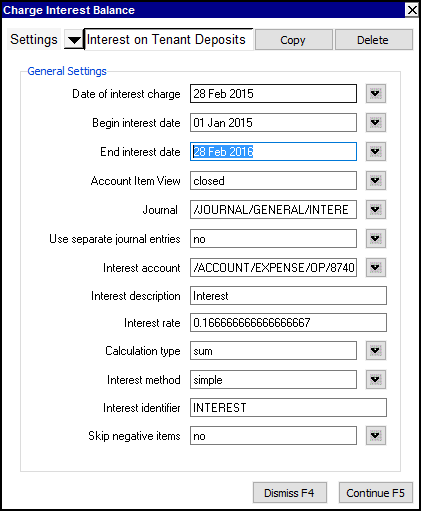
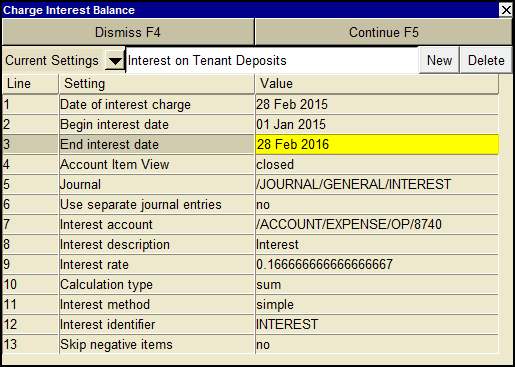
A charge interest balance settings window will appear such as that shown below.
The Account Item View is set to closed.
It is recommended to reconcile only the deposit posting(s) to ensure interest is only
calculated on those amounts.
The sample below is to calculate at 2% per year, row 9 shows an interest rate of
(2% divided by 12 month =) 0.166666666667.
Calculation type is set to sum.
Interest method is set to simple.
Skip negative items is set to no.
-
Fill in the settings fields.
The meaning of each setting is described later in this section.
-
Click the <Continue> button or press <F5> to charge interest on the account's running balance.
When <Continue> is clicked, transactions are created to record the interest.
Line
| Field
| Values
| Comments
|
1
| Date of interest charge
|
| Interest transactions created, if any, will have this date.
|
2
| Begin interest date
|
| Ledger items dated on or after this date (and on or before the end date) are processed.
|
3
| End interest date
|
| Ledger items dated on or before this date (and on or after the begin date) are processed.
|
4
| Account Item View
| ledger
debit
credit
open
closed
| closed in recommended, reconcile the actual deposit posting(s) to ensure interest is only calculated on those amounts.
|
5
| Journal
|
| The journal used for interest charge transactions.
|
6
| Use separate journal entries
| yes
no
| yes will create a separate transaction for each account.
no will create a single transaction with a distribution detail item for each account.
|
7
| Interest account
|
| The name of the account to balance the interest charge transaction (e.g. for Accounts Receivable an Interest revenue such as "Charged on Overdue Accounts").
|
8
| Interest description
|
| The value to put in the interest charge transaction description.
|
9
| Interest rate
|
| If the Calculation type is set to sum, then the interest amount is calculated by multiplying the sum by the rate entered.
If the Calculation type is set to daily, then the interest amount is calculated by converting the annual rate entered to a daily rate and multiplying the ledger running balance by this daily rate. The total interest charged is the sum of all the daily rates.
|
10
| Calculation type
| sum
daily
| If the Calculation type is set to sum, then the interest amount calculated will be determined by multiplying the sum of items in the date range by the interest rate.
If the Calculation type is set to daily, then the interest amount is the daily rate applied to the account balance for each date in the range.
|
11
| Interest method
| simple
compound
| Only applicable if the Calculation type is set to sum.
simple will not include other interest charges in the sum.
compound will include other interest charges in the sum.
|
12
| Interest identifier
|
| Only applicable if the Calculation type is set to sum.
This is a keyword which is used to identify prior interest charges. If this keyword is found in a transaction's description (case insensitive), then the transaction is known to be a prior interest charge.
|
13
| Skip negative items
| yes
no
| Only applicable if the Calculation type is set to sum.
yes will ignore negative items posted to the account.
|