To view/edit default trade tax settings for Sales Journals:
Click NewViews/Journal/Sales in the NV2 Database Explorer.
Use the window tab Default Trade/Tax Info or window list button at the left of the title bar that reads /JOURNAL/SALES to select the Default Trade/Tax Info window.
Make any necessary changes to the settings to suit the majority of sales.
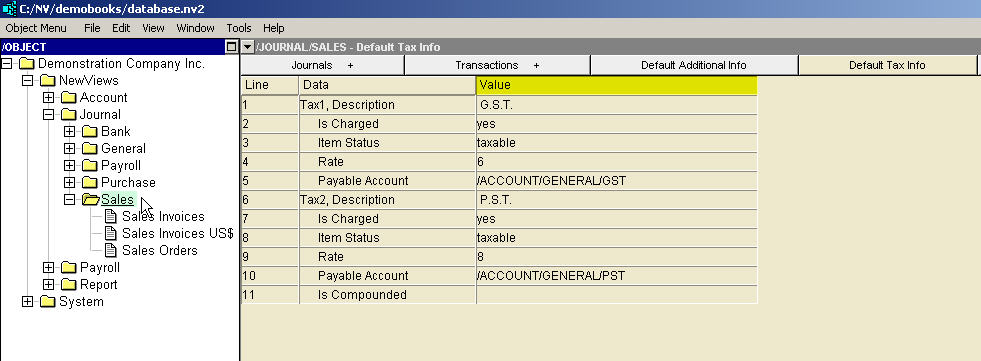
See Trade Tax Information for current rates.
| Sales Journal Trade/Tax Information | |||
| | Line | Field | Description |
| Tax 1,2 | 1,6 | Description | This field describes the tax and the value entered here is displayed in the sales invoice column title for the tax. The default titles are "Tax 1" and "Tax 2" but in this example the invoice column titles will display "G.S.T." and "P.S.T." for Tax1 and Tax2. |
| 2,7 | Is Charged | yes - the tax will be charged. no - the tax will not be charged. empty - the tax will not be charged. The Is Charged setting on the journal can be overridden by any or all customer accounts. | |
| 3,8 | Item Status | taxable - the tax will be charged. exempt - the tax will not be charged. empty - the tax will not be charged. The Item Status setting on the journal can be overridden by any or all product sales accounts. | |
| 4,9 | Rate | The tax, if charged, will be charged at this rate, i.e. six percent for GST and eight percent for PST in this example. The Rate setting can be overridden by the product sales account. See Trade Tax Information for current rates. | |
| 5,10 | Payable Account | The tax, if charged, will be posted to the account selected here. In this example, Tax1, i.e. GST, is posted to /ACCOUNT/GENERAL/GST, and Tax2, i.e. PST, is posted to /ACCOUNT/GENERAL/PST. The payable account setting can be overridden by the product sales account. If the tax is not charged, or if the calculated tax is zero, it is not posted. | |
| Tax 2 | 11 | Is Compounded | yes - Tax2 is compounded on Tax1. no - Tax2 is not compounded on Tax1. empty - Tax2 is not compounded on Tax1. When Tax2 is compounded, it means that Tax1 is added to the invoice amount before the Tax2 rate is applied to the total. Although this may appear unusual to many, jurisdictions do exist where compounded trade taxes are in use. For example, in the province of Quebec, GST (goods and services tax) is added before applying QST (Quebec sales tax). Therefore, in Quebec Tax1 must be used for GST and Tax2 for QST. Note that Tax1 has no corresponding is compounded field. |
Default trade taxes that have been set for Sales Journals can be overwritten for a specific Sales Invoices or Sales Orders Journal by accessing the Trade/Tax Info window for that journal and modifying the settings.