To view/edit default trade tax settings for ALL customer accounts:
Click NewViews/Account/Accounts Receivable.
Use the window tab Default Trade/Tax Info or window list button at the left of the title bar that reads /ACCOUNT/AR to select the Default Trade/Tax Info window.
Make any necessary changes to the settings to suit the majority of your customers.
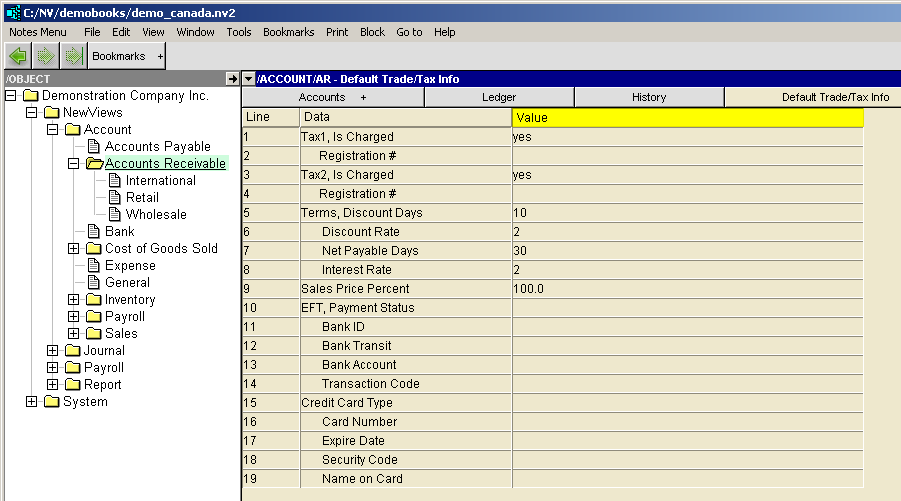
| Customer Trade/Tax Information | |||
| | Line | Field | Description |
| Tax 1,2 | 1,3 | Is Charged | yes - the tax will be charged. no - the tax will not be charged. empty - the journal Is Charged setting is used. The sales journal has a corresponding setting for whether or not each tax is charged. But the setting on the customer has higher priority than the journal so it provides the ability to override the journal setting on a customer-by-customer basis. |
| Tax 1,2 | 2,4 | Registration # | The customer's tax registration number. |
| Terms | 5 | Discount Days | The number of days for which a discount is given to most customers for early payment of invoices. |
| 6 | Discount Rate | The rate (in percent) at which invoices are discounted for most customers if paid within the discount day period. | |
| 7 | Net Payable Days | The number of days in which payment for invoices is due for most customers. | |
| 8 | Interest Rate | The rate (in percent) per month at which interest on overdue invoices is charged to most customers. The rate is multiplied by 12 months, divided by 365 days then multiplied by the number of days outstanding. | |
| Sales | 9 | Price Percent | This is an adjustment to the fixed sale price on an item for a particular customer. A multiplier is applied against the standard sale price of an item. For example, to give a specific customer a 5 percent discount, set this field to 5 on that customer's trade/tax settings. If you were to enter 5 percent in the root customer account, i.e. /ACCOUNT/AR, then all customers inherit the value and have a 5 percent discount unless they override the value. |
NOTE: Default trade taxes for a specific customer are set by accessing the Trade/Tax Info window for that customer and changing the settings.