To view/edit default trade tax settings for inventory accounts:
Activate NewViews/Account/Inventory in the NV2 Database Explorer.
Use the window tab Default Trade/Tax Info or window list button at the left of the title bar that reads /ACCOUNT/INVENTORY to select the Default Trade/Tax Info window.
Make any required changes to the settings to make them suitable for most inventory items.
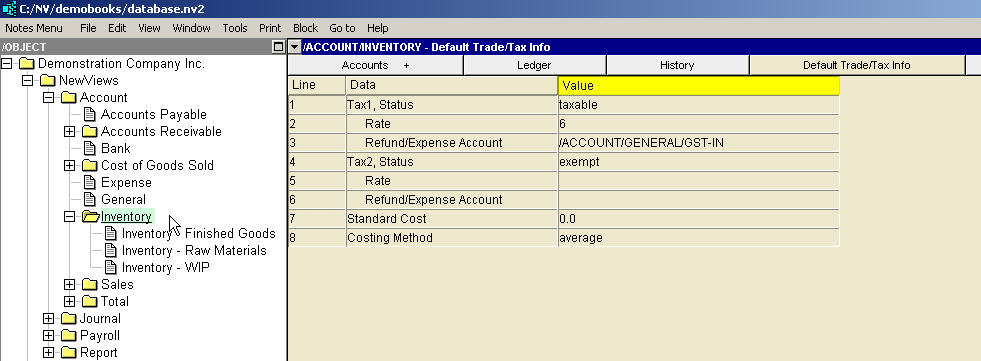
See Trade Tax Information for current rates.
| Inventory Account Trade/Tax Information | |||
| | Line | Field | Description |
| Tax 1,2 | 1,4 | Status | taxable - the tax will be charged. exempt - the tax will not be charged. empty - the journal Status is used. The purchase journal has a corresponding setting for the status of each tax. But the setting on the inventory account has higher priority than the journal so it provides the ability to override the journal setting on a product-by-product basis. |
| 2,5 | Rate | If this field is specified, the tax will be charged at this rate. If this field is empty then the journal tax rate is used. The setting on the inventory account has higher priority than the journal so it provides the ability to override the journal setting on a product-by-product basis. See Trade Tax Information for current rates. | |
| 3,6 | Refund/Expense Account | If charged, the tax will be posted to the account selected here. This will often be a tax refund or expense account. If this field is empty then the journal refund/expense account for the tax is used. If the journal setting is also empty then the tax is posted to the inventory/expense account. The setting on the inventory account has higher priority than the journal so it provides the ability to override the journal setting on a product-by-product basis. | |
| Costing | 7 | Standard Cost | This is the fixed cost you set (apply) to the item being sold. |
| 8 | Costing Method | Depending on the method selected, NV2 will calculate the cost of the item. See Costing Method below for more information. | |
Default trade taxes that have been set for inventory accounts can be overwritten for a specific inventory account by accessing the Trade/Tax Info window for that inventory account and changing the settings.
| Line | Costing Method | Description |
| 8 | standard | If standard is selected then the amount in the Standard Cost field will be the value credited to inventory, and debited to cost of goods sold. |
| 8 | average | If average is selected, NV2 calculates the cost (i.e. the value of the credit to inventory) based on a rolling average (i.e. the current value of inventory divided by the current quantity). NOTE: There are circumstances when it is not possible to determine an average cost. This occurs when the value of inventory or the quantity on hand is zero, and when this happens NV2 will revert to the standard cost, if set. It is good practice to specify a standard cost for all inventory items. It simplifies data entry at the time of purchase (by providing a default cost value on the invoice - which can be edited), and it guarantees that inventory credits and cost of goods sold debits have realistic values. |