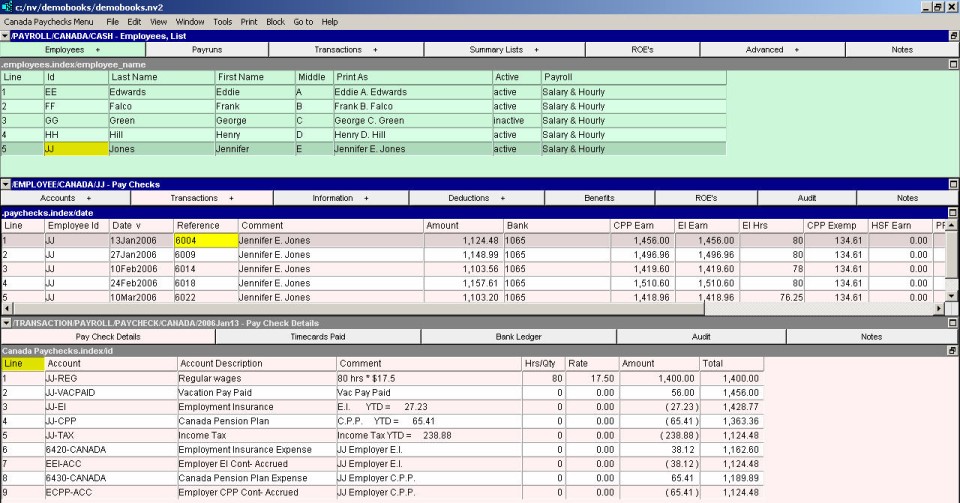
The Paychecks window is a split pane window. The top half (middle pane) displays a table of paycheck summaries for the employee that is currently selected. The bottom half (bottom pane) displays the details for each paycheck.
For more information see Creating a Payrun
The paychecks table contains the usual columns seen in transaction windows, plus some new ones:
| Employee - Paychecks Window | ||
| Table column | Sort | Comments |
| CPP Earn | | CPP pensionable earnings for that paycheck (used to calculate CPP). |
| EI Earn | | The EI insurable earnings for that paycheck (used to calculate EI). |
| EI Hrs | | The EI insurable hours for that paycheck. |
| CPP Exempt | | The CPP/QPP exemption used on the paycheck. Note that for most checks, this will be the annual exemption amount divided by the pay frequency. However, if an employee is issued more than one paycheck in a given pay period, the exemption amount will be zero on the 2nd and subsequent checks because the exemption amount for that pay period has already been used. |
| HSF Earn | | The earnings applicable to Quebec Health Services Fund contributions. |
| PPIP Earn | | The earnings applicable to Provincial Parental Insurance Plan contributions. |
| Benefit 1 | | The earnings applicable to benefit 1. |