The Required Information window contains the minimum information required to calculate deductions and print paychecks, T4 slips, etc.
If an employee submits TD1/TP-1015.3-V form(s) with a simple deduction amount, and they do not receive any non-cash-taxable-benefits, then the information on this window is probably sufficient for payroll purposes.
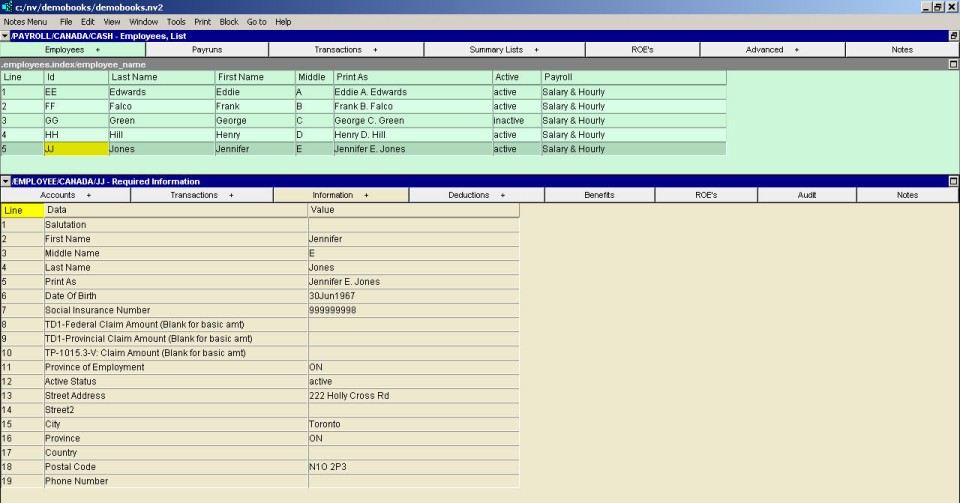
| Employee - Required Information Window | ||
| Line | Field | Value |
| 1 | Salutation | The salutation to be used when formally addressing the employee (e.g. Mr. Ms., etc.). |
| 2, 3 & 4 | First Name, Middle Name, Last Name | The employee's first, middle and last name. |
| 5 | Print As | The name as it will be printed on the employee's paycheck. Example: An employee's legal name is William Brown but on his paycheck you want NV2 to print "Bill Brown". This field is completed automatically as you enter the employee's first, last and middle names. You can override the automatic text with whatever you wish. |
| 6 | Date of Birth | The date of birth should be entered as it is used to determine an employee's CPP/QPP deduction status. If the date of birth is left empty, employees above and below the CPP age limits will have CPP deducted. |
| 7 | Social Insurance Number | The employee's social insurance number. Only valid Social Insurance Numbers may be entered. |
| 8 | TD1-Federal Claim Amount | The amount claimed from the federal TD1 Form. If left blank, the basic personal amount in force at the date of the paycheck is assumed. |
| 9 | TD1-Provincial Claim Amount | The amount claimed from the provincial TD1 Form. If left blank, the basic personal amount in force at the date of the paycheck is assumed. |
| 10 | TP-1015.3-V: Claim Amount | The amount claimed from the Quebec TP-1053.3-V Form. If left blank, the basic personal amount in force at the date of the paycheck is assumed. Note: If an employee claims the basic amount on their TD1 (or Quebec TP-1015.3-V form) then we strongly advise you to leave these amounts blank. As stated above, the correct yearly minimum amount will be used when no amount has been entered. If you do enter the minimum amount, then you will have to change the amount at the beginning of every year that the basic amount changes (in other words, every year.) |
| 11 | Province of Employment | The province the employee is employed in. This choice determines which provincial tax table is used to calculate the provincial tax component of income tax deductions. Press <F3> to select the province from a list. |
| 12 | Active Status | Options are "active" or "inactive". Employees whose status is set to "inactive" are not included in future payruns. You would set the status to "inactive" when an employee leaves your employment either temporarily or permanently. The status can be changed back to "active" if/when the employee returns. |
| 13 to 19 | Street Address, City, etc. | The address information to be printed on paychecks, T4 slips, etc. |