The Payroll Information window contains settings useful for payroll administration.
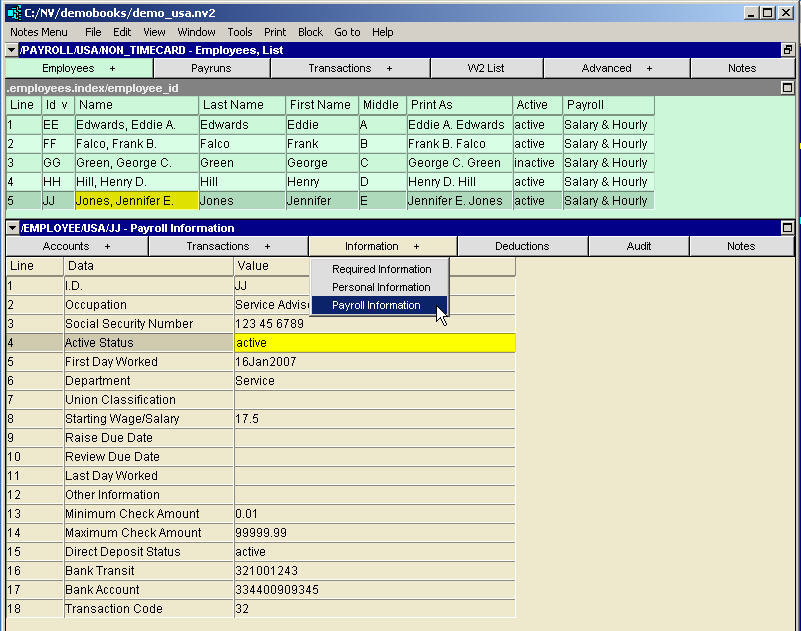
| Employee - Payroll Information Window | |||
| Line | Field | Value | |
| 1 | ID | Employee's payroll accounts prefix. | |
| 2 | Occupation | The employee's job title. | |
| 3 | Social Security Number | The employee's security social insurance number. | |
| 4 | Active Status | The employee's employment status. Press <F3> to select. | |
| 5 | First Day Worked | The employee's first day of employment (for production of ROE forms.) | |
| 6 | Department | The employee's department. | |
| 7 | Union Classification | The employee's union classification. | |
| 8 | Starting Wage Salary | The employee's starting wage/salary. | |
| 9 | Raise Due Date | The date the employee is due for a raise (if applicable). | |
| 10 | Review Due Date | The date the employee is due for a review (if applicable). | |
| 11 | Last Day Worked | The employee's last day of employment. | |
| 12 | Other Information | Any other information relevant to the employee. | |
| 13 | Minimum Check Amount | The minimum amount the employee can be paid on a particular paycheck. | |
| 14 | Maximum Check Amount | The maximum amount an employee can be paid on a particular paycheck. | |
| 15 | Direct Deposit Status | When the EFT Payments Status is set to Active, EFT / ACH transactions are created in the EFT file. Also the printing of paper checks is disabled. | |
| 16 | Bank Transit | The 9-digit Transit Routing Number of the employee's bank | |
| 17 | Bank Account | The employee's bank account Number, up to 12-digits | |
| 18 | Transaction Code | set to 22 for Checking or 32 for Savings | |