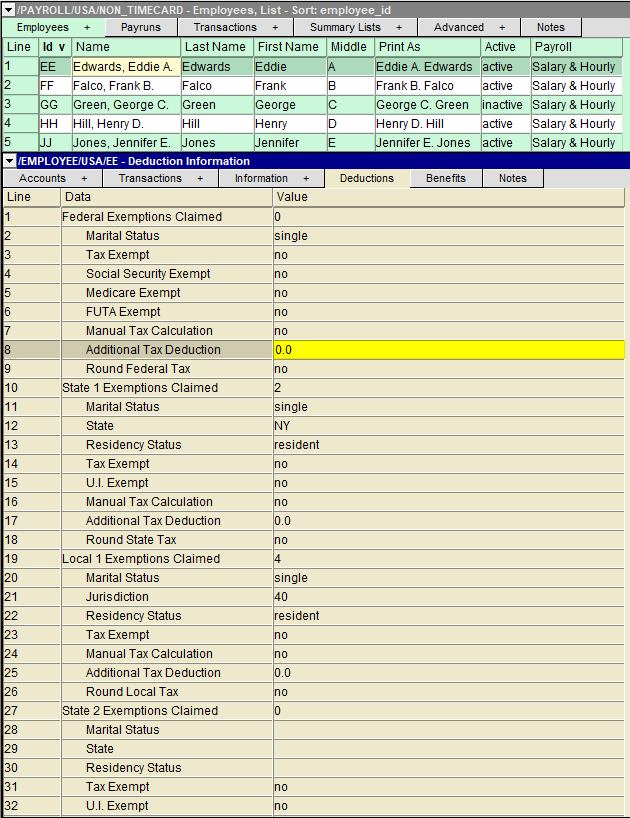
Two state and two local taxes can be deducted per employee. The settings are organized into State 1 & 2, and Local 1 & 2. Since most employees will not require more than 1 state or local tax, the settings for state and local 1 tax are at the top. Below these are the settings for state and local 2 taxes if required.
Employees in the state of California may claim estimated deductions on form DE 4. Use line 10 for both basic personal allowances and estimated additional withholding allowances. Use a decimal (period) to separate the allowances. For example if an employee has 3 basic personal allowances and has 2 estimated allowances enter 3.2 in row 10 of the deductions table.
Employees in the state of Illinois may claim additional allowances/exemptions on form IL-W-4. Use line 10 for both basic personal allowances and additional allowances. Use a decimal (period) to separate the allowances. For example if an employee has 3 basic personal allowances and has 2 additional allowances enter 3.2 in row 10 of the deductions table.
| Employee - Deduction Information | |||
| Line | Field | Value | |
| 1 10 19 27 36 | Exemptions Claimed | Federal State 1 Local 1 State 2 Local 2 | The number of exemptions the employee is claiming per jurisdiction. |
| 2 11 20 28 37 | Marital Status | Federal State 1 Local 1 State 2 Local 2 | The employee's marital status for federal tax purposes. Press <F3> to select. |
| 3 14 23 31 40 | Tax Exempt | Federal State 1 Local 1 State 2 Local 2 | These fields specify whether the employee is exempt from certain taxes per jurisdiction. |
| 4 | Social Security Exempt | Federal | This field specifies if the employee is exempt from the Federal Insurance Contributions Act (FICA). |
| 5 | Medicare Exempt | Federal | This field specifies if the employee is exempt from Medicare (MEDI) calculations. |
| 6 | FUTA Exempt | Federal | This field specifies if the employee's wages are exempt from Federal Unemployment Tax Act (FUTA) contributions. |
| 7 16 24 33 41 | Manual tax calculation | Federal State 1 Local 1 State 2 Local 2 | These fields specify if the employee's Income Tax deduction is calculated manually. |
| 8 17 25 34 42 | Additional Tax Deduction | Federal State 1 Local 1 State 2 Local 2 | These fields specify any additional amounts to be deducted for Federal, State or Local Income Tax on each paycheck. |
| 9 18 26 35 43 | Round Income Tax | Federal State 1 Local 1 State 2 Local 2 | This field specifies if the jurisdiction's Income Tax amount should be rounded to the nearest dollar. |
| 12 29 | State | State 1 State 2 | The employee's state they are employed in. Press <F3> to select. |
| 13 22 30 39 | Residency Status | State 1 Local 1 State 2 Local 2 | This is the employee's residency status for tax purposes. Press <F3> to select from a list of statuses applicable to the jurisdiction. |
| 15 32 | U.I. Exempt | State 1 State 2 | This field specifies if the employee's wages are exempt from state unemployment contributions. |
| 21 38 | Jurisdiction | Local 1 Local 2 | The local tax the employee is subject to (if applicable). Press <F3> to select. |