The Shipping Address window displays address contact information for a shipping destination.
If the middle/lower right window is not the Shipping Address window, click the window tab Accounts + at the top of the blue table and choose Shipping Address.
If the window tabs are not visible click the window list button at the left of the title bar, expand the account folder and choose Shipping Address.
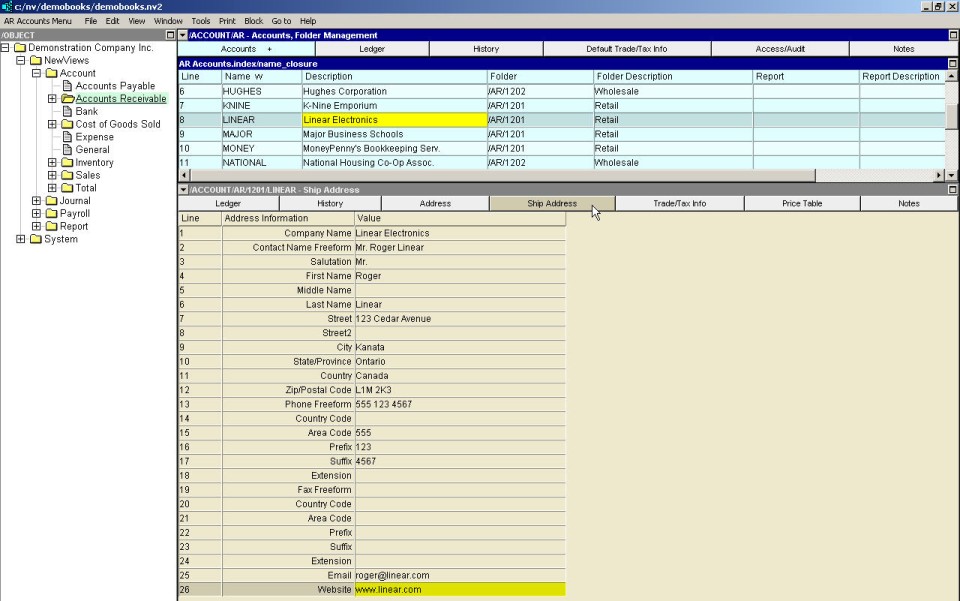
| Line | Address Information | Value |
| 1 | Company Name | Enter the name in this field. |
| 2 to 6 | Contact Name Freeform, Salutation, First, Middle and Last Name | If you do not have any requirement to use different components of the contact name separately (e.g. last name), enter the name of the company's contact person in this field. Otherwise, enter the components of the contact name separately, using the Salutation, First Name, Middle Name and Last Name fields. |
| 7 to 12 | Street City State/Province Country Zip/Postal Code | Enter the complete address in these fields. |
| 13 | Phone Freeform | If you do not have any requirement to use different components of the phone number separately (e.g. area code), enter the phone number in this field. Otherwise, enter the components of the phone number separately, using the country code, area code, prefix, suffix and extension fields. |
| 19 | Fax Freeform | If you do not have any requirement to use different components of the fax number separately (e.g. area code), enter the fax number in this field. Otherwise, enter the components of the phone number separately, using the country code, area code, prefix, suffix and extension fields. |
| 25 | Email | Enter the email address in this field. |
| 26 | Web Site | Enter the web site URL in this field. |