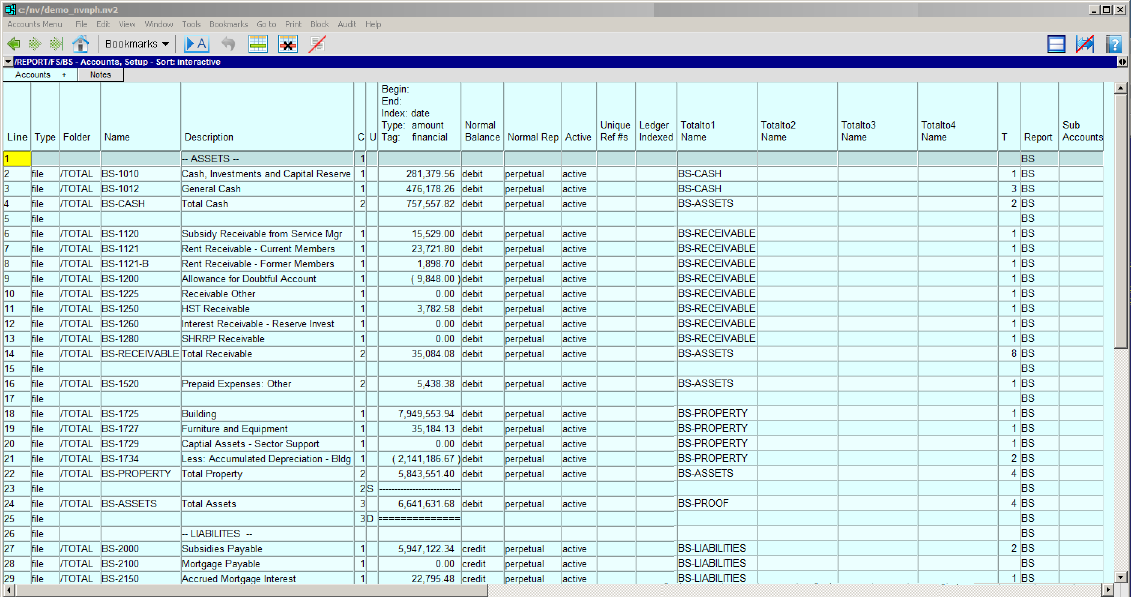
All account tables have a Setup view that is used to add new accounts. The fields in the Setup view are explained below:
| Account Setup | ||
| Table column | Sort column | Comments |
| Line | Yes | Used to sort the accounts in user-defined order. For more information, see Sorting Tables. |
| Folder | Yes | The path to the folder the account is in. The type of account is identified in this column (i.e. AP, AR, BANK, EXPENSE, GENERAL, SALES (Revenue), PAYROLL, and TOTAL). Note that this column can be used to change the account type, providing the account does not contain any transactions. |
| Name | Yes | The account name. |
| Description | Yes | The account description. |
| C | Yes | The column in which the amount should be displayed on the Single Period Report view (1, 2 or 3). |
| U | Yes | Used to control underlines on the Single Period Report View. S will display a single underline. D will display a double underline. |
| Amount | | The account's amount column. |
| Normal Balance | | Indicates the normal balance of the account (debit or credit). For more information on the normal balance of accounts, see Adding Accounts. |
| Normal Rep | | Indicates the normal representation of the account (opening, perpetual or periodic). For more information on the normal representation of accounts, see Adding Accounts. |
| Active | | Indicates whether the account is active or inactive. When an account is inactive, postings cannot be made to the account. |
| Ledger Indexed | | Indicates whether the account displays postings. This is an option for total accounts. See Turning Account Ledger Indexes On/Off. |
| Unique Ref #s | | Enforces unique transaction Ref #s. This setting controls uniqueness on the debit view, credit view or both (i.e. the ledger view). See Unique Ref #s. |
| Total to (4 columns) | | Account names entered in the total to columns control the Introduction to Report Arithmetic. |
| Total | | Indicates whether the account is a posting or total account. For posting accounts, this column displays 0. For total accounts, this column displays the number of accounts that total to the account. |
| Report | | The path to the report that the account is on. |
Normal representation is used when you want to mix perpetual and periodic amounts in the same column on a report.
A traditional trial balance is a good example because it contains a mixture of perpetual and period accounts. Typically, revenue and expense amounts are displayed for a specific period. At the same time, you want to see perpetual amounts for assets and liabilities at the end of that same period. You would also like to see this mixture of perpetual and periodic amounts in the same column.
To accomplish this, you set the column's Respect Normal Rep setting to yes when you define the settings for the column (e.g. on a Single Period Report or Multiple Period Analysis view). If this field is set to yes, then the amount for each account in the column will be displayed according to that account's normal representation.
See Respect Normal Representation for more information.
This setting forces unique reference numbers to be used for specific types of transactions (e.g. to prevent the same supplier invoice from being entered twice). You can enforce unique transaction Ref #s for journals and for accounts. The journal case is just a simple yes/no. The account case provides options for uniqueness on the debit view, credit view, or both (i.e. the ledger view).