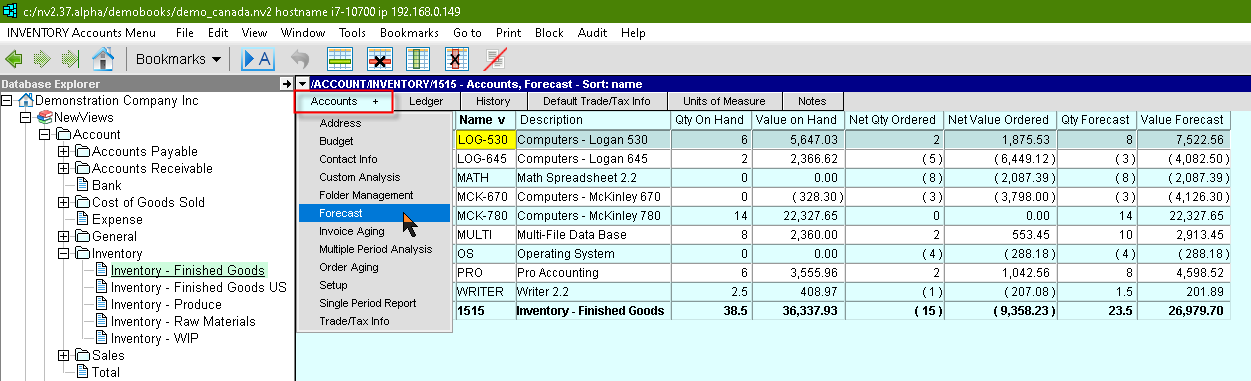
The Account Inventory folder displays all inventory accounts within the system.
Below we display the forecast view which includes the account name, account description, inventory quantity and order quantity. We also display physical inventory values as well as the net value of orders for each item.
The two forecast columns are formulas that calculates the difference between the physical inventory and the net orders. Net orders is the balance of all purchase and sales orders.
For more information on changing the views please see Information Views.
| Table column | Sort | Comments |
| Line | Yes | The line number. |
| Folder | Yes | The path of the folder the account is in. This account is a sub-account of the parent folder (which happens to be an account). |
| Name | Yes | The account name. |
| Description | Yes | The account description. |
| Qty On Hand | | The Quantity currently on hand for that account. This column has the tag financial. |
| Value on Hand | | The Value currently on hand for that account. This column has the tag financial. |
| Net Qty Ordered | | The quantity of orders currently on hand for that account. This column has the tag order. |
| Net Value Ordered | | The value of orders currently on hand for that account. This column has the tag order. |
| Qty Forecast | | The actual minus orders currently on hand for that account. This column is a formula. (Qty On Hand) less (Net Qty Ordered). |
| Value Forecast | | The actual minus orders currently on hand for that account. This column is a formula. (Value On Hand) less (Net Value Ordered). |
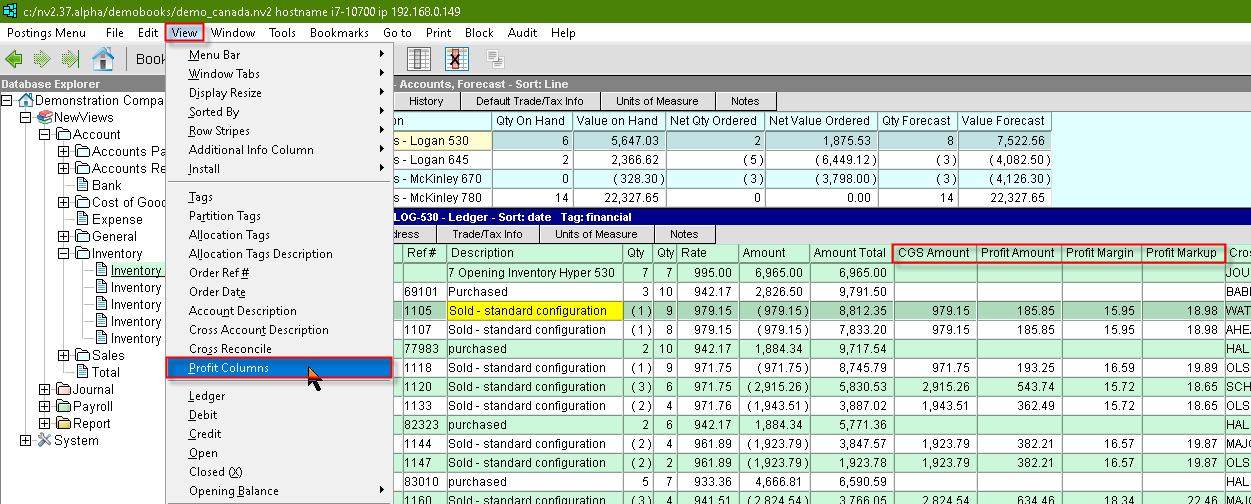
The Profit Columns can be added by executing the menu command View>Profit Columns on the ledger table.