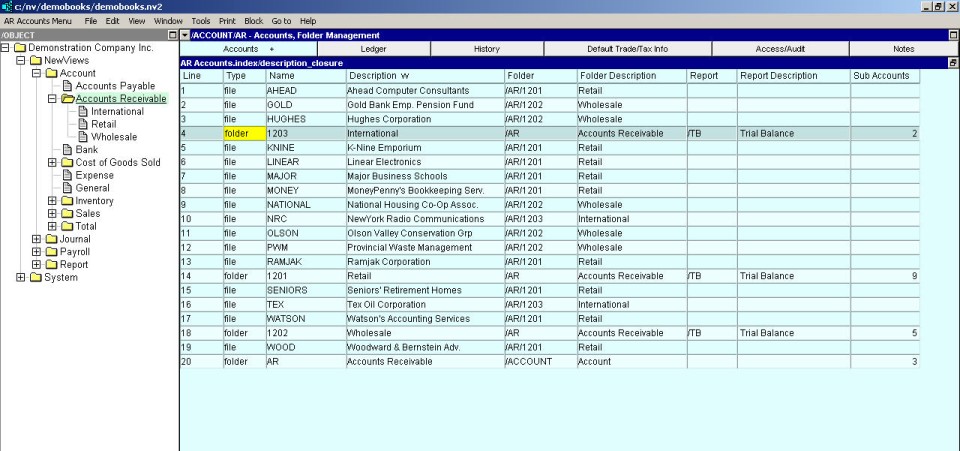
Any type of account can have an unlimited number of sub-accounts. This ability is extremely useful, and allows you to organize accounts of the same type into different folders. You might, for example, add several journals of type ACCOUNTS PAYABLE - one to record US Accounts Payable, another to record Canadian Accounts Payable, and so on.
NOTE: Every account folder displays all transactions from all accounts "below". In the example given here for accounts payable, activating the folder "above" the two sub accounts payable accounts and using the window list button to switch to the Ledger Explorer provides a list of all transactions from either of the two accounts.
In fact, by activating the "root" account folder, you can display every account entry in the database.
In the NV2 Database Explorer, click the type of account that corresponds to the sub-account to be added.
For example, if you want to breakdown US and Canada vendor accounts you would add a Canadian Vendors sub-account and a US Vendors sub-account to the Accounts Payable account (NewViews/Account/Accounts Payable).
Run a default window set-up for the folder where you want to add the sub-account option to. For more information please see default window setups
Use the window list button at the left of the outermost title bar on the account desktop (right window) to choose the folder management window.
Activate the line above or below where you want to add the new sub-account.
Issue the command Edit>Insert to add the new sub-account above the active line or Edit>Append to add the new sub-account below the active line.
NOTE: The positioning of the new sub-account is only an issue if the account table is in line (interactive) order.
If the account table is in account description or name order, the Edit>Insert and Edit>Append commands can be used interchangeably since the account will automatically be placed in the proper position.
Fill in the sub-account name and description fields.
Change the Folder column value from file (this is the default) to folder.
This will enable the sub-account to be viewed directly from the NV2 Database Explorer.