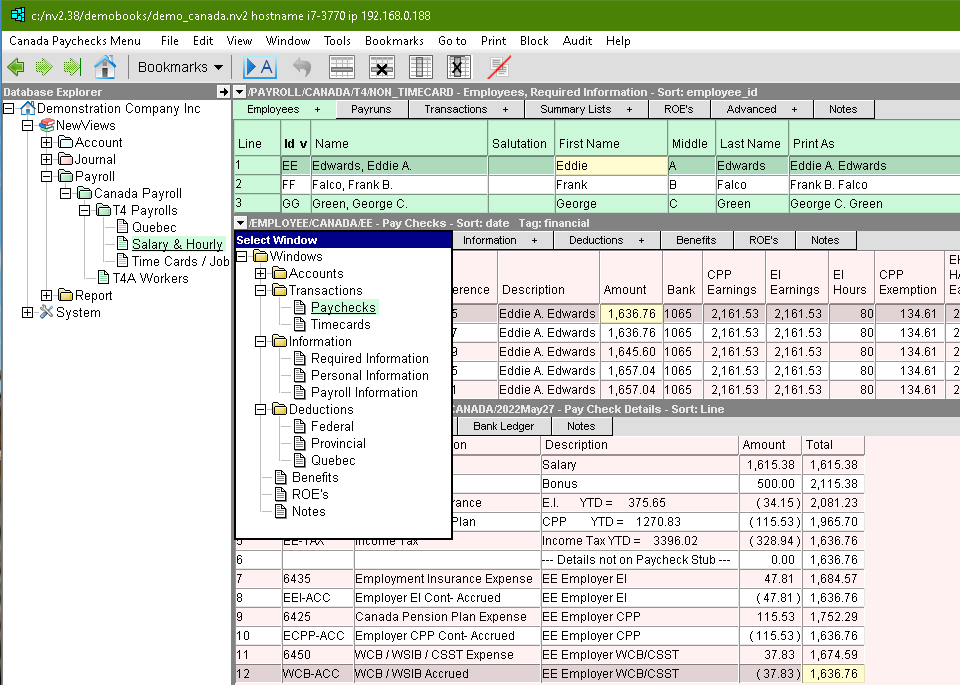
The Employees window is an explorer that contains a table of employees in the top pane. Various employee information windows can be displayed in the bottom pane (e.g. Personal Information, Paychecks, etc.), each of which contains information that is specific to the active employee in the top pane.
For information on setting up an employee see Creating an Employee
Due to the large number of settings you may need to store to correctly process employee's paycheck(s), the settings have been broken up into groups such as personal information, federal (TD1) information, Quebec (RL-1) information, etc.
These groups can be viewed in two ways:
By changing the "view" of the employees table using the window tabs on the employees table. Notice that the color of the selected tab changes to be the same as the table below.
This sets the employee table columns to a particular group of settings, and is handy for printing employee lists, or for quickly scanning the table for missing information.
By using the window list button to select a window in the bottom pane to display a table of related settings. As you click from one employee to another in the employee table, the bottom window shows you the information for that employee.
Note: You will often notice the same piece of information, such as the employee's Social Insurance Number, repeated on several windows or views. This does not mean you have to fill in the same information over and over. If you set the employee's S.I.N. in one window or view, it will appear in all the other windows and views.
In the bottom pane of an employee’s window, the window tabs allow you to select from the following windows:
Accounts
Budget Displays the actual versus budget amounts for any period.
Custom Analysis Allows you to create your own custom analysis report.
Multiple Period Analysis Displays the data for multiple periods of time.
Setup - A table that displays the employee's earnings & deduction accounts.
Setup with Totalto2 Description - Same as above but displays the description of the Totalto2 account.
Single Period Reports Displays account balances for a specific period in a formatted report.
Transactions
Paychecks - A table that displays the employee's paychecks.
Timecards - A table that displays the employee's timecards.
Information
Required Information - The minimum information needed to process and print paychecks for the employee.
Personal Information - More detailed contact information that you may wish to store in the employee's record, such as an emergency contact, email address, etc.
Payroll Information - Payroll administration information such as the employee's hire and termination dates.
Deductions
Federal - The Federal TD1 information supplied by the employee that affects federal tax calculations.
Provincial - The Provincial TD1 information supplied by the employee that affects provincial tax calculations.
Quebec - The Quebec TP-1015.3-V information supplied by the employee that affects Quebec provincial tax calculations.
Benefits Information - Information related to the non-cash taxable benefits the employee receives.
Records of Employment - A table that displays the Records of Employment (ROEs) issued for this employee.
Employee Audit - The audit trail for the employees, listing all changes made to employee accounts.
Notes - A text window in which you can type any extra notes about the employee that you wish to keep.
Benefits - Information related to the non-cash taxable benefits the employee receives.
Deductions Federal - Federal TD1 information supplied by the employee that affects federal tax calculations.
Deductions Provincial - Provincial TD1 information supplied by the employee that affects provincial tax calculations. (All provinces except Quebec.)
Deductions Quebec - Quebec TP-1015.3-V information supplied by the employee that affects Quebec provincial tax calculations.
List - A simple list of the employees showing their status (active or inactive) and the payroll they belong to.
Payroll Information - Payroll administration information such as the employee's hire and termination dates.
Personal Information - More detailed name, address, & phone number information.
Required Information - The minimum information needed to process and print paychecks for the employee.