The Required Information window contains the minimum information required to calculate deductions and print paychecks, W2 forms, etc.
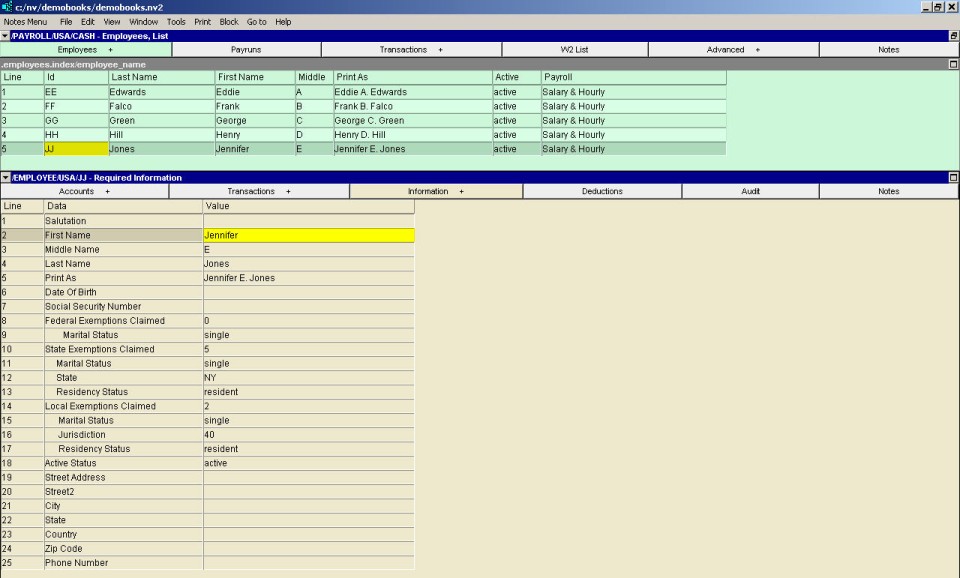
| Employee - Required Information Window | ||
| Line | Field | Value |
| 1 | Salutation | The salutation to be used when formally addressing the employee (e.g. Mr. Ms., etc.). |
| 2, 3 & 4 | First Name, Middle Name, Last Name | The employee's first, middle and last name. |
| 5 | Print As | The name as it will be printed on the employee's paycheck. Example: An employee's legal name is William Brown but on his paycheck you want NewViews to print "Bill Brown". This field is completed automatically as you enter the employee's first, last and middle names. You can override the automatic text with whatever you wish. |
| 6 | Date of Birth | The date of birth should be entered as it is used to determine an employee's CPP/QPP deduction status. If the date of birth is left empty, employees above and below the CPP age limits will have CPP deducted. |
| 7 | Social Security Number | The employee's social security number. |
| 8 | Federal Exemptions Claimed | The number of exemptions the employee is claiming federally. |
| 9 | Marital Status | The employee's federal marital status. Press <F3> to select. |
| 10 | State Exemptions Claimed | The number of exemptions the employee is claiming for the state employed in. If two types of State Exemptions Claimed are required, enter the number, for example, as 1.2 for one exemption of the first type and two of the second type. |
| 11 | Marital Status | The employee's marital status for state tax purposes (if applicable). Press <F3> to select. |
| 12 | State | The state tax the employee is subject to (if applicable). Press <F3> to select. |
| 13 | Residency Status | The employee's residency status (if applicable). Press <F3> to select. |
| 14 | Local Exemptions Claimed | The number of exemptions the employee is claiming for local tax purposes (if applicable). |
| 15 | Marital Status | The employee's marital status for local tax purposes (if applicable). Press <F3> to select. |
| 16 | Jurisdiction | The local tax the employee is subject to (if applicable). Press <F3> to select. |
| 17 | Residency Status | The employee's residency status for local tax purposes (if applicable). Press <F3> to select. |
| 18 | Active Status | The employee's employment status. Press <F3> to select. |
| 19 to 25 | Street Address, City, etc. | The address information to be printed on paychecks, W2 forms, etc. |