Remitting employee deductions and employer contributions requires a check to be created which debits several remittance accounts. The creation of the check entry, and the determination of the correct amounts can be tedious.
This process is made simpler by using the menu command Tools>Pay Withholdings available in the title-bar of a payroll window. This command presents a settings window where information about the remittance is set, and then a preview window is displayed containing the amounts to be remitted. You can review/edit the amounts, then click a button to have the remittance check entry created for you.
To pay withholdings:
Right-click in the title-bar of the payroll window (the outermost title-bar of the right pane) to display the Payroll Desktop Menu.
Choose Tools>Pay Withholdings from the menu.
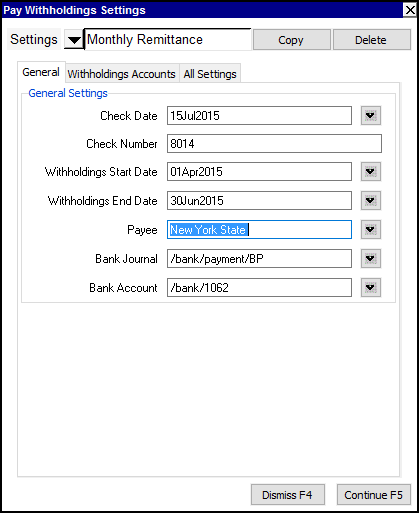
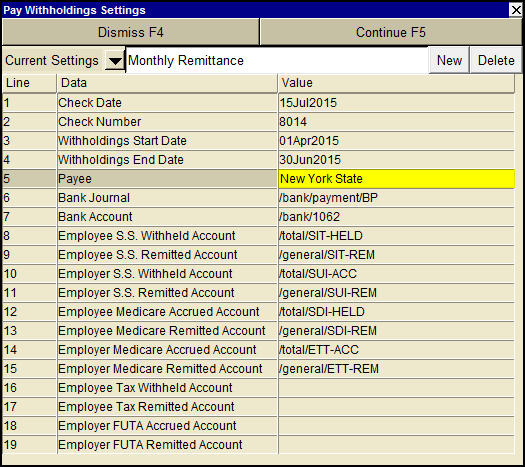
A settings window will be displayed in which you set the date range of withholdings to be paid, bank account name, etc.
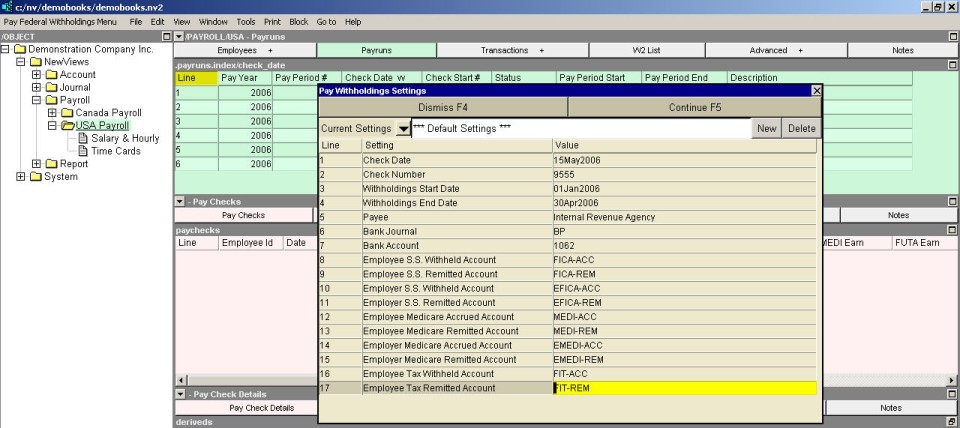
The settings you would have to change most often are at the top:
| Pay Withholdings Settings | ||
| Line | Field | Value |
| 1 | Check Date | Enter the date to be used for the remittance transaction. |
| 2 | Check Number | Enter the check/reference number to be used for the remittance transaction. |
| 3 | Withholding Start Date | Enter the start date of withholdings to be paid. |
| 4 | Withholding End Date | Enter the end date of withholdings to be paid. |
The remaining settings, once set, will likely not need to be changed.
| Pay Withholdings Settings | ||
| Line | Field | Value |
| 5 | Payee | This is the name that will be used in the description of the remittance transaction. |
| 6 | Bank Journal | The journal the remittance will be entered in. |
| 7 | Bank Account | The bank account that the remittance check will be posted to. |
| 8, 9 | Employee S.S. Withheld/Remitted Accounts | The Withheld account is the credit normal balance account that the employee Social Security deduction account totals to. The Remitted account is the debit normal balance account used to record the amounts remitted for Social Security. |
| 10, 11 | Employer SS Accrued/Remitted Accounts | The Accrued account is the credit normal balance employer contribution liability account that employer amounts are posted to. The Remitted account is the debit normal balance account used to record the employer contribution amounts remitted for Social Security. |
| 12, 13 | Employee Medicare Withheld/Remitted Accounts | The Withheld account is the credit normal balance account that the employee Medicare deduction account totals to. The Remitted account is the debit normal balance account used to record the amounts remitted for Medicare. |
| 14, 15 | Employer Medicare Accrued/Remitted Accounts | The Accrued account is the credit normal balance employer contribution liability account that employer amounts are posted to. The Remitted account is the debit normal balance account used to record the employer contribution amounts remitted for Medicare. |
| 16, 17 | Employee Tax Withheld/Remitted Accounts | The Withheld account is the credit normal balance account that the employee tax deduction account totals to. The Remitted account is the debit normal balance account used to record the amounts remitted for Tax. |
One the settings are complete, press the <Continue>
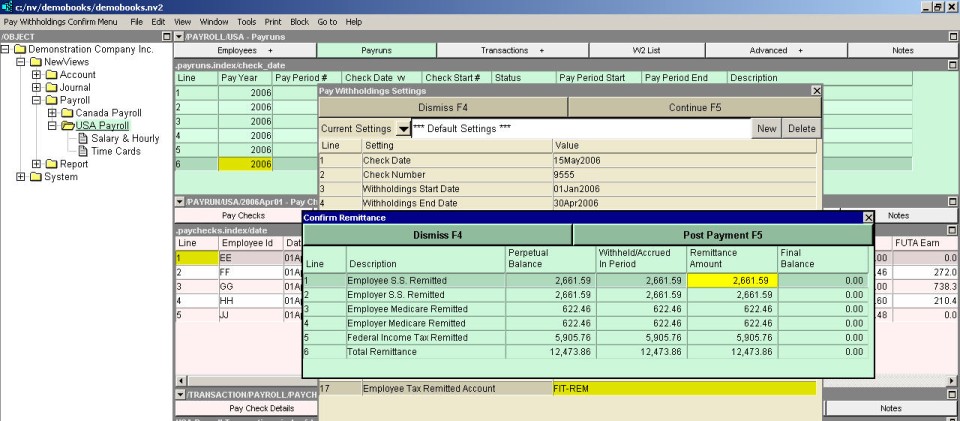
The Confirm Remittances window allows you to view/edit the amounts that will be paid.
| Confirm Remittance | |
| Table column | Comments |
| Perpetual Balance | This column displays the total (perpetual) outstanding balance for each withholding. This is the total of all withholdings minus the total of all remittances, for all periods. The amounts cannot be edited. |
| Withheld/Accrued in Period | The amounts withheld or accrued in the period specified in the settings window. The amounts cannot be edited. |
| Remittance Amount | The amounts that will be remitted on this check. You are free to edit the amounts if necessary |
| Final Balance | These are the outstanding balances that will result when the check is posted. The Perpetual and Final balance columns are there to make it obvious if you have over or under remitted in a prior period. |
The "Perpetual" and "Final" balance columns are there to make it obvious if you have over or under remitted in a prior period.
If a Perpetual balance amount is more than the Withheld/Accrued amount, then it means that one or more past remittances were too low.
If a Perpetual balance amount is less than the Withheld/Accrued amount, then it means that one or more past remittances were too high.